
运动模糊去除滤波
在本教程中,你将学到:
- 什么是运动模糊图像的点扩散函数(PSF,point spread function);
- 如何恢复一幅运动模糊图像。
关于图像退化模型理论和维纳滤波器(Wiener filter)理论,你可以参阅散焦模糊去除滤波教程。本页只考虑线性运动模糊失真。本页中的运动模糊图像是一幅真实世界图像,模糊是由运动中的拍摄对象造成的。
什么是运动模糊图像的 PSF?
Section titled “什么是运动模糊图像的 PSF?”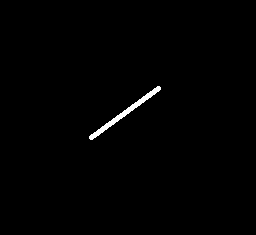
线性运动模糊失真的点扩散函数(PSF)是一个线段。这样的 PSF 由两个参数指定: 是模糊的长度, 是运动的角度。
如何恢复一幅模糊图像?
Section titled “如何恢复一幅模糊图像?”本页使用维纳滤波器作为恢复滤波器,详情请参阅散焦模糊去除滤波教程。为了针对运动模糊情形合成维纳滤波器,需要指定信噪比()、PSF 的 和 。
你可以在 OpenCV 源代码库的 samples/cpp/tutorial_code/ImgProc/motion_deblur_filter/motion_deblur_filter.cpp 中找到源代码。
/*** @brief You will learn how to recover an image with motion blur distortion using a Wiener filter* @author Karpushin Vladislav, karpushin@ngs.ru, https://github.com/VladKarpushin*/#include <iostream>#include "opencv2/imgproc.hpp"#include "opencv2/imgcodecs.hpp"
using namespace cv;using namespace std;
void help();void calcPSF(Mat& outputImg, Size filterSize, int len, double theta);void fftshift(const Mat& inputImg, Mat& outputImg);void filter2DFreq(const Mat& inputImg, Mat& outputImg, const Mat& H);void calcWnrFilter(const Mat& input_h_PSF, Mat& output_G, double nsr);void edgetaper(const Mat& inputImg, Mat& outputImg, double gamma = 5.0, double beta = 0.2);
const String keys ="{help h usage ? |             | print this message    }""{image          |input.png    | input image name    }""{LEN            |125          | length of a motion    }""{THETA          |0            | angle of a motion in degrees }""{SNR            |700          | signal to noise ratio   }";
int main(int argc, char *argv[]){    help();    CommandLineParser parser(argc, argv, keys);    if (parser.has("help"))    {        parser.printMessage();        return 0;    }
    int LEN = parser.get<int>("LEN");    double THETA = parser.get<double>("THETA");    int snr = parser.get<int>("SNR");    string strInFileName = parser.get<String>("image");
    if (!parser.check())    {        parser.printErrors();        return 0;    }
    Mat imgIn;    imgIn = imread(strInFileName, IMREAD_GRAYSCALE);    if (imgIn.empty()) //check whether the image is loaded or not    {        cout << "ERROR : Image cannot be loaded..!!" << endl;        return -1;    }
    Mat imgOut;
    // it needs to process even image only    Rect roi = Rect(0, 0, imgIn.cols & -2, imgIn.rows & -2);
    //Hw calculation (start)    Mat Hw, h;    calcPSF(h, roi.size(), LEN, THETA);    calcWnrFilter(h, Hw, 1.0 / double(snr));    //Hw calculation (stop)
    imgIn.convertTo(imgIn, CV_32F);    edgetaper(imgIn, imgIn);
    // filtering (start)    filter2DFreq(imgIn(roi), imgOut, Hw);    // filtering (stop)
    imgOut.convertTo(imgOut, CV_8U);    normalize(imgOut, imgOut, 0, 255, NORM_MINMAX);    imwrite("result.jpg", imgOut);    return 0;}
void help(){    cout << "2018-08-14" << endl;    cout << "Motion_deblur_v2" << endl;    cout << "You will learn how to recover an image with motion blur distortion using a Wiener filter" << endl;}
void calcPSF(Mat& outputImg, Size filterSize, int len, double theta){    Mat h(filterSize, CV_32F, Scalar(0));    Point point(filterSize.width / 2, filterSize.height / 2);    ellipse(h, point, Size(0, cvRound(float(len) / 2.0)), 90.0 - theta, 0, 360, Scalar(255), FILLED);    Scalar summa = sum(h);    outputImg = h / summa[0];}
void fftshift(const Mat& inputImg, Mat& outputImg){    outputImg = inputImg.clone();    int cx = outputImg.cols / 2;    int cy = outputImg.rows / 2;    Mat q0(outputImg, Rect(0, 0, cx, cy));    Mat q1(outputImg, Rect(cx, 0, cx, cy));    Mat q2(outputImg, Rect(0, cy, cx, cy));    Mat q3(outputImg, Rect(cx, cy, cx, cy));    Mat tmp;    q0.copyTo(tmp);    q3.copyTo(q0);    tmp.copyTo(q3);    q1.copyTo(tmp);    q2.copyTo(q1);    tmp.copyTo(q2);}
void filter2DFreq(const Mat& inputImg, Mat& outputImg, const Mat& H){    Mat planes[2] = { Mat_<float>(inputImg.clone()), Mat::zeros(inputImg.size(), CV_32F) };    Mat complexI;    merge(planes, 2, complexI);    dft(complexI, complexI, DFT_SCALE);
    Mat planesH[2] = { Mat_<float>(H.clone()), Mat::zeros(H.size(), CV_32F) };    Mat complexH;    merge(planesH, 2, complexH);    Mat complexIH;    mulSpectrums(complexI, complexH, complexIH, 0);
    idft(complexIH, complexIH);    split(complexIH, planes);    outputImg = planes[0];}
void calcWnrFilter(const Mat& input_h_PSF, Mat& output_G, double nsr){    Mat h_PSF_shifted;    fftshift(input_h_PSF, h_PSF_shifted);    Mat planes[2] = { Mat_<float>(h_PSF_shifted.clone()), Mat::zeros(h_PSF_shifted.size(), CV_32F) };    Mat complexI;    merge(planes, 2, complexI);    dft(complexI, complexI);    split(complexI, planes);    Mat denom;    pow(abs(planes[0]), 2, denom);    denom += nsr;    divide(planes[0], denom, output_G);}
void edgetaper(const Mat& inputImg, Mat& outputImg, double gamma, double beta){    int Nx = inputImg.cols;    int Ny = inputImg.rows;    Mat w1(1, Nx, CV_32F, Scalar(0));    Mat w2(Ny, 1, CV_32F, Scalar(0));
float* p1 = w1.ptr<float>(0); float* p2 = w2.ptr<float>(0); float dx = float(2.0 * CV_PI / Nx); float x = float(-CV_PI); for (int i = 0; i < Nx; i++) { p1[i] = float(0.5 * (tanh((x + gamma / 2) / beta) - tanh((x - gamma / 2) / beta))); x += dx; } float dy = float(2.0 * CV_PI / Ny); float y = float(-CV_PI); for (int i = 0; i < Ny; i++) { p2[i] = float(0.5 * (tanh((y + gamma / 2) / beta) - tanh((y - gamma / 2) / beta))); y += dy; } Mat w = w2 * w1; multiply(inputImg, w, outputImg);}一个运动模糊图像恢复算法由 PSF 生成、维纳滤波器生成以及在频域中对模糊图像进行滤波三部分组成:
// it needs to process even image onlyRect roi = Rect(0, 0, imgIn.cols & -2, imgIn.rows & -2);
//Hw calculation (start)Mat Hw, h;calcPSF(h, roi.size(), LEN, THETA);calcWnrFilter(h, Hw, 1.0 / double(snr));//Hw calculation (stop)
imgIn.convertTo(imgIn, CV_32F);edgetaper(imgIn, imgIn);
// filtering (start)filter2DFreq(imgIn(roi), imgOut, Hw);// filtering (stop)
函数 calcPSF() 根据输入参数 和 (以度为单位)生成 PSF:
void calcPSF(Mat& outputImg, Size filterSize, int len, double theta){ Mat h(filterSize, CV_32F, Scalar(0)); Point point(filterSize.width / 2, filterSize.height / 2); ellipse(h, point, Size(0, cvRound(float(len) / 2.0)), 90.0 - theta, 0, 360, Scalar(255), FILLED); Scalar summa = sum(h); outputImg = h / summa[0];}函数 edgetaper() 对输入图像的边缘做渐晕处理,以减轻恢复图像中的振铃效应(ringing effect):
void edgetaper(const Mat& inputImg, Mat& outputImg, double gamma, double beta){    int Nx = inputImg.cols;    int Ny = inputImg.rows;    Mat w1(1, Nx, CV_32F, Scalar(0));    Mat w2(Ny, 1, CV_32F, Scalar(0));
    float* p1 = w1.ptr<float>(0);    float* p2 = w2.ptr<float>(0);    float dx = float(2.0 * CV_PI / Nx);    float x = float(-CV_PI);    for (int i = 0; i < Nx; i++)    {        p1[i] = float(0.5 * (tanh((x + gamma / 2) / beta) - tanh((x - gamma / 2) / beta)));        x += dx;    }    float dy = float(2.0 * CV_PI / Ny);    float y = float(-CV_PI);    for (int i = 0; i < Ny; i++)    {        p2[i] = float(0.5 * (tanh((y + gamma / 2) / beta) - tanh((y - gamma / 2) / beta)));        y += dy;    }    Mat w = w2 * w1;    multiply(inputImg, w, outputImg);}
函数 calcWnrFilter()、fftshift() 和 filter2DFreq() 在频域中按指定的 PSF 对图像进行滤波。这些函数是从散焦模糊去除滤波教程中复制过来的。
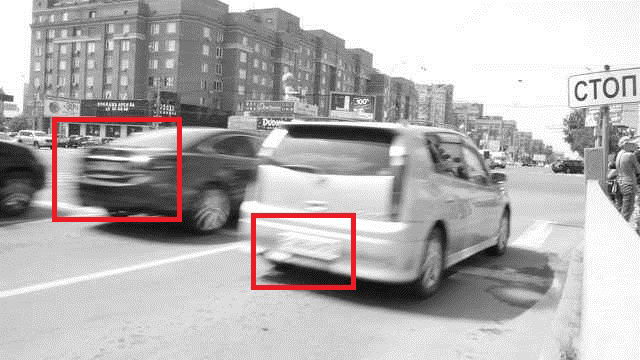
下图是一幅带有运动模糊失真的真实世界图像。两辆车的车牌都无法辨认。红色标记标出了车牌所在的位置。
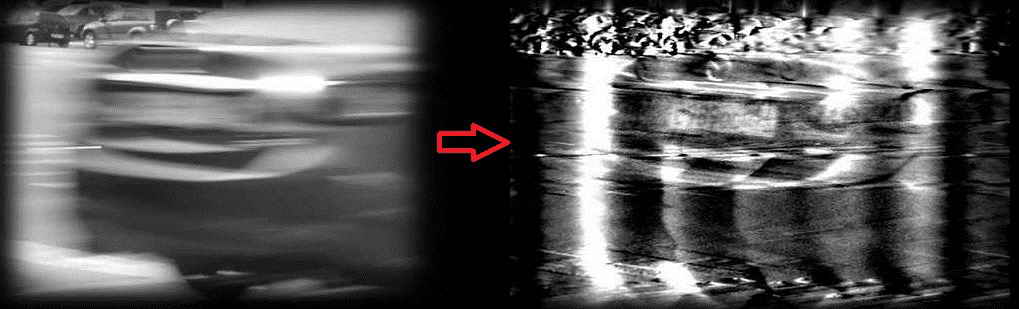
下图是黑色汽车车牌的恢复结果。计算时使用的参数为 = 125, = 0, = 700。
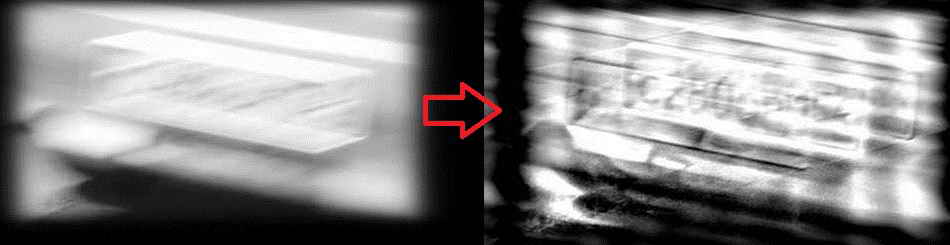
下图是白色汽车车牌的恢复结果。计算时使用的参数为 = 78, = 15, = 300。
、 和 的值是手动选择的,以获得尽可能好的视觉效果。 参数与汽车的运动方向一致, 参数则取决于汽车的移动速度。结果并不完美,但至少让我们大致看出了图像的内容。经过一番努力,车牌现在可以辨认了。
你还可以在 YouTube 上找到一个车牌恢复方法的快速视频演示。