
使用 inRange 的阈值处理操作
本教程中你将学到如何:
- 使用 OpenCV 的 cv::inRange 函数执行基本的阈值处理(thresholding)操作。
- 基于 HSV 色彩空间中像素值的范围来检测物体。
- 在之前的教程中,我们学习了如何使用 cv::threshold 函数进行阈值处理。
- 在本教程中,我们将学习如何使用 cv::inRange 函数来实现。
- 概念保持不变,只是现在我们增加了一个所需的像素值范围。
HSV 色彩空间
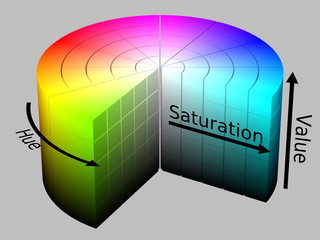
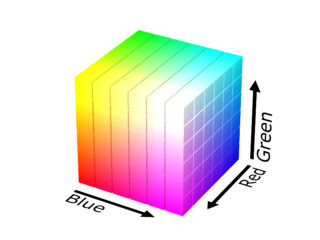
Section titled “HSV 色彩空间”HSV(hue,色相;saturation,饱和度;value,明度)色彩空间是一种与 RGB 颜色模型类似的色彩空间表示模型。由于色相(hue)通道对颜色类型建模,它在需要基于颜色分割物体的图像处理任务中非常有用。饱和度(saturation)的变化从不饱和(表示灰色梯度)到完全饱和(无白色分量)。明度(value)通道描述颜色的亮度或强度。
由于 RGB 色彩空间中的颜色使用三个通道编码,基于颜色来分割图像中的物体会更加困难。
使用 cv::cvtColor 函数在色彩空间之间进行转换的公式,可参见色彩空间转换(Color Space Conversions)相关文档。
C++
教程代码如下所示。你也可以从此处下载。
#include "opencv2/imgproc.hpp"#include "opencv2/highgui.hpp"#include "opencv2/videoio.hpp"#include <iostream>
using namespace cv;
/** Global Variables */const int max_value_H = 360/2;const int max_value = 255;const String window_capture_name = "Video Capture";const String window_detection_name = "Object Detection";int low_H = 0, low_S = 0, low_V = 0;int high_H = max_value_H, high_S = max_value, high_V = max_value;
static void on_low_H_thresh_trackbar(int, void *){    low_H = min(high_H-1, low_H);    setTrackbarPos("Low H", window_detection_name, low_H);}
static void on_high_H_thresh_trackbar(int, void *){    high_H = max(high_H, low_H+1);    setTrackbarPos("High H", window_detection_name, high_H);}
static void on_low_S_thresh_trackbar(int, void *){    low_S = min(high_S-1, low_S);    setTrackbarPos("Low S", window_detection_name, low_S);}
static void on_high_S_thresh_trackbar(int, void *){    high_S = max(high_S, low_S+1);    setTrackbarPos("High S", window_detection_name, high_S);}
static void on_low_V_thresh_trackbar(int, void *){    low_V = min(high_V-1, low_V);    setTrackbarPos("Low V", window_detection_name, low_V);}
static void on_high_V_thresh_trackbar(int, void *){    high_V = max(high_V, low_V+1);    setTrackbarPos("High V", window_detection_name, high_V);}
int main(int argc, char* argv[]){    VideoCapture cap(argc > 1 ? atoi(argv[1]) : 0);
    namedWindow(window_capture_name);    namedWindow(window_detection_name);
    // Trackbars to set thresholds for HSV values    createTrackbar("Low H", window_detection_name, &low_H, max_value_H, on_low_H_thresh_trackbar);    createTrackbar("High H", window_detection_name, &high_H, max_value_H, on_high_H_thresh_trackbar);    createTrackbar("Low S", window_detection_name, &low_S, max_value, on_low_S_thresh_trackbar);    createTrackbar("High S", window_detection_name, &high_S, max_value, on_high_S_thresh_trackbar);    createTrackbar("Low V", window_detection_name, &low_V, max_value, on_low_V_thresh_trackbar);    createTrackbar("High V", window_detection_name, &high_V, max_value, on_high_V_thresh_trackbar);
    Mat frame, frame_HSV, frame_threshold;    while (true) {        cap >> frame;        if(frame.empty())        {            break;        }
        // Convert from BGR to HSV colorspace        cvtColor(frame, frame_HSV, COLOR_BGR2HSV);        // Detect the object based on HSV Range Values        inRange(frame_HSV, Scalar(low_H, low_S, low_V), Scalar(high_H, high_S, high_V), frame_threshold);
        // Show the frames        imshow(window_capture_name, frame);        imshow(window_detection_name, frame_threshold);
        char key = (char) waitKey(30);        if (key == 'q' || key == 27)        {            break;        }    }    return 0;}
Java
教程代码如下所示。你也可以从此处下载。
import java.awt.BorderLayout;import java.awt.Container;import java.awt.Image;import java.awt.event.WindowAdapter;import java.awt.event.WindowEvent;import java.util.List;
import javax.swing.BoxLayout;import javax.swing.ImageIcon;import javax.swing.JFrame;import javax.swing.JLabel;import javax.swing.JPanel;import javax.swing.JSlider;import javax.swing.SwingWorker;import javax.swing.event.ChangeEvent;import javax.swing.event.ChangeListener;
import org.opencv.core.Core;import org.opencv.core.Mat;import org.opencv.core.Scalar;import org.opencv.highgui.HighGui;import org.opencv.imgproc.Imgproc;import org.opencv.videoio.VideoCapture;
public class ThresholdInRange {    private static int MAX_VALUE = 255;    private static int MAX_VALUE_H = 360/2;    private static final String WINDOW_NAME = "Thresholding Operations using inRange demo";    private static final String LOW_H_NAME = "Low H";    private static final String LOW_S_NAME = "Low S";    private static final String LOW_V_NAME = "Low V";    private static final String HIGH_H_NAME = "High H";    private static final String HIGH_S_NAME = "High S";    private static final String HIGH_V_NAME = "High V";    private JSlider sliderLowH;    private JSlider sliderHighH;    private JSlider sliderLowS;    private JSlider sliderHighS;    private JSlider sliderLowV;    private JSlider sliderHighV;    private VideoCapture cap;    private Mat matFrame = new Mat();    private JFrame frame;    private JLabel imgCaptureLabel;    private JLabel imgDetectionLabel;    private CaptureTask captureTask;
    public ThresholdInRange(String[] args) {        int cameraDevice = 0;        if (args.length > 0) {            cameraDevice = Integer.parseInt(args[0]);        }        cap = new VideoCapture(cameraDevice);        if (!cap.isOpened()) {            System.err.println("Cannot open camera: " + cameraDevice);            System.exit(0);        }        if (!cap.read(matFrame)) {            System.err.println("Cannot read camera stream.");            System.exit(0);        }
        // Create and set up the window.        frame = new JFrame(WINDOW_NAME);        frame.setDefaultCloseOperation(JFrame.EXIT_ON_CLOSE);        frame.addWindowListener(new WindowAdapter() {            @Override            public void windowClosing(WindowEvent windowEvent) {                captureTask.cancel(true);            }        });        // Set up the content pane.        Image img = HighGui.toBufferedImage(matFrame);        addComponentsToPane(frame.getContentPane(), img);        // Use the content pane's default BorderLayout. No need for        // setLayout(new BorderLayout());        // Display the window.        frame.pack();        frame.setVisible(true);
        captureTask = new CaptureTask();        captureTask.execute();    }
    private class CaptureTask extends SwingWorker<Void, Mat> {        @Override        protected Void doInBackground() {            Mat matFrame = new Mat();
            while (!isCancelled()) {                if (!cap.read(matFrame)) {                    break;                }                publish(matFrame.clone());            }            return null;        }
        @Override        protected void process(List<Mat> frames) {            Mat frame = frames.get(frames.size() - 1);            Mat frameHSV = new Mat();            Imgproc.cvtColor(frame, frameHSV, Imgproc.COLOR_BGR2HSV);            Mat thresh = new Mat();            Core.inRange(frameHSV, new Scalar(sliderLowH.getValue(), sliderLowS.getValue(), sliderLowV.getValue()),                    new Scalar(sliderHighH.getValue(), sliderHighS.getValue(), sliderHighV.getValue()), thresh);            update(frame, thresh);        }    }
    private void addComponentsToPane(Container pane, Image img) {        if (!(pane.getLayout() instanceof BorderLayout)) {            pane.add(new JLabel("Container doesn't use BorderLayout!"));            return;        }
        JPanel sliderPanel = new JPanel();        sliderPanel.setLayout(new BoxLayout(sliderPanel, BoxLayout.PAGE_AXIS));
        sliderPanel.add(new JLabel(LOW_H_NAME));        sliderLowH = new JSlider(0, MAX_VALUE_H, 0);        sliderLowH.setMajorTickSpacing(50);        sliderLowH.setMinorTickSpacing(10);        sliderLowH.setPaintTicks(true);        sliderLowH.setPaintLabels(true);        sliderPanel.add(sliderLowH);
        sliderPanel.add(new JLabel(HIGH_H_NAME));        sliderHighH = new JSlider(0, MAX_VALUE_H, MAX_VALUE_H);        sliderHighH.setMajorTickSpacing(50);        sliderHighH.setMinorTickSpacing(10);        sliderHighH.setPaintTicks(true);        sliderHighH.setPaintLabels(true);        sliderPanel.add(sliderHighH);
        sliderPanel.add(new JLabel(LOW_S_NAME));        sliderLowS = new JSlider(0, MAX_VALUE, 0);        sliderLowS.setMajorTickSpacing(50);        sliderLowS.setMinorTickSpacing(10);        sliderLowS.setPaintTicks(true);        sliderLowS.setPaintLabels(true);        sliderPanel.add(sliderLowS);
        sliderPanel.add(new JLabel(HIGH_S_NAME));        sliderHighS = new JSlider(0, MAX_VALUE, MAX_VALUE);        sliderHighS.setMajorTickSpacing(50);        sliderHighS.setMinorTickSpacing(10);        sliderHighS.setPaintTicks(true);        sliderHighS.setPaintLabels(true);        sliderPanel.add(sliderHighS);
        sliderPanel.add(new JLabel(LOW_V_NAME));        sliderLowV = new JSlider(0, MAX_VALUE, 0);        sliderLowV.setMajorTickSpacing(50);        sliderLowV.setMinorTickSpacing(10);        sliderLowV.setPaintTicks(true);        sliderLowV.setPaintLabels(true);        sliderPanel.add(sliderLowV);
        sliderPanel.add(new JLabel(HIGH_V_NAME));        sliderHighV = new JSlider(0, MAX_VALUE, MAX_VALUE);        sliderHighV.setMajorTickSpacing(50);        sliderHighV.setMinorTickSpacing(10);        sliderHighV.setPaintTicks(true);        sliderHighV.setPaintLabels(true);        sliderPanel.add(sliderHighV);
        sliderLowH.addChangeListener(new ChangeListener() {            @Override            public void stateChanged(ChangeEvent e) {                JSlider source = (JSlider) e.getSource();                int valH = Math.min(sliderHighH.getValue()-1, source.getValue());                sliderLowH.setValue(valH);            }        });        sliderHighH.addChangeListener(new ChangeListener() {            @Override            public void stateChanged(ChangeEvent e) {                JSlider source = (JSlider) e.getSource();                int valH = Math.max(source.getValue(), sliderLowH.getValue()+1);                sliderHighH.setValue(valH);            }        });        sliderLowS.addChangeListener(new ChangeListener() {            @Override            public void stateChanged(ChangeEvent e) {                JSlider source = (JSlider) e.getSource();                int valS = Math.min(sliderHighS.getValue()-1, source.getValue());                sliderLowS.setValue(valS);            }        });        sliderHighS.addChangeListener(new ChangeListener() {            @Override            public void stateChanged(ChangeEvent e) {                JSlider source = (JSlider) e.getSource();                int valS = Math.max(source.getValue(), sliderLowS.getValue()+1);                sliderHighS.setValue(valS);            }        });        sliderLowV.addChangeListener(new ChangeListener() {            @Override            public void stateChanged(ChangeEvent e) {                JSlider source = (JSlider) e.getSource();                int valV = Math.min(sliderHighV.getValue()-1, source.getValue());                sliderLowV.setValue(valV);            }        });        sliderHighV.addChangeListener(new ChangeListener() {            @Override            public void stateChanged(ChangeEvent e) {                JSlider source = (JSlider) e.getSource();                int valV = Math.max(source.getValue(), sliderLowV.getValue()+1);                sliderHighV.setValue(valV);            }        });
        pane.add(sliderPanel, BorderLayout.PAGE_START);        JPanel framePanel = new JPanel();        imgCaptureLabel = new JLabel(new ImageIcon(img));        framePanel.add(imgCaptureLabel);        imgDetectionLabel = new JLabel(new ImageIcon(img));        framePanel.add(imgDetectionLabel);        pane.add(framePanel, BorderLayout.CENTER);    }
    private void update(Mat imgCapture, Mat imgThresh) {        imgCaptureLabel.setIcon(new ImageIcon(HighGui.toBufferedImage(imgCapture)));        imgDetectionLabel.setIcon(new ImageIcon(HighGui.toBufferedImage(imgThresh)));        frame.repaint();    }
    public static void main(String[] args) {        // Load the native OpenCV library        System.loadLibrary(Core.NATIVE_LIBRARY_NAME);
        // Schedule a job for the event dispatch thread:        // creating and showing this application's GUI.        javax.swing.SwingUtilities.invokeLater(new Runnable() {            @Override            public void run() {                new ThresholdInRange(args);            }        });    }}
Python
教程代码如下所示。你也可以从此处下载。
from __future__ import print_functionimport cv2 as cvimport argparse
max_value = 255max_value_H = 360//2low_H = 0low_S = 0low_V = 0high_H = max_value_Hhigh_S = max_valuehigh_V = max_valuewindow_capture_name = 'Video Capture'window_detection_name = 'Object Detection'low_H_name = 'Low H'low_S_name = 'Low S'low_V_name = 'Low V'high_H_name = 'High H'high_S_name = 'High S'high_V_name = 'High V'
def on_low_H_thresh_trackbar(val):    global low_H    global high_H    low_H = val    low_H = min(high_H-1, low_H)    cv.setTrackbarPos(low_H_name, window_detection_name, low_H)
def on_high_H_thresh_trackbar(val):    global low_H    global high_H    high_H = val    high_H = max(high_H, low_H+1)    cv.setTrackbarPos(high_H_name, window_detection_name, high_H)
def on_low_S_thresh_trackbar(val):    global low_S    global high_S    low_S = val    low_S = min(high_S-1, low_S)    cv.setTrackbarPos(low_S_name, window_detection_name, low_S)
def on_high_S_thresh_trackbar(val):    global low_S    global high_S    high_S = val    high_S = max(high_S, low_S+1)    cv.setTrackbarPos(high_S_name, window_detection_name, high_S)
def on_low_V_thresh_trackbar(val):    global low_V    global high_V    low_V = val    low_V = min(high_V-1, low_V)    cv.setTrackbarPos(low_V_name, window_detection_name, low_V)
def on_high_V_thresh_trackbar(val):    global low_V    global high_V    high_V = val    high_V = max(high_V, low_V+1)    cv.setTrackbarPos(high_V_name, window_detection_name, high_V)
parser = argparse.ArgumentParser(description='Code for Thresholding Operations using inRange tutorial.')parser.add_argument('--camera', help='Camera divide number.', default=0, type=int)args = parser.parse_args()
cap = cv.VideoCapture(args.camera)
cv.namedWindow(window_capture_name)cv.namedWindow(window_detection_name)
cv.createTrackbar(low_H_name, window_detection_name , low_H, max_value_H, on_low_H_thresh_trackbar)cv.createTrackbar(high_H_name, window_detection_name , high_H, max_value_H, on_high_H_thresh_trackbar)cv.createTrackbar(low_S_name, window_detection_name , low_S, max_value, on_low_S_thresh_trackbar)cv.createTrackbar(high_S_name, window_detection_name , high_S, max_value, on_high_S_thresh_trackbar)cv.createTrackbar(low_V_name, window_detection_name , low_V, max_value, on_low_V_thresh_trackbar)cv.createTrackbar(high_V_name, window_detection_name , high_V, max_value, on_high_V_thresh_trackbar)
while True:    ret, frame = cap.read()    if frame is None:        break
    frame_HSV = cv.cvtColor(frame, cv.COLOR_BGR2HSV)    frame_threshold = cv.inRange(frame_HSV, (low_H, low_S, low_V), (high_H, high_S, high_V))
    cv.imshow(window_capture_name, frame)    cv.imshow(window_detection_name, frame_threshold)
key = cv.waitKey(30) if key == ord('q') or key == 27: break让我们看一下程序的整体结构:
-
从默认的或指定的采集设备捕获视频流:
C++
VideoCapture cap(argc > 1 ? atoi(argv[1]) : 0);Java
cap = new VideoCapture(cameraDevice);Python
cap = cv.VideoCapture(args.camera) -
创建窗口,用于显示原始画面和阈值处理后的画面:
C++
namedWindow(window_capture_name);namedWindow(window_detection_name);Java
// Create and set up the window.frame = new JFrame(WINDOW_NAME);frame.setDefaultCloseOperation(JFrame.EXIT_ON_CLOSE);frame.addWindowListener(new WindowAdapter() {@Overridepublic void windowClosing(WindowEvent windowEvent) {captureTask.cancel(true);}});// Set up the content pane.Image img = HighGui.toBufferedImage(matFrame);addComponentsToPane(frame.getContentPane(), img);// Use the content pane's default BorderLayout. No need for// setLayout(new BorderLayout());// Display the window.frame.pack();frame.setVisible(true);Python
cv.namedWindow(window_capture_name)cv.namedWindow(window_detection_name) -
创建用于设置 HSV 值范围的 Trackbar(滑动条):
C++
// Trackbars to set thresholds for HSV valuescreateTrackbar("Low H", window_detection_name, &low_H, max_value_H, on_low_H_thresh_trackbar);createTrackbar("High H", window_detection_name, &high_H, max_value_H, on_high_H_thresh_trackbar);createTrackbar("Low S", window_detection_name, &low_S, max_value, on_low_S_thresh_trackbar);createTrackbar("High S", window_detection_name, &high_S, max_value, on_high_S_thresh_trackbar);createTrackbar("Low V", window_detection_name, &low_V, max_value, on_low_V_thresh_trackbar);createTrackbar("High V", window_detection_name, &high_V, max_value, on_high_V_thresh_trackbar);Java
sliderPanel.add(new JLabel(LOW_H_NAME));sliderLowH = new JSlider(0, MAX_VALUE_H, 0);sliderLowH.setMajorTickSpacing(50);sliderLowH.setMinorTickSpacing(10);sliderLowH.setPaintTicks(true);sliderLowH.setPaintLabels(true);sliderPanel.add(sliderLowH);sliderPanel.add(new JLabel(HIGH_H_NAME));sliderHighH = new JSlider(0, MAX_VALUE_H, MAX_VALUE_H);sliderHighH.setMajorTickSpacing(50);sliderHighH.setMinorTickSpacing(10);sliderHighH.setPaintTicks(true);sliderHighH.setPaintLabels(true);sliderPanel.add(sliderHighH);sliderPanel.add(new JLabel(LOW_S_NAME));sliderLowS = new JSlider(0, MAX_VALUE, 0);sliderLowS.setMajorTickSpacing(50);sliderLowS.setMinorTickSpacing(10);sliderLowS.setPaintTicks(true);sliderLowS.setPaintLabels(true);sliderPanel.add(sliderLowS);sliderPanel.add(new JLabel(HIGH_S_NAME));sliderHighS = new JSlider(0, MAX_VALUE, MAX_VALUE);sliderHighS.setMajorTickSpacing(50);sliderHighS.setMinorTickSpacing(10);sliderHighS.setPaintTicks(true);sliderHighS.setPaintLabels(true);sliderPanel.add(sliderHighS);sliderPanel.add(new JLabel(LOW_V_NAME));sliderLowV = new JSlider(0, MAX_VALUE, 0);sliderLowV.setMajorTickSpacing(50);sliderLowV.setMinorTickSpacing(10);sliderLowV.setPaintTicks(true);sliderLowV.setPaintLabels(true);sliderPanel.add(sliderLowV);sliderPanel.add(new JLabel(HIGH_V_NAME));sliderHighV = new JSlider(0, MAX_VALUE, MAX_VALUE);sliderHighV.setMajorTickSpacing(50);sliderHighV.setMinorTickSpacing(10);sliderHighV.setPaintTicks(true);sliderHighV.setPaintLabels(true);sliderPanel.add(sliderHighV);Python
cv.createTrackbar(low_H_name, window_detection_name , low_H, max_value_H, on_low_H_thresh_trackbar)cv.createTrackbar(high_H_name, window_detection_name , high_H, max_value_H, on_high_H_thresh_trackbar)cv.createTrackbar(low_S_name, window_detection_name , low_S, max_value, on_low_S_thresh_trackbar)cv.createTrackbar(high_S_name, window_detection_name , high_S, max_value, on_high_S_thresh_trackbar)cv.createTrackbar(low_V_name, window_detection_name , low_V, max_value, on_low_V_thresh_trackbar)cv.createTrackbar(high_V_name, window_detection_name , high_V, max_value, on_high_V_thresh_trackbar) -
在用户希望退出程序之前,反复执行以下操作:
C++
cap >> frame;if(frame.empty()){break;}// Convert from BGR to HSV colorspacecvtColor(frame, frame_HSV, COLOR_BGR2HSV);// Detect the object based on HSV Range ValuesinRange(frame_HSV, Scalar(low_H, low_S, low_V), Scalar(high_H, high_S, high_V), frame_threshold);Java
private class CaptureTask extends SwingWorker<Void, Mat> {@Overrideprotected Void doInBackground() {Mat matFrame = new Mat();while (!isCancelled()) {if (!cap.read(matFrame)) {break;}publish(matFrame.clone());}return null;}@Overrideprotected void process(List<Mat> frames) {Mat frame = frames.get(frames.size() - 1);Mat frameHSV = new Mat();Imgproc.cvtColor(frame, frameHSV, Imgproc.COLOR_BGR2HSV);Mat thresh = new Mat();Core.inRange(frameHSV, new Scalar(sliderLowH.getValue(), sliderLowS.getValue(), sliderLowV.getValue()),new Scalar(sliderHighH.getValue(), sliderHighS.getValue(), sliderHighV.getValue()), thresh);update(frame, thresh);}}Python
ret, frame = cap.read()if frame is None:breakframe_HSV = cv.cvtColor(frame, cv.COLOR_BGR2HSV)frame_threshold = cv.inRange(frame_HSV, (low_H, low_S, low_V), (high_H, high_S, high_V)) -
显示图像:
C++
// Show the framesimshow(window_capture_name, frame);imshow(window_detection_name, frame_threshold);Java
imgCaptureLabel.setIcon(new ImageIcon(HighGui.toBufferedImage(imgCapture)));imgDetectionLabel.setIcon(new ImageIcon(HighGui.toBufferedImage(imgThresh)));frame.repaint();Python
cv.imshow(window_capture_name, frame)cv.imshow(window_detection_name, frame_threshold) -
对于控制下限范围的 Trackbar,例如色相(hue)值:
C++
static void on_low_H_thresh_trackbar(int, void *){low_H = min(high_H-1, low_H);setTrackbarPos("Low H", window_detection_name, low_H);}Java
sliderLowH.addChangeListener(new ChangeListener() {@Overridepublic void stateChanged(ChangeEvent e) {JSlider source = (JSlider) e.getSource();int valH = Math.min(sliderHighH.getValue()-1, source.getValue());sliderLowH.setValue(valH);}});Python
def on_low_H_thresh_trackbar(val):global low_Hglobal high_Hlow_H = vallow_H = min(high_H-1, low_H)cv.setTrackbarPos(low_H_name, window_detection_name, low_H) -
对于控制上限范围的 Trackbar,例如色相(hue)值:
C++
static void on_high_H_thresh_trackbar(int, void *){high_H = max(high_H, low_H+1);setTrackbarPos("High H", window_detection_name, high_H);}Java
sliderHighH.addChangeListener(new ChangeListener() {@Overridepublic void stateChanged(ChangeEvent e) {JSlider source = (JSlider) e.getSource();int valH = Math.max(source.getValue(), sliderLowH.getValue()+1);sliderHighH.setValue(valH);}});Python
def on_high_H_thresh_trackbar(val):global low_Hglobal high_Hhigh_H = valhigh_H = max(high_H, low_H+1)cv.setTrackbarPos(high_H_name, window_detection_name, high_H) -
求出最大值和最小值是必要的,以避免出现阈值上限变得小于阈值下限之类的矛盾。
-
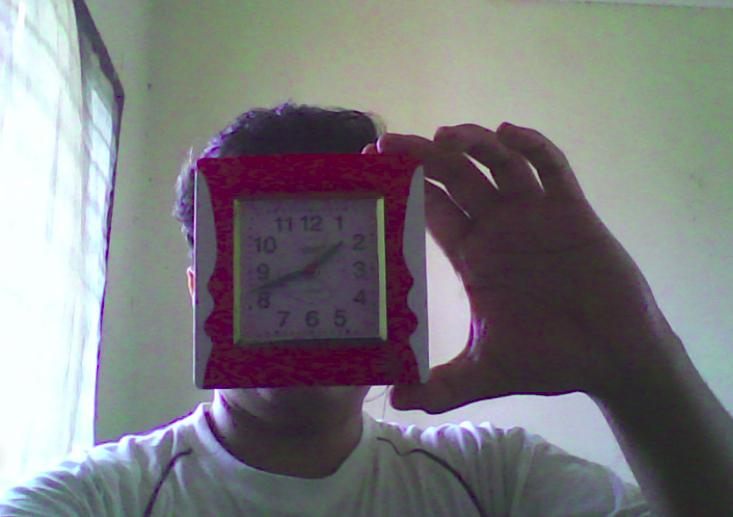
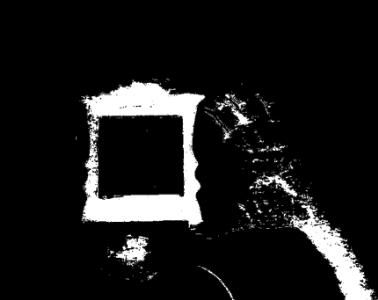
编译本程序后,运行它。程序将打开两个窗口。
-
当你通过 Trackbar 设置范围值时,处理结果画面会显示在另一个窗口中。