
TF2 添加坐标系(C++)
目标: 学习如何向 tf2 中添加一个额外的坐标系。
教程级别: 中级
预计时间: 15 分钟
在之前的教程中,我们通过编写 tf2 广播器和监听器重新创建了 turtlesim 演示程序。本教程将介绍如何向变换树中添加固定坐标系和动态坐标系。在 tf2 中添加坐标系与创建广播器非常相似,但本示例还会展示 tf2 的更多功能。
对于许多与变换相关的任务,在局部坐标系中思考会更加方便。例如,在以激光扫描仪中心为原点的坐标系中处理激光扫描数据最为简单。tf2 允许你为系统中的每个传感器、连杆或关节定义局部坐标系。当从一个坐标系变换到另一个坐标系时,tf2 会自动处理所有中间的坐标系变换。
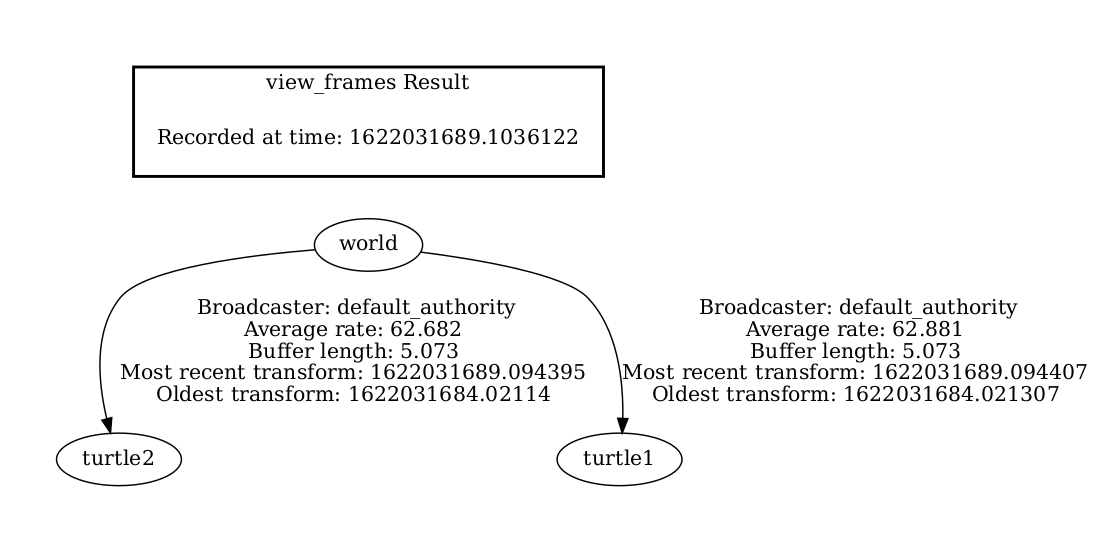
tf2 构建了一棵坐标系树,因此不允许在树结构中形成闭环。这意味着一个坐标系只能有一个父坐标系,但可以有多个子坐标系。目前,我们的 tf2 树包含三个坐标系:world、turtle1 和 turtle2。两个 turtle 坐标系都是 world 的子坐标系。如果要向 tf2 添加新坐标系,需要选择现有坐标系之一作为父坐标系,新坐标系则成为它的子坐标系。
1 编写固定坐标系广播器
Section titled “1 编写固定坐标系广播器”在我们的 turtlesim 示例中,我们将添加一个新坐标系 carrot1,它是 turtle1 的子坐标系。这个坐标系将作为第二只 turtle 的追踪目标。
首先创建源文件。进入之前教程中创建的 learning_tf2_cpp 功能包。在 src 目录中,运行以下命令下载固定坐标系广播器代码:
Linux/macOS:
wget https://raw.githubusercontent.com/ros/geometry_tutorials/{DISTRO}/turtle_tf2_cpp/src/fixed_frame_tf2_broadcaster.cppWindows:
在 Windows 命令行提示符中:
curl -sk https://raw.githubusercontent.com/ros/geometry_tutorials/{DISTRO}/turtle_tf2_cpp/src/fixed_frame_tf2_broadcaster.cpp -o fixed_frame_tf2_broadcaster.cpp或者在 PowerShell 中:
curl https://raw.githubusercontent.com/ros/geometry_tutorials/{DISTRO}/turtle_tf2_cpp/src/fixed_frame_tf2_broadcaster.cpp -o fixed_frame_tf2_broadcaster.cpp现在打开 fixed_frame_tf2_broadcaster.cpp 文件。
#include <chrono>#include <functional>#include <memory>
#include "geometry_msgs/msg/transform_stamped.hpp"#include "rclcpp/rclcpp.hpp"#include "tf2_ros/transform_broadcaster.h"
using namespace std::chrono_literals;
class FixedFrameBroadcaster : public rclcpp::Node{public:  FixedFrameBroadcaster()  : Node("fixed_frame_tf2_broadcaster")  {    tf_broadcaster_ = std::make_shared<tf2_ros::TransformBroadcaster>(this);
    auto broadcast_timer_callback = [this](){        geometry_msgs::msg::TransformStamped t;
        t.header.stamp = this->get_clock()->now();        t.header.frame_id = "turtle1";        t.child_frame_id = "carrot1";        t.transform.translation.x = 0.0;        t.transform.translation.y = 2.0;        t.transform.translation.z = 0.0;        t.transform.rotation.x = 0.0;        t.transform.rotation.y = 0.0;        t.transform.rotation.z = 0.0;        t.transform.rotation.w = 1.0;
        tf_broadcaster_->sendTransform(t);    };    timer_ = this->create_wall_timer(100ms, broadcast_timer_callback);  }
private:  rclcpp::TimerBase::SharedPtr timer_;  std::shared_ptr<tf2_ros::TransformBroadcaster> tf_broadcaster_;};
int main(int argc, char * argv[]){  rclcpp::init(argc, argv);  rclcpp::spin(std::make_shared<FixedFrameBroadcaster>());  rclcpp::shutdown();  return 0;}
这段代码与 tf2 广播器教程中的示例非常相似,唯一的区别是此处的变换不会随时间变化。
1.1 代码解析
Section titled “1.1 代码解析”下面来看代码中的关键部分。这里创建了一个新的变换,从父坐标系 turtle1 到子坐标系 carrot1。carrot1 相对于 turtle1 在 y 轴上有 2 米的偏移。
geometry_msgs::msg::TransformStamped t;
t.header.stamp = this->get_clock()->now();t.header.frame_id = "turtle1";t.child_frame_id = "carrot1";t.transform.translation.x = 0.0;t.transform.translation.y = 2.0;t.transform.translation.z = 0.0;
1.2 CMakeLists.txt
Section titled “1.2 CMakeLists.txt”返回 learning_tf2_cpp 目录,CMakeLists.txt 和 package.xml 就在这里。
现在打开 CMakeLists.txt,添加可执行文件并将其命名为 fixed_frame_tf2_broadcaster。
add_executable(fixed_frame_tf2_broadcaster src/fixed_frame_tf2_broadcaster.cpp)target_link_libraries( fixed_frame_tf2_broadcaster PUBLIC geometry_msgs::geometry_msgs rclcpp::rclcpp tf2_ros::tf2_ros)最后,添加 install(TARGETS…) 部分,以便 ros2 run 能够找到你的可执行文件:
install(TARGETS fixed_frame_tf2_broadcaster DESTINATION lib/${PROJECT_NAME})1.3 编写 launch 文件
Section titled “1.3 编写 launch 文件”接下来为这个示例创建一个 launch 文件。使用文本编辑器,在 src/learning_tf2_cpp/launch 目录中创建一个名为 turtle_tf2_fixed_frame_demo_launch 的新文件,扩展名为 .py、.xml 或 .yaml(与之前教程中 launch 文件的类型保持一致),并添加以下内容。
此 launch 文件导入所需的包,然后创建一个 demo_nodes 变量来存储之前教程 launch 文件中创建的节点。
代码的最后一部分使用我们的 fixed_frame_tf2_broadcaster 节点,将固定的 carrot1 坐标系添加到 turtlesim 世界中。
1.4 构建
Section titled “1.4 构建”在工作空间根目录运行 rosdep 以检查缺失的依赖。
Linux:
rosdep install -i --from-path src --rosdistro {DISTRO} -ymacOS:
rosdep 仅在 Linux 上运行,你需要自行安装 geometry_msgs 和 turtlesim 依赖。
Windows:
rosdep 仅在 Linux 上运行,你需要自行安装 geometry_msgs 和 turtlesim 依赖。
继续在工作空间根目录下构建功能包:
Linux/macOS:
colcon build --packages-select learning_tf2_cppWindows:
colcon build --merge-install --packages-select learning_tf2_cpp打开一个新终端,导航到工作空间根目录,并 source 环境设置脚本:
Linux/macOS:
. install/setup.bashWindows:
在 Windows 命令行提示符中:
call install\setup.bat或者在 PowerShell 中:
.\install\setup.ps11.5 运行
Section titled “1.5 运行”现在可以启动 turtle 广播器演示程序:
ros2 launch learning_tf2_cpp turtle_tf2_fixed_frame_demo_launch.xml # .py 或 .yaml 也可以你应该会看到新的 carrot1 坐标系出现在变换树中。
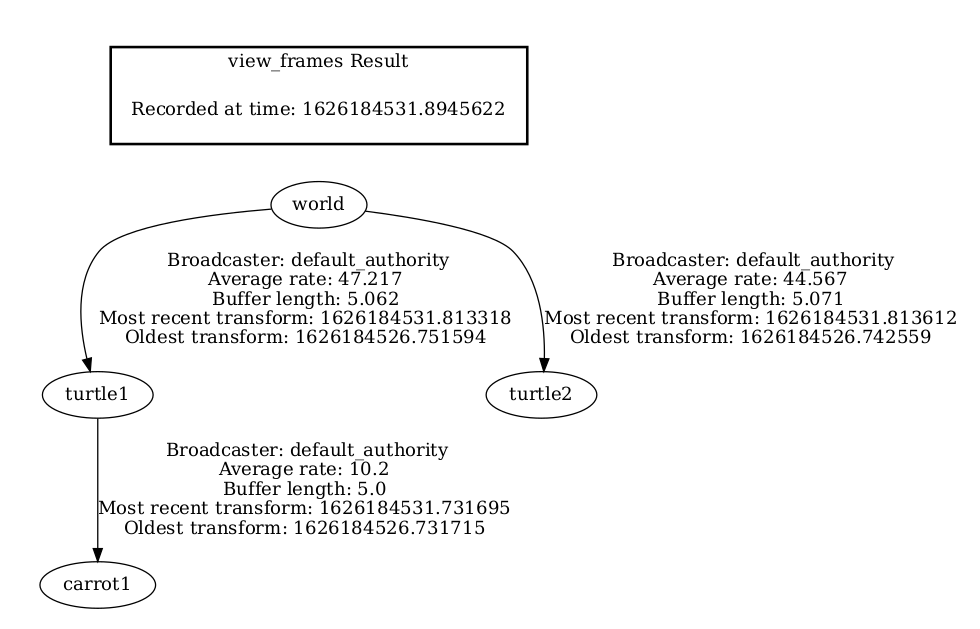
如果你操控第一只 turtle 移动,会发现虽然添加了新坐标系,但行为与之前教程相比没有变化。这是因为添加额外坐标系不会影响其他坐标系,监听器仍然在使用之前定义的坐标系。
因此,要让第二只 turtle 跟随胡萝卜而不是第一只 turtle,需要更改 target_frame 的值。这可以通过两种方式实现。
第一种方式是直接从命令行向 launch 文件传递 target_frame 参数:
ros2 launch learning_tf2_cpp turtle_tf2_fixed_frame_demo_launch.xml target_frame:=carrot1 # .py 或 .yaml 也可以第二种方式是更新 launch 文件。为此,打开 turtle_tf2_fixed_frame_demo_launch.py 文件,通过 launch_arguments 参数添加 'target_frame': 'carrot1'。
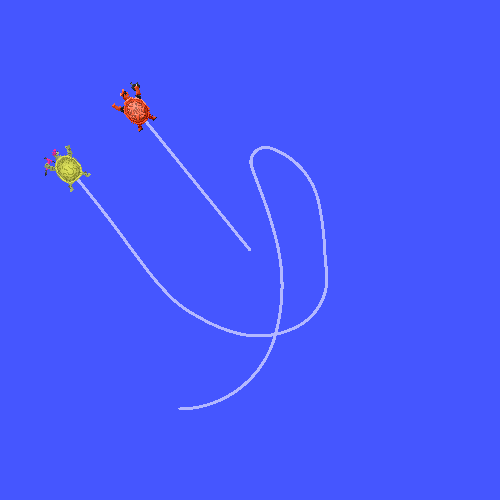
def generate_launch_description(): demo_nodes = IncludeLaunchDescription( ..., launch_arguments={'target_frame': 'carrot1'}.items(), )现在重新构建功能包,重启 turtle_tf2_fixed_frame_demo_launch.py,你会看到第二只 turtle 在跟随胡萝卜,而不是第一只 turtle!
2 编写动态坐标系广播器
Section titled “2 编写动态坐标系广播器”本教程中发布的额外坐标系是一个固定坐标系,相对于父坐标系不会随时间变化。但如果需要发布一个移动的坐标系,可以编写广播器代码使坐标系随时间变化。下面修改 carrot1 坐标系,使其相对于 turtle1 随时间变化。
进入之前教程中创建的 learning_tf2_cpp 功能包。在 src 目录中,运行以下命令下载动态坐标系广播器代码:
Linux/macOS:
wget https://raw.githubusercontent.com/ros/geometry_tutorials/{DISTRO}/turtle_tf2_cpp/src/dynamic_frame_tf2_broadcaster.cppWindows:
在 Windows 命令行提示符中:
curl -sk https://raw.githubusercontent.com/ros/geometry_tutorials/{DISTRO}/turtle_tf2_cpp/src/dynamic_frame_tf2_broadcaster.cpp -o dynamic_frame_tf2_broadcaster.cpp或者在 PowerShell 中:
curl https://raw.githubusercontent.com/ros/geometry_tutorials/{DISTRO}/turtle_tf2_cpp/src/dynamic_frame_tf2_broadcaster.cpp -o dynamic_frame_tf2_broadcaster.cpp现在打开 dynamic_frame_tf2_broadcaster.cpp 文件:
#include <chrono>#include <functional>#include <memory>
#include "geometry_msgs/msg/transform_stamped.hpp"#include "rclcpp/rclcpp.hpp"#include "tf2_ros/transform_broadcaster.h"
using namespace std::chrono_literals;
const double PI = 3.141592653589793238463;
class DynamicFrameBroadcaster : public rclcpp::Node{public:  DynamicFrameBroadcaster()  : Node("dynamic_frame_tf2_broadcaster")  {    tf_broadcaster_ = std::make_shared<tf2_ros::TransformBroadcaster>(this);
    auto broadcast_timer_callback = [this](){        rclcpp::Time now = this->get_clock()->now();        double x = now.seconds() * PI;
        geometry_msgs::msg::TransformStamped t;        t.header.stamp = now;        t.header.frame_id = "turtle1";        t.child_frame_id = "carrot1";        t.transform.translation.x = 10 * sin(x);        t.transform.translation.y = 10 * cos(x);        t.transform.translation.z = 0.0;        t.transform.rotation.x = 0.0;        t.transform.rotation.y = 0.0;        t.transform.rotation.z = 0.0;        t.transform.rotation.w = 1.0;
        tf_broadcaster_->sendTransform(t);    };    timer_ = this->create_wall_timer(100ms, broadcast_timer_callback);  }
private:  rclcpp::TimerBase::SharedPtr timer_;  std::shared_ptr<tf2_ros::TransformBroadcaster> tf_broadcaster_;};
int main(int argc, char * argv[]){  rclcpp::init(argc, argv);  rclcpp::spin(std::make_shared<DynamicFrameBroadcaster>());  rclcpp::shutdown();  return 0;}
2.1 代码解析
Section titled “2.1 代码解析”不再使用固定的 x 和 y 偏移,而是根据当前时间使用 sin() 和 cos() 函数,使 carrot1 的偏移不断变化。
double x = now.seconds() * PI;...t.transform.translation.x = 10 * sin(x);t.transform.translation.y = 10 * cos(x);2.2 CMakeLists.txt
Section titled “2.2 CMakeLists.txt”返回 learning_tf2_cpp 目录,CMakeLists.txt 和 package.xml 就在这里。
现在打开 CMakeLists.txt,添加可执行文件并将其命名为 dynamic_frame_tf2_broadcaster。
add_executable(dynamic_frame_tf2_broadcaster src/dynamic_frame_tf2_broadcaster.cpp)target_link_libraries( dynamic_frame_tf2_broadcaster PUBLIC geometry_msgs::geometry_msgs rclcpp::rclcpp tf2_ros::tf2_ros)最后,添加 install(TARGETS…) 部分,以便 ros2 run 能够找到你的可执行文件:
install(TARGETS dynamic_frame_tf2_broadcaster DESTINATION lib/${PROJECT_NAME})2.3 编写 launch 文件
Section titled “2.3 编写 launch 文件”要测试此代码,在 src/learning_tf2_cpp/launch 目录中创建一个名为 turtle_tf2_dynamic_frame_demo_launch 的新 launch 文件,扩展名为 .py、.xml 或 .yaml(与之前教程中 launch 文件的类型保持一致),并粘贴以下代码。
2.4 构建
Section titled “2.4 构建”在工作空间根目录运行 rosdep 以检查缺失的依赖。
Linux:
rosdep install -i --from-path src --rosdistro {DISTRO} -ymacOS:
rosdep 仅在 Linux 上运行,你需要自行安装 geometry_msgs 和 turtlesim 依赖。
Windows:
rosdep 仅在 Linux 上运行,你需要自行安装 geometry_msgs 和 turtlesim 依赖。
继续在工作空间根目录下,构建功能包:
Linux/macOS:
colcon build --packages-select learning_tf2_cppWindows:
colcon build --merge-install --packages-select learning_tf2_cpp打开一个新终端,导航到工作空间根目录,并 source 环境设置脚本:
Linux/macOS:
. install/setup.bashWindows:
在 Windows 命令行提示符中:
call install\setup.bat或者在 PowerShell 中:
.\install\setup.ps12.5 运行
Section titled “2.5 运行”现在可以启动动态坐标系演示程序:
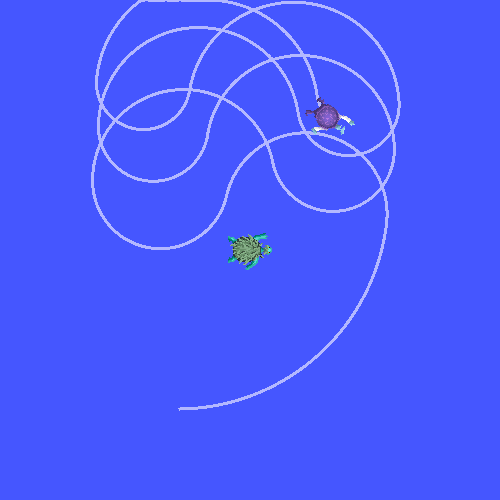
ros2 launch learning_tf2_cpp turtle_tf2_dynamic_frame_demo_launch.xml # .py 或 .yaml 也可以你应该会看到第二只 turtle 正在跟随不断变化的胡萝卜位置。
在本教程中,你学习了 tf2 变换树的结构及其特性,体会到在局部坐标系中思考问题最直观,并学会了添加固定坐标系和动态坐标系。