
使用速度限制进行导航(Speed Filter)
本教程介绍如何使用 Speed Filter(速度过滤器)来限制机器人在地图上标记的速度限制区域内的最大速度。该功能由 SpeedFilter 代价地图过滤器插件提供,本文档将说明如何启用并配置该插件。
假设 ROS 2、Gazebo 和 TurtleBot 4 软件包已安装或在本地构建。同时请确保 Nav2 项目已按构建说明在本地构建。
1. 准备过滤器掩码
Section titled “1. 准备过滤器掩码”如概念中所述,任何代价地图过滤器(Costmap Filter)——包括 Speed Filter——都会读取过滤器掩码(filter mask)文件中标记的数据。关于过滤器掩码的类型、结构以及如何制作新掩码,请参阅使用禁区(Keepout Zones)导航教程中「1. Prepare filter masks(准备过滤器掩码)」一节。Speed Filter 绘制过滤器掩码的原理与 Keepout Filter 相同(即在地图上标注所需区域),区别仅在于 OccupancyGrid 掩码值的含义不同:这些值编码的是对应地图单元所在区域的速度限制。
下面来看掩码值是如何解码的。OccupancyGrid 值的范围是 [0..100]。对于 Speed Filter,值 0 表示掩码上对应单元的区域没有速度限制。[1..100] 范围内的值通过以下公式线性转换为速度限制值:
speed_limit = filter_mask_data * multiplier + base;其中:
filter_mask_data—— 掩码上需要限制最大速度的对应单元的OccupancyGrid值。base和multiplier—— 取自 Costmap Filter Info Server 发布的nav2_msgs/CostmapFilterInfo消息的系数(参见下一节)。
解码后的 speed_limit 值有两种可能的含义:
- 以机器人最大速度的百分比表示的速度限制。
- 以绝对值表示的速度限制(例如
m/s)。
Speed Filter 使用哪种含义,从 nav2_msgs/CostmapFilterInfo 消息中读取。本教程使用第一种,即以机器人最大速度的百分比表示速度限制。
注意:对于以百分比表示的速度限制,
speed_limit将直接作为[0..100]范围内的百分比值使用,而非[0.0..1.0]范围。
创建一个 PGM/PNG/BMP 格式的新图像:从 Nav2 仓库复制用于仿真世界的主地图 depot.pgm,另存为 depot_speed.pgm。在常用的栅格图形编辑器中打开 depot_speed.pgm,用灰色填充速度限制区域。在本示例中,颜色越深表示速度限制越高:
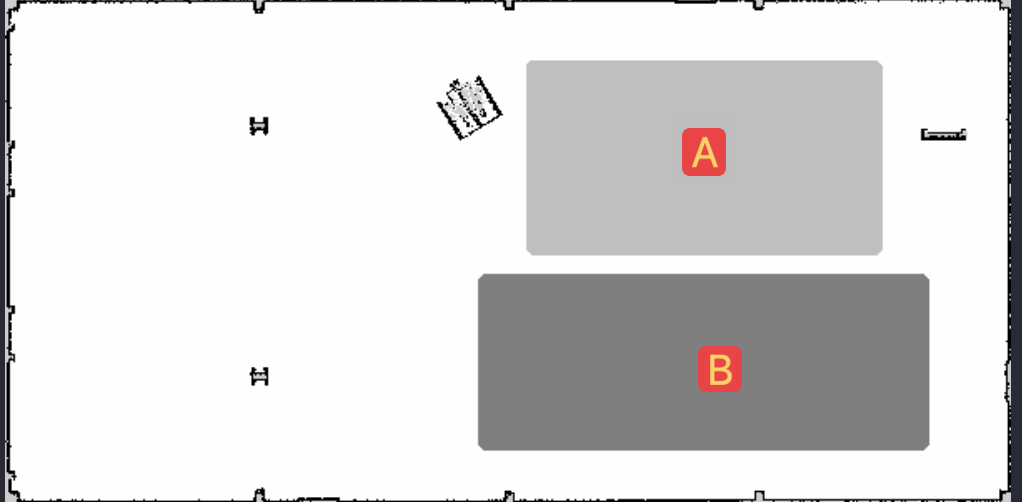
区域「A」填充 25% 灰色,区域「B」填充 50% 灰色,这意味着区域「A」的速度限制为机器人最大速度的 100% - 25% = 75%,区域「B」为 100% - 50% = 50%。这里使用不带阈值的 scale 地图模式。在此模式下,颜色越深,OccupancyGrid 值越高。例如,对于 50% 灰色的区域「B」,OccupancyGrid 数据值为 50。因此,需要选择 base = 100.0、multiplier = -1.0,将 OccupancyGrid 值反向缩放到所需的范围。为方便起见,在 yaml 文件中不设置阈值(free_thresh、occupied_thresh),从而实现过滤器掩码亮度值到速度限制百分比的 1:1 全范围转换。
注意:以上是
base和multiplier的典型选择,但并非强制要求。例如,也可以选择raw地图模式,此时颜色亮度直接转换为OccupancyGrid值。对于raw模式保存的掩码,base和multiplier分别取0.0和1.0。此外,也不必使用整个
[0..100]百分比刻度。可以选取合适的base和multiplier系数,使速度限制值落在百分比范围内的某一区间。例如,base = 40.0、multiplier = 0.1会得到[40.0%..50.0%]范围内的速度限制,步长为0.1%,便于精细调整。
填充完所有速度限制区域后,保存 depot_speed.pgm 图像。
与所有其他地图一样,过滤器掩码也需要自己的 YAML 元数据文件。将 depot.yaml 复制为 speed_mask.yaml。打开 speed_mask.yaml,按如下所示更新字段(如前所述,scale 模式下要使用完整的颜色亮度范围,不应设置阈值:free_thresh = 0.0、occupied_thresh = 1.0):
image: depot.pgm->image: depot_speed.pgm
mode: trinary->mode: scale
occupied_thresh: 0.65free_thresh: 0.25->occupied_thresh: 1.0free_thresh: 0.0
由于 Costmap2D 不支持方向(orientation),origin 向量的最后一个「yaw」分量必须为零(例如:origin: [1.25, -5.18, 0.0])。保存 speed_mask.yaml,新的过滤器掩码即可使用。
注意:世界地图和过滤器掩码可以具有不同的大小、原点和分辨率,这在某些场景下很有用(例如,过滤器掩码只覆盖地图上的较小区域,或者同一个过滤器掩码被重复使用——如为酒店中形状相同的房间标注速度限制区域)。此时需要在 YAML 中相应调整
resolution和origin字段,使过滤器掩码正确叠加在原始地图上。本示例以主地图为基础,但并非必须如此。
2. 配置 Costmap Filter Info Publisher Server
Section titled “2. 配置 Costmap Filter Info Publisher Server”每个代价地图过滤器都会从 nav2_msgs/CostmapFilterInfo 类型的消息中读取元信息(如过滤器类型或数据转换系数)。这些消息由 Costmap Filter Info Publisher Server 发布,该服务器作为生命周期节点(lifecycle node)运行。根据设计文档,nav2_msgs/CostmapFilterInfo 消息与 OccupancyGrid 过滤器掩码话题成对出现。因此,除了 Costmap Filter Info Publisher Server 之外,还需启用一个新的 Map Server 实例,配置其发布过滤器掩码。
要在配置中启用 Speed Filter,两个服务器都应在 Python launch 文件中作为生命周期节点启动。也可以将它们作为组合节点(Composition Node)添加到 Navigation Component Container 中,例如:
import os
from ament_index_python.packages import get_package_share_directoryfrom launch import LaunchDescriptionfrom launch.actions import DeclareLaunchArgument, GroupAction, SetEnvironmentVariablefrom launch.conditions import IfConditionfrom launch.substitutions import LaunchConfiguration, PythonExpressionfrom launch_ros.actions import LoadComposableNodes, Node, PushROSNamespace, SetParameterfrom launch_ros.descriptions import ComposableNode, ParameterFilefrom nav2_common.launch import LaunchConfigAsBool, RewrittenYaml

def generate_launch_description() -> LaunchDescription:    # Get the launch directory    bringup_dir = get_package_share_directory('nav2_bringup')
    namespace = LaunchConfiguration('namespace')    speed_mask_yaml_file = LaunchConfiguration('speed_mask')    use_sim_time = LaunchConfigAsBool('use_sim_time')    autostart = LaunchConfigAsBool('autostart')    params_file = LaunchConfiguration('params_file')    use_composition = LaunchConfigAsBool('use_composition')    container_name = LaunchConfiguration('container_name')    container_name_full = (namespace, '/', container_name)    use_respawn = LaunchConfigAsBool('use_respawn')    use_speed_zones = LaunchConfigAsBool('use_speed_zones')    log_level = LaunchConfiguration('log_level')
    lifecycle_nodes = ['speed_filter_mask_server', 'speed_costmap_filter_info_server']
    # Map fully qualified names to relative ones so the node's namespace can be prepended.    remappings = [('/tf', 'tf'), ('/tf_static', 'tf_static')]
    yaml_substitutions = {        'SPEED_ZONE_ENABLED': use_speed_zones,    }
    configured_params = ParameterFile(        RewrittenYaml(            source_file=params_file,            root_key=namespace,            param_rewrites={},            value_rewrites=yaml_substitutions,            convert_types=True,        ),        allow_substs=True,    )
    stdout_linebuf_envvar = SetEnvironmentVariable(        'RCUTILS_LOGGING_BUFFERED_STREAM', '1'    )
    declare_namespace_cmd = DeclareLaunchArgument(        'namespace', default_value='', description='Top-level namespace'    )
    declare_speed_mask_yaml_cmd = DeclareLaunchArgument(        'speed_mask',        default_value='',        description='Full path to speed mask yaml file to load',    )
    declare_use_sim_time_cmd = DeclareLaunchArgument(        'use_sim_time',        default_value='false',        description='Use simulation (Gazebo) clock if true',    )
    declare_params_file_cmd = DeclareLaunchArgument(        'params_file',        default_value=os.path.join(bringup_dir, 'params', 'nav2_params.yaml'),        description='Full path to the ROS2 parameters file to use for all launched nodes',    )
    declare_use_composition_cmd = DeclareLaunchArgument(        'use_composition',        default_value='False',        description='Use composed bringup if True',    )
    declare_container_name_cmd = DeclareLaunchArgument(        'container_name',        default_value='nav2_container',        description='the name of container that nodes will load in if use composition',    )
    declare_use_respawn_cmd = DeclareLaunchArgument(        'use_respawn',        default_value='False',        description='Whether to respawn if a node crashes. Applied when composition is disabled.',    )
    declare_use_speed_zones_cmd = DeclareLaunchArgument(        'use_speed_zones', default_value='True',        description='Whether to enable speed zones or not'    )
    declare_log_level_cmd = DeclareLaunchArgument(        'log_level', default_value='info', description='log level'    )
    load_nodes = GroupAction(        condition=IfCondition(PythonExpression(['not ', use_composition])),        actions=[            PushROSNamespace(namespace),            SetParameter('use_sim_time', use_sim_time),            Node(                condition=IfCondition(use_speed_zones),                package='nav2_map_server',                executable='map_server',                name='speed_filter_mask_server',                output='screen',                respawn=use_respawn,                respawn_delay=2.0,                parameters=[configured_params, {'yaml_filename': speed_mask_yaml_file}],                arguments=['--ros-args', '--log-level', log_level],                remappings=remappings,            ),            Node(                condition=IfCondition(use_speed_zones),                package='nav2_map_server',                executable='costmap_filter_info_server',                name='speed_costmap_filter_info_server',                output='screen',                respawn=use_respawn,                respawn_delay=2.0,                parameters=[configured_params],                arguments=['--ros-args', '--log-level', log_level],                remappings=remappings,            ),            Node(                package='nav2_lifecycle_manager',                executable='lifecycle_manager',                name='lifecycle_manager_speed_zone',                output='screen',                arguments=['--ros-args', '--log-level', log_level],                parameters=[{'autostart': autostart}, {'node_names': lifecycle_nodes}],            ),        ],    )    # LoadComposableNode for map server twice depending if we should use the    # value of map from a CLI or launch default or user defined value in the    # yaml configuration file. They are separated since the conditions    # currently only work on the LoadComposableNodes commands and not on the    # ComposableNode node function itself    load_composable_nodes = GroupAction(        condition=IfCondition(use_composition),        actions=[            PushROSNamespace(namespace),            SetParameter('use_sim_time', use_sim_time),            LoadComposableNodes(                target_container=container_name_full,                condition=IfCondition(use_speed_zones),                composable_node_descriptions=[                    ComposableNode(                        package='nav2_map_server',                        plugin='nav2_map_server::MapServer',                        name='speed_filter_mask_server',                        parameters=[                            configured_params,                            {'yaml_filename': speed_mask_yaml_file}                        ],                        remappings=remappings,                    ),                    ComposableNode(                        package='nav2_map_server',                        plugin='nav2_map_server::CostmapFilterInfoServer',                        name='speed_costmap_filter_info_server',                        parameters=[configured_params],                        remappings=remappings,                    ),                ],            ),
            LoadComposableNodes(                target_container=container_name_full,                composable_node_descriptions=[                    ComposableNode(                        package='nav2_lifecycle_manager',                        plugin='nav2_lifecycle_manager::LifecycleManager',                        name='lifecycle_manager_speed_zone',                        parameters=[                            {'autostart': autostart, 'node_names': lifecycle_nodes}                        ],                    ),                ],            ),        ],    )
    # Create the launch description and populate    ld = LaunchDescription()
    # Set environment variables    ld.add_action(stdout_linebuf_envvar)
    # Declare the launch options    ld.add_action(declare_namespace_cmd)    ld.add_action(declare_speed_mask_yaml_cmd)    ld.add_action(declare_use_sim_time_cmd)    ld.add_action(declare_params_file_cmd)    ld.add_action(declare_use_composition_cmd)    ld.add_action(declare_container_name_cmd)    ld.add_action(declare_use_respawn_cmd)    ld.add_action(declare_use_speed_zones_cmd)    ld.add_action(declare_log_level_cmd)
    # Add the actions to launch all of the map modifier nodes    ld.add_action(load_nodes)    ld.add_action(load_composable_nodes)
    return ld
其中 params_file 变量应指向包含 Costmap Filter Info Publisher Server 和 Map Server 节点 ROS 参数的 YAML 文件。相关参数及其含义详见地图服务器配置页面。params_file 示例如下:
speed_filter_mask_server:  ros__parameters:    topic_name: "speed_filter_mask"    # yaml_filename: ""
speed_costmap_filter_info_server:  ros__parameters:    type: 1    filter_info_topic: "speed_costmap_filter_info"    mask_topic: "speed_filter_mask"    base: 100.0    multiplier: -1.0
需要注意以下几点:
- 对于以最大速度百分比设置速度限制的 Speed Filter,代价地图过滤器的
type应设置为1。所有代价地图过滤器类型均可在地图服务器配置页面查阅。 - 过滤器掩码话题名称应与 Costmap Filter Info Publisher Server 的
mask_topic参数和 Map Server 的topic_name参数保持一致。 - 如前一节所述,本教程示例中
base和multiplier应分别设置为100.0和-1.0。
3. 启用 Speed Filter
Section titled “3. 启用 Speed Filter”代价地图过滤器是 Costmap2D 插件。在 nav2_params.yaml 的 plugins 参数中添加 speed_filter,即可在 Costmap2D 中启用 SpeedFilter 插件。该插件需定义以下参数:
plugin:插件类型,本例中为nav2_costmap_2d::SpeedFilter。filter_info_topic:过滤器信息话题名称,需与上一节中 Costmap Filter Info Publisher Server 的filter_info_topic参数一致。speed_limit_topic:发布速度限制的话题名称。
SpeedFilter 支持的完整参数列表请参阅速度过滤器配置页面。
可将插件放在 nav2_params.yaml 的 global_costmap 部分,使速度限制掩码应用于全局代价地图;也可放在 local_costmap 部分,应用于局部代价地图。但 SpeedFilter 插件绝不能同时在全局和局部代价地图中启用,否则会在速度限制边界处产生大量多余的「speed restriction」/「no restriction」消息,导致机器人抖动或出现其他不可预测的行为。
本教程为全局代价地图启用 Speed Filter,配置如下:
global_costmap: global_costmap: ros__parameters: ... plugins: ["static_layer", "obstacle_layer", "inflation_layer"] filters: ["speed_filter"] ... speed_filter: plugin: "nav2_costmap_2d::SpeedFilter" enabled: True filter_info_topic: "speed_costmap_filter_info" speed_limit_topic: "speed_limit"如设计文档所述,Speed Filter 会向 Controller Server 发布速度限制消息,在需要时限制机器人的最大速度。Controller Server 提供了 speed_limit_topic ROS 参数,应设置为与 speed_filter 插件中相同的值。除速度限制区域外,该话题还可用于其他各种速度受限场景,例如根据载荷质量动态调整最大速度。
将 Controller Server 的 speed_limit_topic 参数设置为与 speed_filter 插件相同的值:
controller_server: ros__parameters: ... speed_limit_topic: "speed_limit"4. 运行 Nav2 技术栈
Section titled “4. 运行 Nav2 技术栈”Speed Filter 开箱即用的独立 Python launch 脚本、ROS 参数 YAML 文件以及过滤器掩码示例均可在 nav2_bringup 目录中找到。运行演示只需执行以下命令:
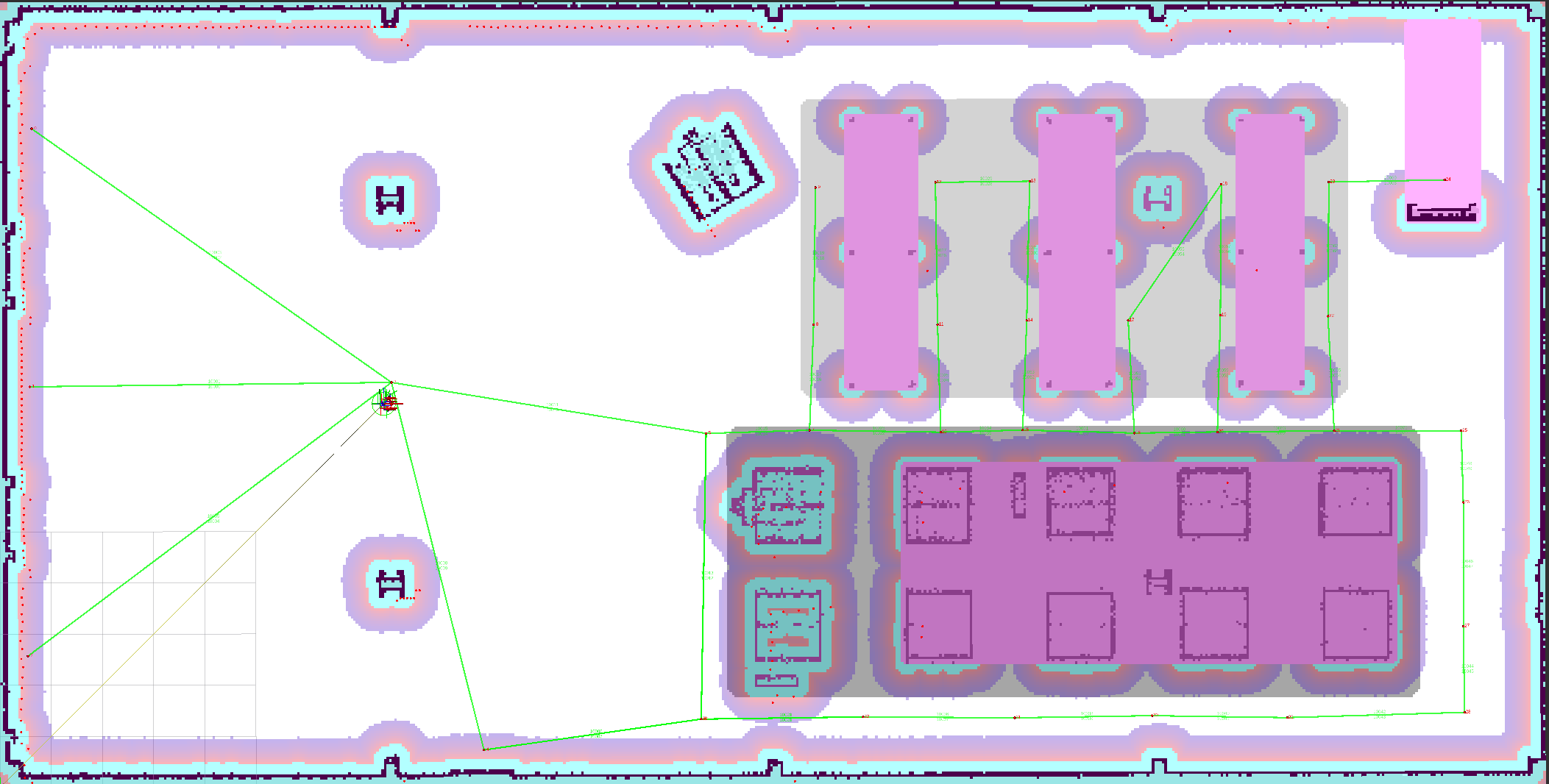
ros2 launch nav2_bringup tb4_simulation_launch.py为了更好地可视化速度过滤器掩码,在 RViz 左侧的 Displays(显示)面板中展开 Map(地图),将 Topic(话题)从 /map 更改为 /speed_filter_mask。在速度限制区域后方设置目标导航点,检查过滤器是否正常工作:机器人通过速度限制区域时应减速。效果示例如下:
5. 可选:启用路径前瞻
Section titled “5. 可选:启用路径前瞻”默认情况下,Speed Filter 应用机器人正下方单元的速度限制。这意味着只有在机器人已经进入速度限制区域后才会发布速度限制,由控制器负责减速。大多数场景下这已经足够。
如果要求机器人在越过区域边界时就已达到(或接近)该速度限制——例如进入仓库中的低速通道时——可以启用路径前瞻(path lookahead)模式。在此模式下,过滤器会在规划的路径上、一个与速度相关的窗口内采样位姿,并应用该窗口内最严格的速度限制,使机器人在到达区域之前就开始减速。
要启用此模式,请在 speed_filter 插件配置中设置 enable_path_lookahead: true:
global_costmap: global_costmap: ros__parameters: ... speed_filter: plugin: "nav2_costmap_2d::SpeedFilter" enabled: True filter_info_topic: "speed_costmap_filter_info" speed_limit_topic: "speed_limit" enable_path_lookahead: true max_decel: -0.5 min_lookahead: 0.3 max_lookahead: 5.0 path_topic: "plan" odom_topic: "odom"前瞻距离根据机器人当前速度按 d = v² / (2·|max_decel|) 计算,并限制在 [min_lookahead, max_lookahead] 范围内。将 max_decel 设置为与机器人舒适减速度相匹配的值,以确保前瞻窗口能在区域边界处及时停住。完整参数参考请参阅速度过滤器配置页面。
注意:更多示例和背景信息,请参阅 Navigation2 教程:https://github.com/ros-navigation/navigation2_tutorials/tree/rolling/nav2_costmap_filters_demo