
TF2 带时间戳数据与 MessageFilter
目标: 学习如何使用 tf2_ros::MessageFilter 处理带时间戳的数据类型。
教程级别: 中级
预计时间: 10 分钟
本教程介绍如何在 tf2 中使用传感器数据。传感器数据的常见应用场景包括:
- 摄像头(单目和双目)
- 激光扫描
假设新建了一只名为 turtle3 的 turtle,它的里程计不够准确,但有一台顶置摄像头在跟踪它的位置,并以 PointStamped 消息的形式发布到 world 坐标系下。
turtle1 想知道 turtle3 相对于自己的位置。
为此,turtle1 需要监听发布 turtle3 姿态的话题,等待到目标坐标系的变换就绪,然后再执行相应动作。为了简化这一流程,可以使用 tf2_ros::MessageFilter。它会订阅任何带有 header 的 ROS 2 消息并加以缓存,直到可以将其变换到目标坐标系。
本教程要求你已安装 turtle_tf2_py 功能包。
Ubuntu:
sudo apt install ros-{DISTRO}-turtle-tf2-pyRHEL:
sudo dnf install ros-{DISTRO}-turtle-tf2-py源码安装:
# Clone the required package repository inside src directory of the ros2_ws$ git clone https://github.com/ros/geometry_tutorials.git -b ros2# Build the required package$ colcon build --packages-select turtle_tf2_py1 编写 PointStamped 消息的广播器节点
Section titled “1 编写 PointStamped 消息的广播器节点”在本教程中,我们将搭建一个演示应用程序,其中一个 Python 节点负责广播 turtle3 的 PointStamped 位置消息。
首先创建源文件。进入之前教程中创建的 learning_tf2_py 功能包,在 src/learning_tf2_py/learning_tf2_py 目录中执行以下命令,下载示例传感器消息广播器代码:
Linux/macOS:
wget https://raw.githubusercontent.com/ros/geometry_tutorials/{DISTRO}/turtle_tf2_py/turtle_tf2_py/turtle_tf2_message_broadcaster.pyWindows:
在 Windows 命令行提示符中:
curl -sk https://raw.githubusercontent.com/ros/geometry_tutorials/{DISTRO}/turtle_tf2_py/turtle_tf2_py/turtle_tf2_message_broadcaster.py -o turtle_tf2_message_broadcaster.py或者在 PowerShell 中:
curl https://raw.githubusercontent.com/ros/geometry_tutorials/{DISTRO}/turtle_tf2_py/turtle_tf2_py/turtle_tf2_message_broadcaster.py -o turtle_tf2_message_broadcaster.py使用你喜欢的文本编辑器打开该文件。
from geometry_msgs.msg import PointStampedfrom geometry_msgs.msg import Twist
import rclpyfrom rclpy.executors import ExternalShutdownExceptionfrom rclpy.node import Node
from turtlesim_msgs.msg import Posefrom turtlesim_msgs.srv import Spawn

class PointPublisher(Node):
    def __init__(self):        super().__init__('turtle_tf2_message_broadcaster')
        # Create a client to spawn a turtle        self.spawner = self.create_client(Spawn, 'spawn')        # Boolean values to store the information        # if the service for spawning turtle is available        self.turtle_spawning_service_ready = False        # if the turtle was successfully spawned        self.turtle_spawned = False        # if the topics of turtle3 can be subscribed        self.turtle_pose_cansubscribe = False
        self.timer = self.create_timer(1.0, self.on_timer)
    def on_timer(self):        if self.turtle_spawning_service_ready:            if self.turtle_spawned:                self.turtle_pose_cansubscribe = True            else:                if self.result.done():                    self.get_logger().info(                        f'Successfully spawned {self.result.result().name}')                    self.turtle_spawned = True                else:                    self.get_logger().info('Spawn is not finished')        else:            if self.spawner.service_is_ready():                # Initialize request with turtle name and coordinates                # Note that x, y and theta are defined as floats in turtlesim_msgs/srv/Spawn                request = Spawn.Request()                request.name = 'turtle3'                request.x = 4.0                request.y = 2.0                request.theta = 0.0                # Call request                self.result = self.spawner.call_async(request)                self.turtle_spawning_service_ready = True            else:                # Check if the service is ready                self.get_logger().info('Service is not ready')
        if self.turtle_pose_cansubscribe:            self.vel_pub = self.create_publisher(Twist, 'turtle3/cmd_vel', 10)            self.sub = self.create_subscription(Pose, 'turtle3/pose', self.handle_turtle_pose, 10)            self.pub = self.create_publisher(PointStamped, 'turtle3/turtle_point_stamped', 10)
    def handle_turtle_pose(self, msg):        vel_msg = Twist()        vel_msg.linear.x = 1.0        vel_msg.angular.z = 1.0        self.vel_pub.publish(vel_msg)
        ps = PointStamped()        ps.header.stamp = self.get_clock().now().to_msg()        ps.header.frame_id = 'world'        ps.point.x = msg.x        ps.point.y = msg.y        ps.point.z = 0.0        self.pub.publish(ps)

def main():    try:        with rclpy.init():            node = PointPublisher()            rclpy.spin(node)    except (KeyboardInterrupt, ExternalShutdownException):        pass
1.1 代码解析
Section titled “1.1 代码解析”现在来看看这段代码。首先,在 on_timer 回调函数中,当 turtle 生成服务就绪后,我们通过异步调用 turtlesim_msgs 的 Spawn 服务来生成 turtle3,并将其初始位置设为 (4, 2, 0)。
# Initialize request with turtle name and coordinates# Note that x, y and theta are defined as floats in turtlesim_msgs/srv/Spawnrequest = Spawn.Request()request.name = 'turtle3'request.x = 4.0request.y = 2.0request.theta = 0.0# Call requestself.result = self.spawner.call_async(request)之后,节点会发布话题 turtle3/cmd_vel 和 turtle3/turtle_point_stamped,同时订阅话题 turtle3/pose,并在收到每条消息时调用回调函数 handle_turtle_pose。
self.vel_pub = self.create_publisher(Twist, '/turtle3/cmd_vel', 10)self.sub = self.create_subscription(Pose, '/turtle3/pose', self.handle_turtle_pose, 10)self.pub = self.create_publisher(PointStamped, '/turtle3/turtle_point_stamped', 10)最后,在回调函数 handle_turtle_pose 中,我们先构造 turtle3 的 Twist 消息并发布,使 turtle3 沿圆周运动。然后用收到的 Pose 消息填充 turtle3 的 PointStamped 消息并发布。
vel_msg = Twist()vel_msg.linear.x = 1.0vel_msg.angular.z = 1.0self.vel_pub.publish(vel_msg)
ps = PointStamped()ps.header.stamp = self.get_clock().now().to_msg()ps.header.frame_id = 'world'ps.point.x = msg.xps.point.y = msg.yps.point.z = 0.0self.pub.publish(ps)
1.2 编写 launch 文件
Section titled “1.2 编写 launch 文件”要运行这个演示,需要在 learning_tf2_py 功能包的 launch 子目录中创建一个名为 turtle_tf2_sensor_message_launch 的 launch 文件,扩展名为 .py、.xml 或 .yaml。
1.3 添加入口点
Section titled “1.3 添加入口点”要让 ros2 run 命令能够运行你的节点,必须在 setup.py(位于 src/learning_tf2_py 目录中)中添加入口点。
在 'console_scripts': 的方括号之间添加以下行:
'turtle_tf2_message_broadcaster = learning_tf2_py.turtle_tf2_message_broadcaster:main',1.4 添加数据文件
Section titled “1.4 添加数据文件”要让 ros2 launch 命令能够启动你的 launch 文件,必须在 setup.py(位于 src/learning_tf2_py 目录中)中添加数据文件。
在 setup.py 顶部导入以下库:
...import osfrom glob import glob在 'data_files': 的方括号之间添加以下行:
data_files=[ ... (os.path.join('share', package_name, 'launch'), glob('launch/*')),],1.5 构建
Section titled “1.5 构建”在工作空间根目录运行 rosdep,检查缺失的依赖。
Linux:
rosdep install -i --from-path src --rosdistro {DISTRO} -ymacOS:
rosdep 仅在 Linux 上运行,需要自行安装 geometry_msgs 和 turtlesim_msgs 依赖。
Windows:
rosdep 仅在 Linux 上运行,需要自行安装 geometry_msgs 和 turtlesim_msgs 依赖。
然后构建功能包:
Linux/macOS:
colcon build --packages-select learning_tf2_pyWindows:
colcon build --merge-install --packages-select learning_tf2_py2 编写消息过滤器/监听器节点
Section titled “2 编写消息过滤器/监听器节点”现在,为了可靠地获取 turtle1 坐标系下 turtle3 的流式 PointStamped 数据,我们来创建消息过滤器/监听器节点的源文件。
进入之前教程中创建的 learning_tf2_cpp 功能包,在 src/learning_tf2_cpp/src 目录中执行以下命令,下载文件 turtle_tf2_message_filter.cpp:
Linux/macOS:
wget https://raw.githubusercontent.com/ros/geometry_tutorials/{DISTRO}/turtle_tf2_cpp/src/turtle_tf2_message_filter.cppWindows:
在 Windows 命令行提示符中:
curl -sk https://raw.githubusercontent.com/ros/geometry_tutorials/{DISTRO}/turtle_tf2_cpp/src/turtle_tf2_message_filter.cpp -o turtle_tf2_message_filter.cpp或者在 PowerShell 中:
curl https://raw.githubusercontent.com/ros/geometry_tutorials/{DISTRO}/turtle_tf2_cpp/src/turtle_tf2_message_filter.cpp -o turtle_tf2_message_filter.cpp使用你喜欢的文本编辑器打开该文件。
#include <chrono>#include <memory>#include <string>
#include "geometry_msgs/msg/point_stamped.hpp"#include "message_filters/subscriber.h"#include "rclcpp/rclcpp.hpp"#include "tf2_ros/buffer.h"#include "tf2_ros/create_timer_ros.h"#include "tf2_ros/message_filter.h"#include "tf2_ros/transform_listener.h"#ifdef TF2_CPP_HEADERS  #include "tf2_geometry_msgs/tf2_geometry_msgs.hpp"#else  #include "tf2_geometry_msgs/tf2_geometry_msgs.h"#endif
using namespace std::chrono_literals;
class PoseDrawer : public rclcpp::Node{public:  PoseDrawer()  : Node("turtle_tf2_pose_drawer")  {    // Declare and acquire `target_frame` parameter    target_frame_ = this->declare_parameter<std::string>("target_frame", "turtle1");
    std::chrono::duration<int> buffer_timeout(1);
    tf2_buffer_ = std::make_shared<tf2_ros::Buffer>(this->get_clock());    // Create the timer interface before call to waitForTransform,    // to avoid a tf2_ros::CreateTimerInterfaceException exception    auto timer_interface = std::make_shared<tf2_ros::CreateTimerROS>(      this->get_node_base_interface(),      this->get_node_timers_interface());    tf2_buffer_->setCreateTimerInterface(timer_interface);    tf2_listener_ =      std::make_shared<tf2_ros::TransformListener>(*tf2_buffer_);
    point_sub_.subscribe(this, "/turtle3/turtle_point_stamped");    tf2_filter_ = std::make_shared<tf2_ros::MessageFilter<geometry_msgs::msg::PointStamped>>(      point_sub_, *tf2_buffer_, target_frame_, 100, this->get_node_logging_interface(),      this->get_node_clock_interface(), buffer_timeout);    // Register a callback with tf2_ros::MessageFilter to be called when transforms are available    tf2_filter_->registerCallback(&PoseDrawer::msgCallback, this);  }
private:  void msgCallback(const geometry_msgs::msg::PointStamped::SharedPtr point_ptr)  {    geometry_msgs::msg::PointStamped point_out;    try {      tf2_buffer_->transform(*point_ptr, point_out, target_frame_);      RCLCPP_INFO(        this->get_logger(), "Point of turtle3 in frame of turtle1: x:%f y:%f z:%f\n",        point_out.point.x,        point_out.point.y,        point_out.point.z);    } catch (const tf2::TransformException & ex) {      RCLCPP_WARN(        // Print exception which was caught        this->get_logger(), "Failure %s\n", ex.what());    }  }
  std::string target_frame_;  std::shared_ptr<tf2_ros::Buffer> tf2_buffer_;  std::shared_ptr<tf2_ros::TransformListener> tf2_listener_;  message_filters::Subscriber<geometry_msgs::msg::PointStamped> point_sub_;  std::shared_ptr<tf2_ros::MessageFilter<geometry_msgs::msg::PointStamped>> tf2_filter_;};
int main(int argc, char * argv[]){  rclcpp::init(argc, argv);  rclcpp::spin(std::make_shared<PoseDrawer>());  rclcpp::shutdown();  return 0;}
2.1 代码解析
Section titled “2.1 代码解析”首先,必须包含来自 tf2_ros 包的 tf2_ros::MessageFilter 头文件,以及之前用到的 tf2 和 ROS 2 相关头文件。
#include "geometry_msgs/msg/point_stamped.hpp"#include "message_filters/subscriber.h"#include "rclcpp/rclcpp.hpp"#include "tf2_ros/buffer.h"#include "tf2_ros/create_timer_ros.h"#include "tf2_ros/message_filter.h"#include "tf2_ros/transform_listener.h"#ifdef TF2_CPP_HEADERS #include "tf2_geometry_msgs/tf2_geometry_msgs.hpp"#else #include "tf2_geometry_msgs/tf2_geometry_msgs.h"#endif其次,需要持久保存 tf2_ros::Buffer、tf2_ros::TransformListener 和 tf2_ros::MessageFilter 的实例,确保它们不会被提前析构。
std::string target_frame_;std::shared_ptr<tf2_ros::Buffer> tf2_buffer_;std::shared_ptr<tf2_ros::TransformListener> tf2_listener_;message_filters::Subscriber<geometry_msgs::msg::PointStamped> point_sub_;std::shared_ptr<tf2_ros::MessageFilter<geometry_msgs::msg::PointStamped>> tf2_filter_;第三,ROS 2 的 message_filters::Subscriber 必须用话题来初始化,而 tf2_ros::MessageFilter 则需要用该 Subscriber 对象来初始化。MessageFilter 构造函数中其他值得注意的参数是 target_frame 和回调函数。目标坐标系是指它会确保 canTransform 成功的坐标系。回调函数则是数据就绪后会被调用的函数。
PoseDrawer(): Node("turtle_tf2_pose_drawer"){  // Declare and acquire `target_frame` parameter  target_frame_ = this->declare_parameter<std::string>("target_frame", "turtle1");
  std::chrono::duration<int> buffer_timeout(1);
  tf2_buffer_ = std::make_shared<tf2_ros::Buffer>(this->get_clock());  // Create the timer interface before call to waitForTransform,  // to avoid a tf2_ros::CreateTimerInterfaceException exception  auto timer_interface = std::make_shared<tf2_ros::CreateTimerROS>(    this->get_node_base_interface(),    this->get_node_timers_interface());  tf2_buffer_->setCreateTimerInterface(timer_interface);  tf2_listener_ =    std::make_shared<tf2_ros::TransformListener>(*tf2_buffer_);
  point_sub_.subscribe(this, "/turtle3/turtle_point_stamped");  tf2_filter_ = std::make_shared<tf2_ros::MessageFilter<geometry_msgs::msg::PointStamped>>(    point_sub_, *tf2_buffer_, target_frame_, 100, this->get_node_logging_interface(),    this->get_node_clock_interface(), buffer_timeout);  // Register a callback with tf2_ros::MessageFilter to be called when transforms are available  tf2_filter_->registerCallback(&PoseDrawer::msgCallback, this);}
最后,回调方法在数据就绪时调用 tf2_buffer_->transform,并将输出打印到控制台。
private: void msgCallback(const geometry_msgs::msg::PointStamped::SharedPtr point_ptr) { geometry_msgs::msg::PointStamped point_out; try { tf2_buffer_->transform(*point_ptr, point_out, target_frame_); RCLCPP_INFO( this->get_logger(), "Point of turtle3 in frame of turtle1: x:%f y:%f z:%f\n", point_out.point.x, point_out.point.y, point_out.point.z); } catch (const tf2::TransformException & ex) { RCLCPP_WARN( // Print exception which was caught this->get_logger(), "Failure %s\n", ex.what()); } }2.2 添加依赖
Section titled “2.2 添加依赖”在构建 learning_tf2_cpp 功能包之前,请先在该功能包的 package.xml 文件中添加两个额外的依赖:
<depend>message_filters</depend><depend>tf2_geometry_msgs</depend>2.3 CMakeLists.txt
Section titled “2.3 CMakeLists.txt”在 CMakeLists.txt 文件中,在现有依赖下方添加两行:
find_package(message_filters REQUIRED)find_package(tf2_geometry_msgs REQUIRED)以下代码用于处理不同 ROS 发行版之间的差异:
if(TARGET tf2_geometry_msgs::tf2_geometry_msgs)  get_target_property(_include_dirs tf2_geometry_msgs::tf2_geometry_msgs INTERFACE_INCLUDE_DIRECTORIES)else()  set(_include_dirs ${tf2_geometry_msgs_INCLUDE_DIRS})endif()
find_file(TF2_CPP_HEADERS  NAMES tf2_geometry_msgs.hpp  PATHS ${_include_dirs}  NO_CACHE  PATH_SUFFIXES tf2_geometry_msgs)
之后,添加可执行文件并命名为 turtle_tf2_message_filter,稍后你可以通过 ros2 run 来运行它。
add_executable(turtle_tf2_message_filter src/turtle_tf2_message_filter.cpp)target_link_libraries(  turtle_tf2_message_filter PUBLIC  geometry_msgs::geometry_msgs  message_filters::message_filters  rclcpp::rclcpp  tf2::tf2  tf2_geometry_msgs::tf2_geometry_msgs  tf2_ros::tf2_ros)
if(EXISTS ${TF2_CPP_HEADERS})  target_compile_definitions(turtle_tf2_message_filter PUBLIC -DTF2_CPP_HEADERS)endif()
最后,添加 install(TARGETS…) 部分(放在其他已有节点下方),以便 ros2 run 能找到你的可执行文件:
install(TARGETS turtle_tf2_message_filter DESTINATION lib/${PROJECT_NAME})2.4 构建
Section titled “2.4 构建”在工作空间根目录运行 rosdep,检查缺失的依赖。
Linux:
rosdep install -i --from-path src --rosdistro {DISTRO} -ymacOS:
rosdep 仅在 Linux 上运行,需要自行安装 geometry_msgs 和 turtlesim_msgs 依赖。
Windows:
rosdep 仅在 Linux 上运行,需要自行安装 geometry_msgs 和 turtlesim_msgs 依赖。
现在打开一个新终端,导航到工作空间根目录,重新构建功能包:
Linux/macOS:
colcon build --packages-select learning_tf2_cppWindows:
colcon build --merge-install --packages-select learning_tf2_cpp打开一个新终端,导航到工作空间根目录,并 source 环境配置文件:
Linux/macOS:
. install/setup.bashWindows:
在 Windows 命令行提示符中:
call install\setup.bat或者在 PowerShell 中:
.\install\setup.ps1首先,通过启动 launch 文件 turtle_tf2_sensor_message_launch 来运行若干节点(包括 PointStamped 消息的广播器节点):
ros2 launch learning_tf2_py turtle_tf2_sensor_message_launch.xml这会打开一个包含两只 turtle 的 turtlesim 窗口,其中 turtle3 沿圆周运动,而 turtle1 初始时保持不动。你可以在另一个终端运行 turtle_teleop_key 节点来驱动 turtle1 移动:
ros2 run turtlesim turtle_teleop_key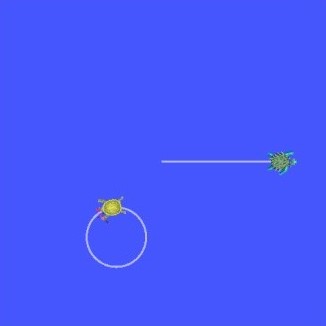
现在如果你监听话题 turtle3/turtle_point_stamped:
$ ros2 topic echo /turtle3/turtle_point_stampedheader: stamp: sec: 1629877510 nanosec: 902607040 frame_id: worldpoint: x: 4.989276885986328 y: 3.073937177658081 z: 0.0---header: stamp: sec: 1629877510 nanosec: 918389395 frame_id: worldpoint: x: 4.987966060638428 y: 3.089883327484131 z: 0.0---header: stamp: sec: 1629877510 nanosec: 934186680 frame_id: worldpoint: x: 4.986400127410889 y: 3.105806589126587 z: 0.0---演示运行期间,打开另一个终端并运行消息过滤器/监听器节点:
$ ros2 run learning_tf2_cpp turtle_tf2_message_filter[INFO] [1630016162.006173900] [turtle_tf2_pose_drawer]: Point of turtle3 in frame of turtle1: x:-6.493231 y:-2.961614 z:0.000000
[INFO] [1630016162.006291983] [turtle_tf2_pose_drawer]: Point of turtle3 in frame of turtle1: x:-6.472169 y:-3.004742 z:0.000000
[INFO] [1630016162.006326234] [turtle_tf2_pose_drawer]: Point of turtle3 in frame of turtle1: x:-6.479420 y:-2.990479 z:0.000000
[INFO] [1630016162.006355644] [turtle_tf2_pose_drawer]: Point of turtle3 in frame of turtle1: x:-6.486441 y:-2.976102 z:0.000000在本教程中,你学习了如何在 tf2 中使用传感器数据和消息。具体来说,你学习了如何在话题上发布 PointStamped 消息,以及如何监听该话题并用 tf2_ros::MessageFilter 对 PointStamped 消息进行坐标系变换。