
理解 ROS 2 动作
目标: 在 ROS 2 中内省(introspect)动作。
教程级别: 初级
预计用时: 15 分钟
动作是 ROS 2 中的一种通信类型,适用于长时间运行的任务。它由三部分组成:goal(目标)、feedback(反馈)和 result(结果)。
动作建立在话题(topic)和服务(service)之上。它的功能类似于服务,但动作可以被取消。动作还能提供持续的反馈,而服务只返回一次响应。动作采用客户端-服务端(client-server)模型,类似于发布者-订阅者(publisher-subscriber)模型(在话题教程中已有描述)。一个 Action 客户端节点向 Action 服务端节点发送 goal,Action 服务端确认该 goal,并返回一连串的 feedback 和一个 result。
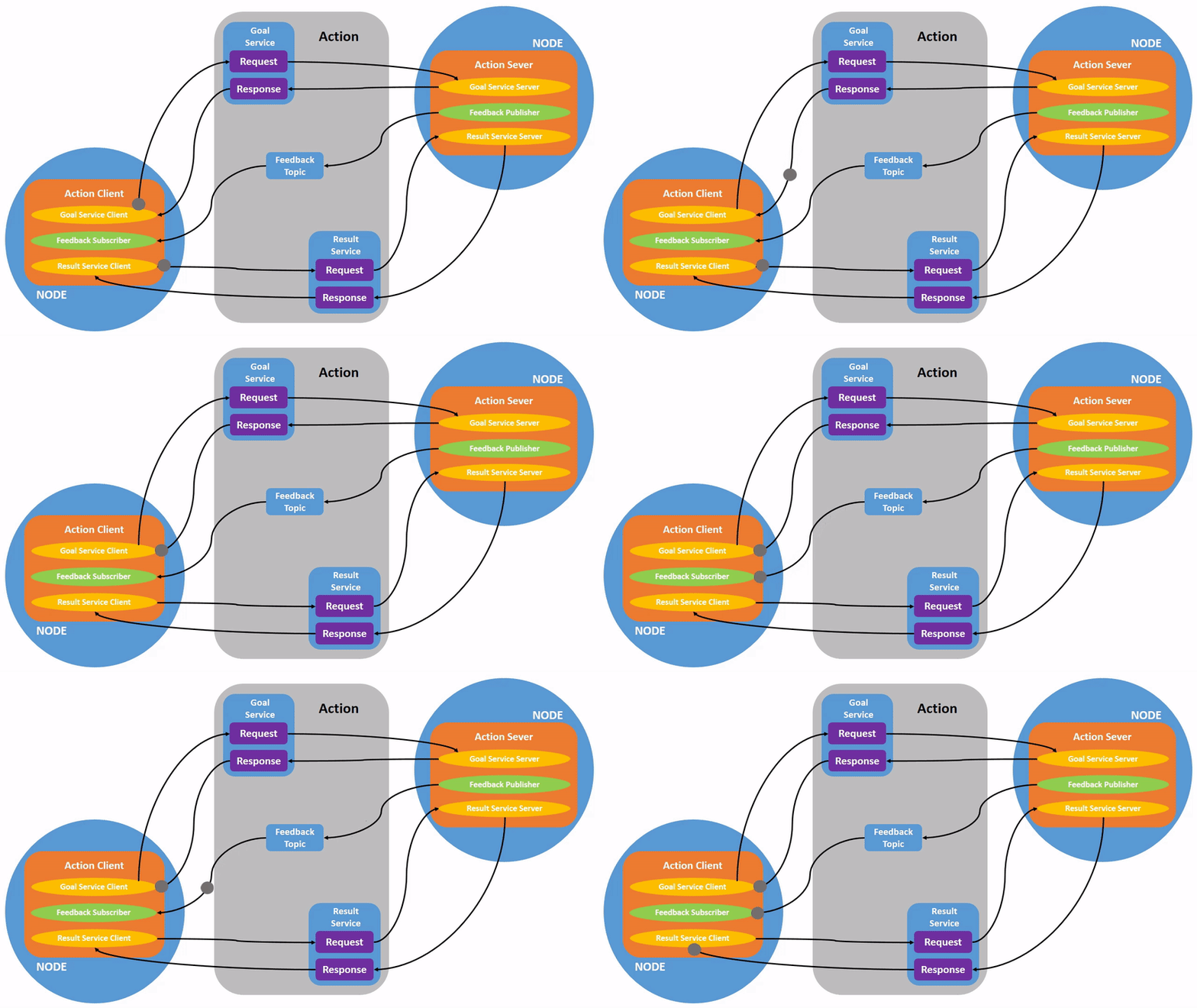
本教程建立在之前教程中介绍的概念之上,例如节点(node)和话题(topic)。
本教程使用 turtlesim 功能包。
和之前一样,每次打开新的终端时,请记得 source ROS 2 环境。
启动两个 turtlesim 节点:/turtlesim 和 /teleop_turtle。
打开一个新终端并运行:
$ ros2 run turtlesim turtlesim_node打开另一个终端并运行:
$ ros2 run turtlesim turtle_teleop_key2 使用动作
Section titled “2 使用动作”当你启动 /teleop_turtle 节点时,终端中会显示以下消息:
Use arrow keys to move the turtle.Use G|B|V|C|D|E|R|T keys to rotate to absolute orientations. 'F' to cancel a rotation.我们来关注第二行,它对应一个动作。(第一条指令对应 “cmd_vel” 话题,之前在话题教程中已经讨论过。)
请注意,字母键 G|B|V|C|D|E|R|T 在美式 QWERTY 键盘上围绕着 F 键形成一个 “方框”(如果你使用的不是 QWERTY 键盘,可以参见 此链接 来对照)。每个键在 F 周围的位置对应 turtlesim 中的相应朝向。例如,E 会将乌龟的朝向旋转到左上角。

注意观察运行 /turtlesim 节点的终端。每按下一个键,你都在向 /turtlesim 节点中的 Action 服务端发送一个 goal。该 goal 的目的是将乌龟旋转到面向特定方向。当乌龟完成旋转后,会显示一条传达 goal 结果的消息:
[INFO] [turtlesim]: Rotation goal completed successfullyF 键可以在执行过程中取消 goal。
尝试按下 C 键,然后在乌龟完成旋转之前按下 F 键。在运行 /turtlesim 节点的终端中,你会看到以下消息:
[INFO] [turtlesim]: Rotation goal canceled不仅客户端(你在 teleop 中的输入)可以停止 goal,服务端(/turtlesim 节点)也可以。当服务端选择停止处理一个 goal 时,这被称为 “abort”(中止)该 goal。
尝试按下 D 键,然后在第一次旋转完成之前按下 G 键。在运行 /turtlesim 节点的终端中,你会看到以下消息:
[WARN] [turtlesim]: Rotation goal received before a previous goal finished. Aborting previous goal这个 Action 服务端选择中止第一个 goal,因为它收到了一个新的 goal。它也可以选择其他方式,比如拒绝新的 goal,或者在第一个 goal 完成后再执行第二个 goal。不要假设每个 Action 服务端在收到新 goal 时都会选择中止当前 goal。
3 ros2 node info
Section titled “3 ros2 node info”要查看一个节点(此处为 /turtlesim)提供的动作列表,打开一个新终端并运行以下命令:
$ ros2 node info /turtlesim/turtlesim  Subscribers:    /parameter_events: rcl_interfaces/msg/ParameterEvent    /turtle1/cmd_vel: geometry_msgs/msg/Twist  Publishers:    /parameter_events: rcl_interfaces/msg/ParameterEvent    /rosout: rcl_interfaces/msg/Log    /turtle1/color_sensor: turtlesim_msgs/msg/Color    /turtle1/pose: turtlesim_msgs/msg/Pose  Service Servers:    /clear: std_srvs/srv/Empty    /kill: turtlesim_msgs/srv/Kill    /reset: std_srvs/srv/Empty    /spawn: turtlesim_msgs/srv/Spawn    /turtle1/set_pen: turtlesim_msgs/srv/SetPen    /turtle1/teleport_absolute: turtlesim_msgs/srv/TeleportAbsolute    /turtle1/teleport_relative: turtlesim_msgs/srv/TeleportRelative    /turtlesim/describe_parameters: rcl_interfaces/srv/DescribeParameters    /turtlesim/get_parameter_types: rcl_interfaces/srv/GetParameterTypes    /turtlesim/get_parameters: rcl_interfaces/srv/GetParameters    /turtlesim/list_parameters: rcl_interfaces/srv/ListParameters    /turtlesim/set_parameters: rcl_interfaces/srv/SetParameters    /turtlesim/set_parameters_atomically: rcl_interfaces/srv/SetParametersAtomically  Service Clients:
  Action Servers:    /turtle1/rotate_absolute: turtlesim_msgs/action/RotateAbsolute  Action Clients:
该命令返回 /turtlesim 的订阅者、发布者、服务、Action 服务端和 Action 客户端列表。
请注意,/turtlesim 的 /turtle1/rotate_absolute 动作位于 Action Servers 下。这意味着 /turtlesim 会响应 /turtle1/rotate_absolute 这个动作并提供反馈。
/teleop_turtle 节点在 Action Clients 下有 /turtle1/rotate_absolute,这意味着它为该动作名称发送 goal。要查看这一点,运行:
$ ros2 node info /teleop_turtle/teleop_turtle  Subscribers:    /parameter_events: rcl_interfaces/msg/ParameterEvent  Publishers:    /parameter_events: rcl_interfaces/msg/ParameterEvent    /rosout: rcl_interfaces/msg/Log    /turtle1/cmd_vel: geometry_msgs/msg/Twist  Service Servers:    /teleop_turtle/describe_parameters: rcl_interfaces/srv/DescribeParameters    /teleop_turtle/get_parameter_types: rcl_interfaces/srv/GetParameterTypes    /teleop_turtle/get_parameters: rcl_interfaces/srv/GetParameters    /teleop_turtle/list_parameters: rcl_interfaces/srv/ListParameters    /teleop_turtle/set_parameters: rcl_interfaces/srv/SetParameters    /teleop_turtle/set_parameters_atomically: rcl_interfaces/srv/SetParametersAtomically  Service Clients:
  Action Servers:
  Action Clients:    /turtle1/rotate_absolute: turtlesim_msgs/action/RotateAbsolute
4 ros2 action list
Section titled “4 ros2 action list”要识别 ROS 图中的所有动作,运行以下命令:
$ ros2 action list/turtle1/rotate_absolute这是当前 ROS 图中唯一的动作。如前所述,它控制乌龟的旋转。通过之前使用 ros2 node info <node_name> 命令,你已经知道该动作有一个 Action 客户端(/teleop_turtle 的一部分)和一个 Action 服务端(/turtlesim 的一部分)。
4.1 ros2 action list -t
Section titled “4.1 ros2 action list -t”动作有类型,类似于话题和服务。要查找 /turtle1/rotate_absolute 的类型,运行以下命令:
$ ros2 action list -t/turtle1/rotate_absolute [turtlesim_msgs/action/RotateAbsolute]在每个动作名称(此处只有 /turtle1/rotate_absolute)右侧的方括号中是动作类型 turtlesim_msgs/action/RotateAbsolute。当你想从命令行或代码中执行一个动作时,会需要用到这个信息。
5 ros2 action type
Section titled “5 ros2 action type”如果你想查看某个动作的动作类型,运行以下命令:
$ ros2 action type /turtle1/rotate_absoluteturtlesim_msgs/action/RotateAbsolute6 ros2 action info
Section titled “6 ros2 action info”你可以使用以下命令进一步内省 /turtle1/rotate_absolute 动作:
$ ros2 action info /turtle1/rotate_absoluteAction: /turtle1/rotate_absoluteAction clients: 1 /teleop_turtleAction servers: 1 /turtlesim这告诉我们之前通过在每个节点上运行 ros2 node info 所了解的信息:/teleop_turtle 节点有一个 Action 客户端,/turtlesim 节点有一个 Action 服务端,它们都是针对 /turtle1/rotate_absolute 动作的。
7 ros2 interface show
Section titled “7 ros2 interface show”在自己发送或执行动作 goal 之前,你还需要知道动作类型的结构。
回想一下,你在运行 ros2 action list -t 命令时已经识别了 /turtle1/rotate_absolute 的类型。在终端中输入以下命令并附上动作类型:
$ ros2 interface show turtlesim_msgs/action/RotateAbsolute将返回:
# The desired heading in radiansfloat32 theta---# The angular displacement in radians to the starting positionfloat32 delta---# The remaining rotation in radiansfloat32 remaining第一条 --- 上方的部分是 goal 请求的结构(数据类型和名称)。下一个部分是 result 的结构。最后一个部分是 feedback 的结构。
8 ros2 action send_goal
Section titled “8 ros2 action send_goal”现在我们来使用以下语法从命令行发送一个动作 goal:
$ ros2 action send_goal <action_name> <action_type> <values><values> 需要使用 YAML 格式。
关注 turtlesim 窗口,并在终端中输入以下命令:
$ ros2 action send_goal /turtle1/rotate_absolute turtlesim_msgs/action/RotateAbsolute "{theta: 1.57}"Waiting for an action server to become available...Sending goal:   theta: 1.57
Goal accepted with ID: f8db8f44410849eaa93d3feb747dd444
Result:  delta: -1.568000316619873
Goal finished with status: SUCCEEDED
你应该能看到乌龟在旋转。
所有 goal 都有一个唯一 ID,显示在返回消息中。你还可以看到 result,一个名为 delta 的字段,表示相对于起始位置的位移。
要查看此 goal 的 feedback,在 ros2 action send_goal 命令中添加 --feedback:
$ ros2 action send_goal /turtle1/rotate_absolute turtlesim_msgs/action/RotateAbsolute "{theta: -1.57}" --feedbackSending goal:   theta: -1.57
Goal accepted with ID: e6092c831f994afda92f0086f220da27
Feedback:  remaining: -3.1268222332000732
Feedback:  remaining: -3.1108222007751465
…
Result:  delta: 3.1200008392333984
Goal finished with status: SUCCEEDED
在 goal 完成之前,你将持续收到反馈(剩余弧度值)。
9 ros2 action echo
Section titled “9 ros2 action echo”要查看 Action 客户端和 Action 服务端之间的数据通信,你可以使用以下命令 echo 动作数据:
$ ros2 action echo <action_name> <optional arguments/action_type>ros2 action echo 依赖于 Action 客户端和 Action 服务端的动作内省(introspection)功能,该功能默认是禁用的。要启用它,用户必须在创建 Action 客户端或 Action 服务端后调用 configure_introspection。
启动 fibonacci_action_server 和 fibonacci_action_client,并启用 action_server_configure_introspection 参数进行演示。
$ ros2 run action_tutorials_cpp fibonacci_action_server --ros-args -p action_server_configure_introspection:=contents$ ros2 run action_tutorials_py fibonacci_action_client --ros-args -p action_client_configure_introspection:=contents现在我们可以通过 ros2 action echo 查看 fibonacci_action_server 和 fibonacci_action_client 之间的动作通信。
$ ros2 action echo /fibonacci example_interfaces/action/Fibonacci --flow-styleinterface: GOAL_SERVICEinfo: event_type: REQUEST_SENT stamp: sec: 1742070798 nanosec: 400435819 client_gid: [1, 15, 165, 231, 194, 197, 167, 157, 0, 0, 0, 0, 0, 0, 20, 4] sequence_number: 1request: [{goal_id: {uuid: [230, 96, 12, 6, 100, 69, 69, 70, 220, 205, 135, 251, 210, 2, 231, 110]}, goal: {order: 10}}]response: []---interface: GOAL_SERVICEinfo: event_type: REQUEST_RECEIVED stamp: sec: 1742070798 nanosec: 400706446 client_gid: [1, 15, 165, 231, 194, 197, 167, 157, 0, 0, 0, 0, 0, 0, 20, 4] sequence_number: 1request: [{goal_id: {uuid: [230, 96, 12, 6, 100, 69, 69, 70, 220, 205, 135, 251, 210, 2, 231, 110]}, goal: {order: 10}}]response: []---interface: RESULT_SERVICEinfo: event_type: REQUEST_SENT stamp: sec: 1742070798 nanosec: 401486678 client_gid: [1, 15, 165, 231, 194, 197, 167, 157, 0, 0, 0, 0, 0, 0, 24, 4] sequence_number: 1request: [{goal_id: {uuid: [230, 96, 12, 6, 100, 69, 69, 70, 220, 205, 135, 251, 210, 2, 231, 110]}}]response: []---interface: FEEDBACK_TOPICgoal_id: uuid: [230, 96, 12, 6, 100, 69, 69, 70, 220, 205, 135, 251, 210, 2, 231, 110]feedback: sequence: [0, 1, 1]---interface: STATUS_TOPICstatus_list: [{goal_info: {goal_id: {uuid: [230, 96, 12, 6, 100, 69, 69, 70, 220, 205, 135, 251, 210, 2, 231, 110]}, stamp: {sec: 1742070798, nanosec: 401146752}}, status: 2}]---...注意:此功能在
Kilted Kaiju或更高版本中可用。
动作类似于服务,但允许你执行长时间运行的任务、提供定期反馈,并且可以被取消。
一个机器人系统可能会使用动作来进行导航。一个动作 goal 可以告诉机器人前往某个位置。当机器人导航到该位置时,它可以沿途发送更新(即 feedback),然后在到达目的地后发送一条最终的 result 消息。
Turtlesim 有一个 Action 服务端,Action 客户端可以向其发送 goal 来旋转乌龟。在本教程中,你内省了该动作 /turtle1/rotate_absolute,以更好地了解动作是什么以及它们如何工作。
现在你已经涵盖了所有核心 ROS 2 概念。本系列的最后几个教程将向你介绍一些工具和技术,让使用 ROS 2 更加容易,从使用 rqt_console 开始。
你可以在 这里 阅读更多关于 ROS 2 中动作设计决策的信息。