
子坐标系
子坐标系(subframe)是定义在 CollisionObjects 上的坐标系。它们可用于定义你在场景中放置的对象上的关注点,例如瓶子的开口、螺丝刀的尖端或螺丝的头部。它们可用于规划,也可用于编写机器人指令,例如 “pick up the bottle, then move the opening under the spout of the tap”(拿起瓶子,然后将瓶口移到水龙头嘴下方),或 “pick up the screwdriver, then place it above the head of the screw”(拿起螺丝刀,然后将其放在螺丝头部上方)。
编写聚焦于机器人所操作对象的代码不仅可读性更强,而且在机器人之间更具鲁棒性和可移植性。本教程将展示如何在碰撞对象(collision object)上定义子坐标系、将它们发布到规划场景(planning scene),并使用它们规划运动,这样你就可以实现类似这样的操作:
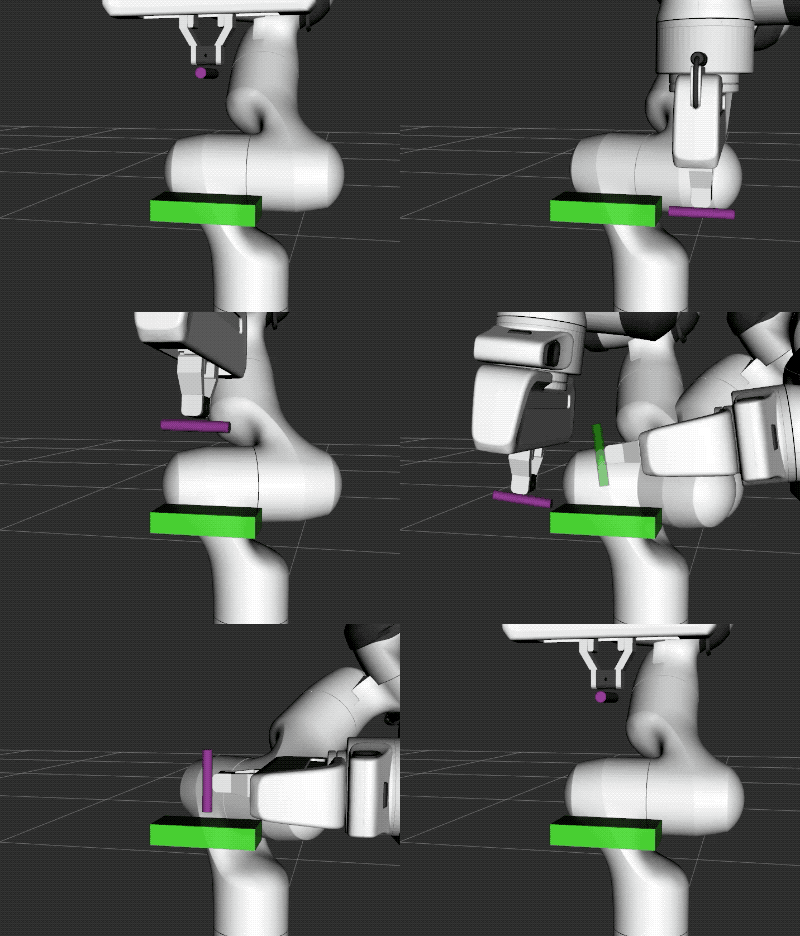
在此动画中,机器人将圆柱体的尖端移动到盒子上的不同位置。
已完成 Getting Started 中的步骤后,打开两个终端。在第一个终端中,执行以下命令加载 panda,并等待所有内容加载完成:
roslaunch panda_moveit_config demo.launch在第二个终端中运行本教程:
rosrun moveit_tutorials subframes_tutorial在此终端中,你应该可以输入 1–12 的数字来发送命令,并观察机器人和场景如何响应。
本示例的代码可以在 moveit_tutorials GitHub 项目的此处查看,下面将详细说明。
该代码在规划场景中生成一个盒子和一个圆柱体,将圆柱体附着到机器人上,然后让你通过命令行发送运动命令。它还定义了两个便捷函数:一个用于发送运动命令,另一个用于发布对象。
/********************************************************************* * Software License Agreement (BSD License) * *  Copyright (c) 2019, Felix von Drigalski *  All rights reserved. * *  Redistribution and use in source and binary forms, with or without *  modification, are permitted provided that the following conditions *  are met: * *   * Redistributions of source code must retain the above copyright *     notice, this list of conditions and the following disclaimer. *   * Redistributions in binary form must reproduce the above *     copyright notice, this list of conditions and the following *     disclaimer in the documentation and/or other materials provided *     with the distribution. *   * Neither the name of OMRON SINIC X nor the names of its *     contributors may be used to endorse or promote products derived *     from this software without specific prior written permission. * *  THIS SOFTWARE IS PROVIDED BY THE COPYRIGHT HOLDERS AND CONTRIBUTORS *  "AS IS" AND ANY EXPRESS OR IMPLIED WARRANTIES, INCLUDING, BUT NOT *  LIMITED TO, THE IMPLIED WARRANTIES OF MERCHANTABILITY AND FITNESS *  FOR A PARTICULAR PURPOSE ARE DISCLAIMED. IN NO EVENT SHALL THE *  COPYRIGHT OWNER OR CONTRIBUTORS BE LIABLE FOR ANY DIRECT, INDIRECT, *  INCIDENTAL, SPECIAL, EXEMPLARY, OR CONSEQUENTIAL DAMAGES (INCLUDING, *  BUT NOT LIMITED TO, PROCUREMENT OF SUBSTITUTE GOODS OR SERVICES; *  LOSS OF USE, DATA, OR PROFITS; OR BUSINESS INTERRUPTION) HOWEVER *  CAUSED AND ON ANY THEORY OF LIABILITY, WHETHER IN CONTRACT, STRICT *  LIABILITY, OR TORT (INCLUDING NEGLIGENCE OR OTHERWISE) ARISING IN *  ANY WAY OUT OF THE USE OF THIS SOFTWARE, EVEN IF ADVISED OF THE *  POSSIBILITY OF SUCH DAMAGE. *********************************************************************/
/* Author: Felix von Drigalski */
// ROS#include <ros/ros.h>
// MoveIt#include <moveit/planning_scene_interface/planning_scene_interface.h>#include <moveit/planning_scene_monitor/planning_scene_monitor.h>#include <moveit/move_group_interface/move_group_interface.h>
// TF2#include <tf2_geometry_msgs/tf2_geometry_msgs.h>#include <tf2_eigen/tf2_eigen.h>
// BEGIN_SUB_TUTORIAL plan1//// Creating the planning request// ^^^^^^^^^^^^^^^^^^^^^^^^^^^^^// In this tutorial, we use a small helper function to create our planning requests and move the robot.bool moveToCartPose(const geometry_msgs::PoseStamped& pose, moveit::planning_interface::MoveGroupInterface& group,                    const std::string& end_effector_link){  // To use subframes of objects that are attached to the robot in planning, you need to set the end effector of your  // move_group to the subframe of the object. The format has to be ``object_name/subframe_name``, as shown  // in the "*Example 1*" line.  // Do not forget to reset your end_effector_link to a robot link when you detach your object, and the subframe  // is not part of your robot anymore!  group.clearPoseTargets();  group.setEndEffectorLink(end_effector_link);  /*  group.setEndEffectorLink("cylinder/tip");    // Example 1  group.setEndEffectorLink("panda_hand");      // Example 2  */  group.setStartStateToCurrentState();  group.setPoseTarget(pose);
  // The rest of the planning is done as usual. Naturally, you can also use the ``go()`` command instead of  // ``plan()`` and ``execute()``.  ROS_INFO_STREAM("Planning motion to pose:");  ROS_INFO_STREAM(pose.pose.position.x << ", " << pose.pose.position.y << ", " << pose.pose.position.z);  moveit::planning_interface::MoveGroupInterface::Plan myplan;  if (group.plan(myplan) && group.execute(myplan))    return true;
  ROS_WARN("Failed to perform motion.");  return false;}// END_SUB_TUTORIAL
// BEGIN_SUB_TUTORIAL object1//// Defining two CollisionObjects with subframes// ^^^^^^^^^^^^^^^^^^^^^^^^^^^^^^^^^^^^^^^^^^^^// This helper function creates two objects and publishes them to the PlanningScene: a box and a cylinder.// The box spawns in front of the gripper, the cylinder at the tip of the gripper, as if it had been grasped.
void spawnCollisionObjects(moveit::planning_interface::PlanningSceneInterface& planning_scene_interface){  double z_offset_box = .25;  // The z-axis points away from the gripper  double z_offset_cylinder = .1;
  // First, we start defining the `CollisionObject <http://docs.ros.org/api/moveit_msgs/html/msg/CollisionObject.html>`_  // as usual.  moveit_msgs::CollisionObject box;  box.id = "box";  box.header.frame_id = "panda_hand";  box.primitives.resize(1);  box.primitive_poses.resize(1);  box.primitives[0].type = box.primitives[0].BOX;  box.primitives[0].dimensions.resize(3);  box.primitives[0].dimensions[0] = 0.05;  box.primitives[0].dimensions[1] = 0.1;  box.primitives[0].dimensions[2] = 0.02;  box.primitive_poses[0].position.z = z_offset_box;
  // Then, we define the subframes of the CollisionObject. The subframes are defined in the ``frame_id`` coordinate  // system, just like the shapes that make up the object. Each subframe consists of a name and a pose.  // In this tutorial, we set the orientation of the subframes so that the z-axis of the subframe  // points away from the object.  // This is not strictly necessary, but it is helpful to follow a convention, and it avoids confusion when  // setting the orientation of the target pose later on.  box.subframe_names.resize(5);  box.subframe_poses.resize(5);
  box.subframe_names[0] = "bottom";  box.subframe_poses[0].position.y = -.05;  box.subframe_poses[0].position.z = 0.0 + z_offset_box;
  tf2::Quaternion orientation;  orientation.setRPY(90.0 / 180.0 * M_PI, 0, 0);  box.subframe_poses[0].orientation = tf2::toMsg(orientation);  // END_SUB_TUTORIAL
  box.subframe_names[1] = "top";  box.subframe_poses[1].position.y = .05;  box.subframe_poses[1].position.z = 0.0 + z_offset_box;  orientation.setRPY(-90.0 / 180.0 * M_PI, 0, 0);  box.subframe_poses[1].orientation = tf2::toMsg(orientation);
  box.subframe_names[2] = "corner_1";  box.subframe_poses[2].position.x = -.025;  box.subframe_poses[2].position.y = -.05;  box.subframe_poses[2].position.z = -.01 + z_offset_box;  orientation.setRPY(90.0 / 180.0 * M_PI, 0, 0);  box.subframe_poses[2].orientation = tf2::toMsg(orientation);
  box.subframe_names[3] = "corner_2";  box.subframe_poses[3].position.x = .025;  box.subframe_poses[3].position.y = -.05;  box.subframe_poses[3].position.z = -.01 + z_offset_box;  orientation.setRPY(90.0 / 180.0 * M_PI, 0, 0);  box.subframe_poses[3].orientation = tf2::toMsg(orientation);
  box.subframe_names[4] = "side";  box.subframe_poses[4].position.x = .0;  box.subframe_poses[4].position.y = .0;  box.subframe_poses[4].position.z = -.01 + z_offset_box;  orientation.setRPY(0, 180.0 / 180.0 * M_PI, 0);  box.subframe_poses[4].orientation = tf2::toMsg(orientation);
  // Next, define the cylinder  moveit_msgs::CollisionObject cylinder;  cylinder.id = "cylinder";  cylinder.header.frame_id = "panda_hand";  cylinder.primitives.resize(1);  cylinder.primitive_poses.resize(1);  cylinder.primitives[0].type = box.primitives[0].CYLINDER;  cylinder.primitives[0].dimensions.resize(2);  cylinder.primitives[0].dimensions[0] = 0.06;   // height (along x)  cylinder.primitives[0].dimensions[1] = 0.005;  // radius  cylinder.primitive_poses[0].position.x = 0.0;  cylinder.primitive_poses[0].position.y = 0.0;  cylinder.primitive_poses[0].position.z = 0.0 + z_offset_cylinder;  orientation.setRPY(0, 90.0 / 180.0 * M_PI, 0);  cylinder.primitive_poses[0].orientation = tf2::toMsg(orientation);
  cylinder.subframe_poses.resize(1);  cylinder.subframe_names.resize(1);  cylinder.subframe_names[0] = "tip";  cylinder.subframe_poses[0].position.x = 0.03;  cylinder.subframe_poses[0].position.y = 0.0;  cylinder.subframe_poses[0].position.z = 0.0 + z_offset_cylinder;  orientation.setRPY(0, 90.0 / 180.0 * M_PI, 0);  cylinder.subframe_poses[0].orientation = tf2::toMsg(orientation);
  // BEGIN_SUB_TUTORIAL object2  // Lastly, the objects are published to the PlanningScene. In this tutorial, we publish a box and a cylinder.  box.operation = moveit_msgs::CollisionObject::ADD;  cylinder.operation = moveit_msgs::CollisionObject::ADD;  planning_scene_interface.applyCollisionObjects({ box, cylinder });}// END_SUB_TUTORIAL
void createArrowMarker(visualization_msgs::Marker& marker, const geometry_msgs::Pose& pose, const Eigen::Vector3d& dir,                       int id, double scale = 0.1){  marker.action = visualization_msgs::Marker::ADD;  marker.type = visualization_msgs::Marker::CYLINDER;  marker.id = id;  marker.scale.x = 0.1 * scale;  marker.scale.y = 0.1 * scale;  marker.scale.z = scale;
  Eigen::Isometry3d pose_eigen;  tf2::fromMsg(pose, pose_eigen);  marker.pose = tf2::toMsg(pose_eigen * Eigen::Translation3d(dir * (0.5 * scale)) *                           Eigen::Quaterniond::FromTwoVectors(Eigen::Vector3d::UnitZ(), dir));
  marker.color.r = 0.0;  marker.color.g = 0.0;  marker.color.b = 0.0;  marker.color.a = 1.0;}
void createFrameMarkers(visualization_msgs::MarkerArray& markers, const geometry_msgs::PoseStamped& target,                        const std::string& ns, bool locked = false){  int id = markers.markers.size();  visualization_msgs::Marker m;  m.header.frame_id = target.header.frame_id;  m.ns = ns;  m.frame_locked = locked;
  createArrowMarker(m, target.pose, Eigen::Vector3d::UnitX(), ++id);  m.color.r = 1.0;  markers.markers.push_back(m);  createArrowMarker(m, target.pose, Eigen::Vector3d::UnitY(), ++id);  m.color.g = 1.0;  markers.markers.push_back(m);  createArrowMarker(m, target.pose, Eigen::Vector3d::UnitZ(), ++id);  m.color.b = 1.0;  markers.markers.push_back(m);}
int main(int argc, char** argv){  ros::init(argc, argv, "panda_arm_subframes");  ros::NodeHandle nh;  ros::AsyncSpinner spinner(1);  spinner.start();
  moveit::planning_interface::PlanningSceneInterface planning_scene_interface;  moveit::planning_interface::MoveGroupInterface group("panda_arm");  group.setPlanningTime(10.0);
  // BEGIN_SUB_TUTORIAL sceneprep  // Preparing the scene  // ^^^^^^^^^^^^^^^^^^^  // In the main function, we first spawn the objects in the planning scene, then attach the cylinder to the robot.  // Attaching the cylinder turns it purple in Rviz.  spawnCollisionObjects(planning_scene_interface);  moveit_msgs::AttachedCollisionObject att_coll_object;  att_coll_object.object.id = "cylinder";  att_coll_object.link_name = "panda_hand";  att_coll_object.object.operation = att_coll_object.object.ADD;  ROS_INFO_STREAM("Attaching cylinder to robot.");  planning_scene_interface.applyAttachedCollisionObject(att_coll_object);  // END_SUB_TUTORIAL
  // Fetch the current planning scene state once  auto planning_scene_monitor = std::make_shared<planning_scene_monitor::PlanningSceneMonitor>("robot_description");  planning_scene_monitor->requestPlanningSceneState();  planning_scene_monitor::LockedPlanningSceneRO planning_scene(planning_scene_monitor);
  // Visualize frames as rviz markers  ros::Publisher marker_publisher = nh.advertise<visualization_msgs::MarkerArray>("visualization_marker_array", 10);  auto showFrames = [&](geometry_msgs::PoseStamped target, const std::string& eef) {    visualization_msgs::MarkerArray markers;    // convert target pose into planning frame    Eigen::Isometry3d tf;    tf2::fromMsg(target.pose, tf);    target.pose = tf2::toMsg(planning_scene->getFrameTransform(target.header.frame_id) * tf);    target.header.frame_id = planning_scene->getPlanningFrame();    createFrameMarkers(markers, target, "target");
    // convert eef in pose relative to panda_hand    target.header.frame_id = "panda_hand";    target.pose = tf2::toMsg(planning_scene->getFrameTransform(target.header.frame_id).inverse() *                             planning_scene->getFrameTransform(eef));    createFrameMarkers(markers, target, "eef", true);
    marker_publisher.publish(markers);  };
  // Define a pose in the robot base.  tf2::Quaternion target_orientation;  geometry_msgs::PoseStamped fixed_pose, target_pose;  fixed_pose.header.frame_id = "panda_link0";  fixed_pose.pose.position.y = -.4;  fixed_pose.pose.position.z = .3;  target_orientation.setRPY(0, (-20.0 / 180.0 * M_PI), 0);  fixed_pose.pose.orientation = tf2::toMsg(target_orientation);
  // Set up a small command line interface to make the tutorial interactive.  int character_input;  while (ros::ok())  {    ROS_INFO("==========================\n"             "Press a key and hit Enter to execute an action. \n0 to exit"             "\n1 to move cylinder tip to box bottom \n2 to move cylinder tip to box top"             "\n3 to move cylinder tip to box corner 1 \n4 to move cylinder tip to box corner 2"             "\n5 to move cylinder tip to side of box"             "\n6 to return the robot to the start pose"             "\n7 to move the robot's wrist to a cartesian pose"             "\n8 to move cylinder/tip to the same cartesian pose"             "\n----------"             "\n10 to remove box and cylinder from the scene"             "\n11 to spawn box and cylinder"             "\n12 to attach the cylinder to the gripper\n");    std::cin >> character_input;    if (character_input == 0)    {      return 0;    }    else if (character_input == 1)    {      ROS_INFO_STREAM("Moving to bottom of box with cylinder tip");
      // BEGIN_SUB_TUTORIAL orientation      // Setting the orientation      // ^^^^^^^^^^^^^^^^^^^^^^^      // The target pose is given relative to a box subframe:      target_pose.header.frame_id = "box/bottom";      // The orientation is determined by RPY angles to align the cylinder and box subframes:      target_orientation.setRPY(0, 180.0 / 180.0 * M_PI, 90.0 / 180.0 * M_PI);      target_pose.pose.orientation = tf2::toMsg(target_orientation);      // To keep some distance to the box, we use a small offset:      target_pose.pose.position.z = 0.01;      showFrames(target_pose, "cylinder/tip");      moveToCartPose(target_pose, group, "cylinder/tip");      // END_SUB_TUTORIAL    }    // BEGIN_SUB_TUTORIAL move_example    // The command "2" moves the cylinder tip to the top of the box (the right side in the top animation).    else if (character_input == 2)    {      ROS_INFO_STREAM("Moving to top of box with cylinder tip");      target_pose.header.frame_id = "box/top";      target_orientation.setRPY(180.0 / 180.0 * M_PI, 0, 90.0 / 180.0 * M_PI);      target_pose.pose.orientation = tf2::toMsg(target_orientation);      target_pose.pose.position.z = 0.01;      showFrames(target_pose, "cylinder/tip");      moveToCartPose(target_pose, group, "cylinder/tip");    }    // END_SUB_TUTORIAL    else if (character_input == 3)    {      ROS_INFO_STREAM("Moving to corner1 of box with cylinder tip");      target_pose.header.frame_id = "box/corner_1";      target_orientation.setRPY(0, 180.0 / 180.0 * M_PI, 90.0 / 180.0 * M_PI);      target_pose.pose.orientation = tf2::toMsg(target_orientation);      target_pose.pose.position.z = 0.01;      showFrames(target_pose, "cylinder/tip");      moveToCartPose(target_pose, group, "cylinder/tip");    }    else if (character_input == 4)    {      target_pose.header.frame_id = "box/corner_2";      target_orientation.setRPY(0, 180.0 / 180.0 * M_PI, 90.0 / 180.0 * M_PI);      target_pose.pose.orientation = tf2::toMsg(target_orientation);      target_pose.pose.position.z = 0.01;      showFrames(target_pose, "cylinder/tip");      moveToCartPose(target_pose, group, "cylinder/tip");    }    else if (character_input == 5)    {      target_pose.header.frame_id = "box/side";      target_orientation.setRPY(0, 180.0 / 180.0 * M_PI, 90.0 / 180.0 * M_PI);      target_pose.pose.orientation = tf2::toMsg(target_orientation);      target_pose.pose.position.z = 0.01;      showFrames(target_pose, "cylinder/tip");      moveToCartPose(target_pose, group, "cylinder/tip");    }    else if (character_input == 6)    {      // Go to neutral home pose      group.clearPoseTargets();      group.setNamedTarget("ready");      group.move();    }    else if (character_input == 7)    {      ROS_INFO_STREAM("Moving to a pose with robot wrist");      showFrames(fixed_pose, "panda_hand");      moveToCartPose(fixed_pose, group, "panda_hand");    }    else if (character_input == 8)    {      ROS_INFO_STREAM("Moving to a pose with cylinder tip");      showFrames(fixed_pose, "cylinder/tip");      moveToCartPose(fixed_pose, group, "cylinder/tip");    }    else if (character_input == 10)    {      try      {        ROS_INFO_STREAM("Removing box and cylinder.");        moveit_msgs::AttachedCollisionObject att_coll_object;        att_coll_object.object.id = "box";        att_coll_object.object.operation = att_coll_object.object.REMOVE;        planning_scene_interface.applyAttachedCollisionObject(att_coll_object);
        att_coll_object.object.id = "cylinder";        att_coll_object.object.operation = att_coll_object.object.REMOVE;        planning_scene_interface.applyAttachedCollisionObject(att_coll_object);
        moveit_msgs::CollisionObject co1, co2;        co1.id = "box";        co1.operation = moveit_msgs::CollisionObject::REMOVE;        co2.id = "cylinder";        co2.operation = moveit_msgs::CollisionObject::REMOVE;        planning_scene_interface.applyCollisionObjects({ co1, co2 });      }      catch (const std::exception& exc)      {        ROS_WARN_STREAM(exc.what());      }    }    else if (character_input == 11)    {      ROS_INFO_STREAM("Respawning test box and cylinder.");      spawnCollisionObjects(planning_scene_interface);    }    else if (character_input == 12)    {      moveit_msgs::AttachedCollisionObject att_coll_object;      att_coll_object.object.id = "cylinder";      att_coll_object.link_name = "panda_hand";      att_coll_object.object.operation = att_coll_object.object.ADD;      ROS_INFO_STREAM("Attaching cylinder to robot.");      planning_scene_interface.applyAttachedCollisionObject(att_coll_object);    }    else    {      ROS_INFO("Could not read input. Quitting.");      break;    }  }
  ros::waitForShutdown();  return 0;}
// BEGIN_TUTORIAL// CALL_SUB_TUTORIAL object1// CALL_SUB_TUTORIAL object2// CALL_SUB_TUTORIAL plan1//// CALL_SUB_TUTORIAL sceneprep//// Interactively testing the robot// ^^^^^^^^^^^^^^^^^^^^^^^^^^^^^^^// We set up a small command line interface so you can interact with the simulation and see how it responds to certain// commands. You can use it to experiment with the behavior of the robot when you remove the box and cylinder, respawn// and reattach them, or create new planning requests. Try moving the robot into a new position and respawn the box// and cylinder there (they are spawned relative to the robot wrist).// Or try commands 7 and 8 to move different frames to the same position in space.//// CALL_SUB_TUTORIAL move_example//// CALL_SUB_TUTORIAL orientation//// END_TUTORIAL子坐标系对 TF 不可见,因此它们不能用于 MoveIt 规划请求之外。如果你需要到某个子坐标系的变换,可以从 PlanningScene 的 CollisionRobot 中通过 getFrameTransform 函数获得。该函数返回一个 Eigen::Isometry3d 对象,你可以从中提取平移和四元数(参见此处)。然后可以利用平移和四元数创建 Transform,并将其注册到你的 TFListener 中。
子坐标系的可视化
Section titled “子坐标系的可视化”目前还没有针对子坐标系的现成可视化,但我们欢迎为此功能提交 pull request!
对于你最近没有自行生成的较旧的 moveit_config 包,子坐标系所需的规划适配器(planning adapter)可能未配置,导致找不到子坐标系链接(subframe link)。要修复你的 moveit_config 包,请打开机器人 <robot_moveit_config>/launch 文件夹中的 ompl_planning_pipeline.launch 文件。对于 Panda 机器人,它是这个文件。编辑此启动文件,找到提及 <arg name="planning_adapters"> 的行,并在 default_planning_request_adapters/FixStartStatePathConstraints 行之后插入 default_planning_request_adapters/ResolveConstraintFrames。