
可视化碰撞
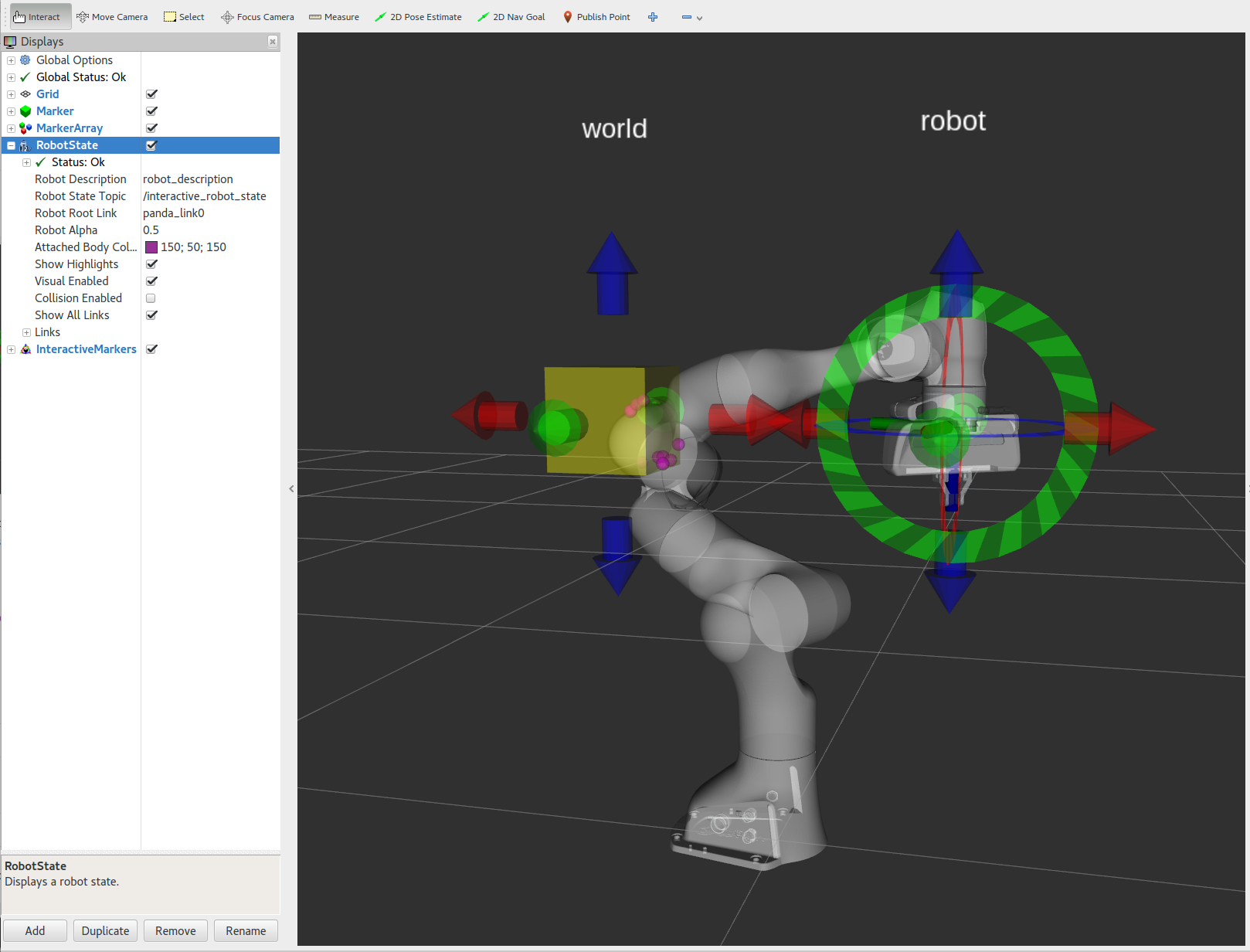
本节将带你逐步了解一段 C++ 示例代码,通过它你可以在 RViz 中移动和操作机械臂时,直观地查看机器人自身以及机器人与环境之间的碰撞接触点。
如果你还没有完成,请确保你已完成 Getting Started 中的步骤。
使用 roslaunch 直接从 moveit_tutorials 运行启动文件:
roslaunch moveit_tutorials visualizing_collisions_tutorial.launch现在你应该能看到 Panda 机器人,以及 2 个可以四处拖动的交互标记(interactive marker)。
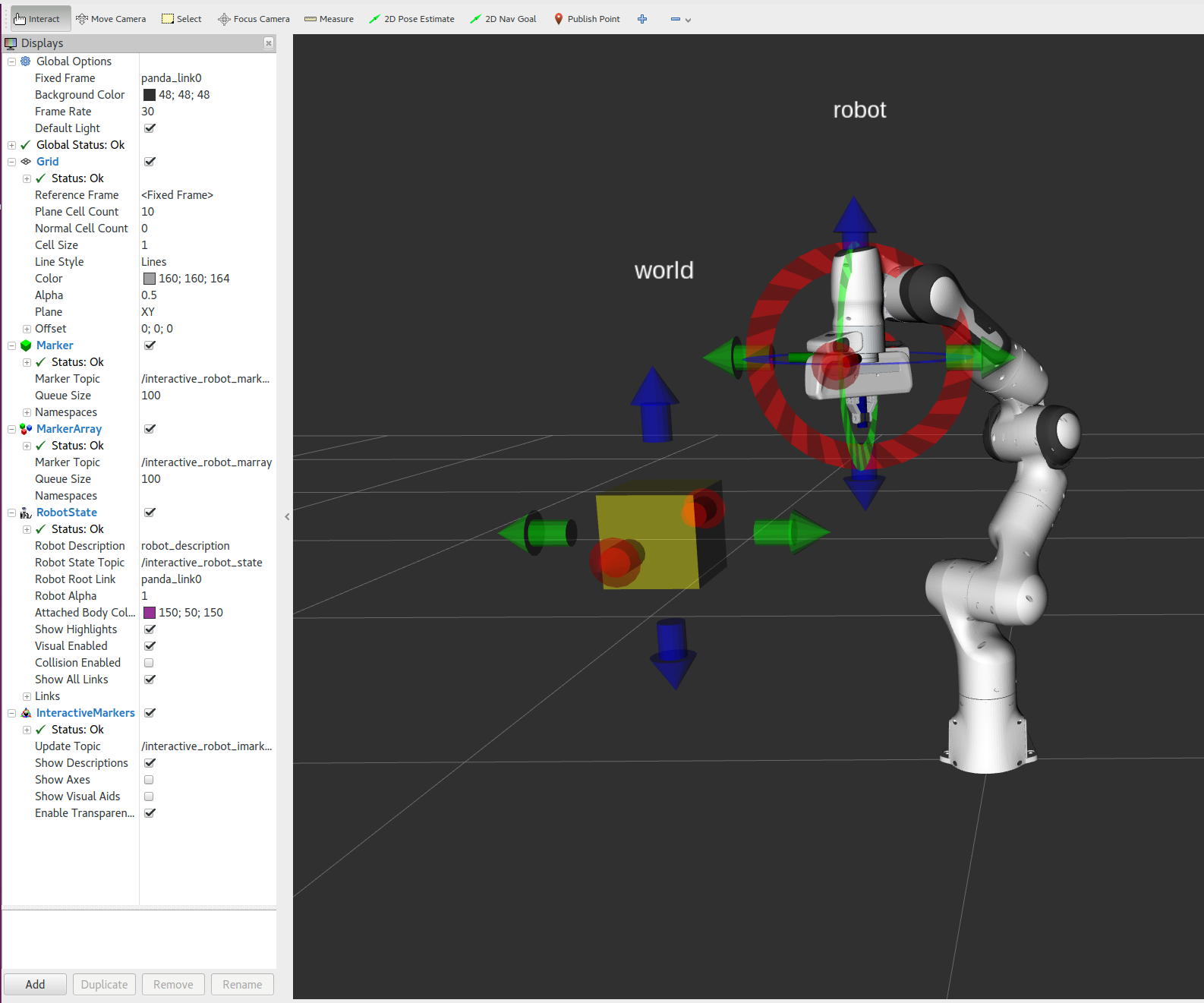
本教程的代码主要在 InteractiveRobot 类中,我们将在下面逐步讲解。InteractiveRobot 类维护一个 RobotModel、一个 RobotState,以及关于“世界”的信息(在本例中,“世界”是一个黄色立方体)。
InteractiveRobot 类使用了负责管理交互标记的 IMarker 类。本教程不涉及 IMarker 类的实现细节(imarker.cpp),但其大部分代码都是从 basic_controls 教程中复制而来。如果你感兴趣,可以在那里了解更多关于交互标记的内容。
在 RViz 中,你会看到两组红/绿/蓝的交互标记箭头。用鼠标拖动它们即可。
移动右臂使其与左臂接触,你会看到品红色(magenta)球体标记出接触点。
如果你没有看到品红色球体,请确保你按照上面的说明添加了主题为 interactive_robot_marray 的 MarkerArray 显示。同时,还要确保将 RobotAlpha 设置为 0.3(或其他小于 1 的值),使机器人变为半透明,这样才能看到球体。
移动右臂使其与黄色立方体接触(你也可以移动黄色立方体),同样会看到品红色球体标记出接触点。
完整的代码可以在 moveit_tutorials GitHub 项目中查看:此处。所使用的库可以在此处找到。为了让本教程聚焦于碰撞接触可视化,我们省略了大量理解该演示所需的背景信息。要完全理解这个演示,强烈建议你通读源代码。
/********************************************************************* * Software License Agreement (BSD License) * *  Copyright (c) 2013, Willow Garage, Inc. *  All rights reserved. * *  Redistribution and use in source and binary forms, with or without *  modification, are permitted provided that the following conditions *  are met: * *   * Redistributions of source code must retain the above copyright *     notice, this list of conditions and the following disclaimer. *   * Redistributions in binary form must reproduce the above *     copyright notice, this list of conditions and the following *     disclaimer in the documentation and/or other materials provided *     with the distribution. *   * Neither the name of Willow Garage nor the names of its *     contributors may be used to endorse or promote products derived *     from this software without specific prior written permission. * *  THIS SOFTWARE IS PROVIDED BY THE COPYRIGHT HOLDERS AND CONTRIBUTORS *  "AS IS" AND ANY EXPRESS OR IMPLIED WARRANTIES, INCLUDING, BUT NOT *  LIMITED TO, THE IMPLIED WARRANTIES OF MERCHANTABILITY AND FITNESS *  FOR A PARTICULAR PURPOSE ARE DISCLAIMED. IN NO EVENT SHALL THE *  COPYRIGHT OWNER OR CONTRIBUTORS BE LIABLE FOR ANY DIRECT, INDIRECT, *  INCIDENTAL, SPECIAL, EXEMPLARY, OR CONSEQUENTIAL DAMAGES (INCLUDING, *  BUT NOT LIMITED TO, PROCUREMENT OF SUBSTITUTE GOODS OR SERVICES; *  LOSS OF USE, DATA, OR PROFITS; OR BUSINESS INTERRUPTION) HOWEVER *  CAUSED AND ON ANY THEORY OF LIABILITY, WHETHER IN CONTRACT, STRICT *  LIABILITY, OR TORT (INCLUDING NEGLIGENCE OR OTHERWISE) ARISING IN *  ANY WAY OUT OF THE USE OF THIS SOFTWARE, EVEN IF ADVISED OF THE *  POSSIBILITY OF SUCH DAMAGE. *********************************************************************/
/* Author: Acorn Pooley, Michael Lautman */
// This code goes with the Collision Contact Visualization tutorial
#include <ros/ros.h>#include "interactivity/interactive_robot.h"#include "interactivity/pose_string.h"
// MoveIt#include <moveit/robot_model/robot_model.h>#include <moveit/robot_state/robot_state.h>#include <moveit/planning_scene/planning_scene.h>#include <moveit/collision_detection_fcl/collision_env_fcl.h>#include <moveit/collision_detection/collision_tools.h>
planning_scene::PlanningScene* g_planning_scene = nullptr;shapes::ShapePtr g_world_cube_shape;ros::Publisher* g_marker_array_publisher = nullptr;visualization_msgs::MarkerArray g_collision_points;
void help(){  ROS_INFO("#####################################################");  ROS_INFO("RVIZ SETUP");  ROS_INFO("----------");  ROS_INFO("  Global options:");  ROS_INFO("    FixedFrame = /panda_link0");  ROS_INFO("  Add a RobotState display:");  ROS_INFO("    RobotDescription = robot_description");  ROS_INFO("    RobotStateTopic  = interactive_robot_state");  ROS_INFO("  Add a Marker display:");  ROS_INFO("    MarkerTopic = interactive_robot_markers");  ROS_INFO("  Add an InteractiveMarker display:");  ROS_INFO("    UpdateTopic = interactive_robot_imarkers/update");  ROS_INFO("  Add a MarkerArray display:");  ROS_INFO("    MarkerTopic = interactive_robot_marray");  ROS_INFO("#####################################################");}
void publishMarkers(visualization_msgs::MarkerArray& markers){  // delete old markers  if (!g_collision_points.markers.empty())  {    for (auto& marker : g_collision_points.markers)      marker.action = visualization_msgs::Marker::DELETE;
    g_marker_array_publisher->publish(g_collision_points);  }
  // move new markers into g_collision_points  std::swap(g_collision_points.markers, markers.markers);
  // draw new markers (if there are any)  if (!g_collision_points.markers.empty())    g_marker_array_publisher->publish(g_collision_points);}
void computeCollisionContactPoints(InteractiveRobot& robot){  // move the world geometry in the collision world  Eigen::Isometry3d world_cube_pose;  double world_cube_size;  robot.getWorldGeometry(world_cube_pose, world_cube_size);  g_planning_scene->getWorldNonConst()->moveShapeInObject("world_cube", g_world_cube_shape, world_cube_pose);
  // BEGIN_SUB_TUTORIAL computeCollisionContactPoints  //  // Collision Requests  // ^^^^^^^^^^^^^^^^^^  // We will create a collision request for the Panda robot  collision_detection::CollisionRequest c_req;  collision_detection::CollisionResult c_res;  c_req.group_name = robot.getGroupName();  c_req.contacts = true;  c_req.max_contacts = 100;  c_req.max_contacts_per_pair = 5;  c_req.verbose = false;
  // Checking for Collisions  // ^^^^^^^^^^^^^^^^^^^^^^^  // We check for collisions between robot and itself or the world.  g_planning_scene->checkCollision(c_req, c_res, *robot.robotState());
  // Displaying Collision Contact Points  // ^^^^^^^^^^^^^^^^^^^^^^^^^^^^^^^^^^^  // If there are collisions, we get the contact points and display them as markers.  // **getCollisionMarkersFromContacts()** is a helper function that adds the  // collision contact points into a MarkerArray message. If you want to use  // the contact points for something other than displaying them you can  // iterate through **c_res.contacts** which is a std::map of contact points.  // Look at the implementation of getCollisionMarkersFromContacts() in  // `collision_tools.cpp  // <https://github.com/moveit/moveit/blob/noetic-devel/moveit_core/collision_detection/src/collision_tools.cpp>`_  // for how.  if (c_res.collision)  {    ROS_INFO("COLLIDING contact_point_count=%d", (int)c_res.contact_count);    if (c_res.contact_count > 0)    {      std_msgs::ColorRGBA color;      color.r = 1.0;      color.g = 0.0;      color.b = 1.0;      color.a = 0.5;      visualization_msgs::MarkerArray markers;
      /* Get the contact points and display them as markers */      collision_detection::getCollisionMarkersFromContacts(markers, "panda_link0", c_res.contacts, color,                                                           ros::Duration(),  // remain until deleted                                                           0.01);            // radius      publishMarkers(markers);    }  }  // END_SUB_TUTORIAL  else  {    ROS_INFO("Not colliding");
    // delete the old collision point markers    visualization_msgs::MarkerArray empty_marker_array;    publishMarkers(empty_marker_array);  }}
int main(int argc, char** argv){  ros::init(argc, argv, "visualizing_collisions_tutorial");  ros::NodeHandle nh;
  // BEGIN_TUTORIAL  //  // Initializing the Planning Scene and Markers  // ^^^^^^^^^^^^^^^^^^^^^^^^^^^^^^^^^^^^^^^^^^^  // For this tutorial we use an :codedir:`InteractiveRobot <interactivity/src/interactive_robot.cpp>`  // object as a wrapper that combines a robot_model with the cube and an interactive marker. We also  // create a PlanningScene for collision checking. If you haven't already gone through the  // :doc:`planning scene tutorial </doc/examples/planning_scene/planning_scene_tutorial>`, you go through that first.  InteractiveRobot robot;  g_planning_scene = new planning_scene::PlanningScene(robot.robotModel());
  // Adding geometry to the PlanningScene  Eigen::Isometry3d world_cube_pose;  double world_cube_size;  robot.getWorldGeometry(world_cube_pose, world_cube_size);  g_world_cube_shape.reset(new shapes::Box(world_cube_size, world_cube_size, world_cube_size));  g_planning_scene->getWorldNonConst()->addToObject("world_cube", g_world_cube_shape, world_cube_pose);
  // CALL_SUB_TUTORIAL computeCollisionContactPoints  // END_TUTORIAL
  // Create a marker array publisher for publishing contact points  g_marker_array_publisher =      new ros::Publisher(nh.advertise<visualization_msgs::MarkerArray>("interactive_robot_marray", 100));
  robot.setUserCallback(computeCollisionContactPoints);
  help();
  ros::spin();
  delete g_planning_scene;  delete g_marker_array_publisher;
ros::shutdown(); return 0;}完整的启动文件在 GitHub 上:此处。本教程中的所有代码都可以从 moveit_tutorials 包编译并运行。