
彩色点云配准
本教程演示一种同时利用几何信息和颜色信息进行配准的 ICP 变体,它实现了 [Park2017] 提出的算法。颜色信息能够在切平面(tangent plane)方向上锁定位移,因此该算法比此前的点云配准算法更精确、更鲁棒,同时运行速度与 ICP 配准相当。本教程沿用 ICP 配准中的记号约定。
辅助可视化函数
Section titled “辅助可视化函数”为了展示彩色点云之间的对齐效果,draw_registration_result_original_color 使用点云自身的原始颜色进行渲染。
def draw_registration_result_original_color(source, target, transformation): source_temp = copy.deepcopy(source) source_temp.transform(transformation) o3d.visualization.draw_geometries([source_temp, target], zoom=0.5, front=[-0.2458, -0.8088, 0.5342], lookat=[1.7745, 2.2305, 0.9787], up=[0.3109, -0.5878, -0.7468])下面的代码从两个文件中分别读取源点云和目标点云,并使用单位矩阵作为配准的初始变换。
print("1. Load two point clouds and show initial pose")demo_colored_icp_pcds = o3d.data.DemoColoredICPPointClouds()source = o3d.io.read_point_cloud(demo_colored_icp_pcds.paths[0])target = o3d.io.read_point_cloud(demo_colored_icp_pcds.paths[1])
# draw initial alignmentcurrent_transformation = np.identity(4)draw_registration_result_original_color(source, target, current_transformation)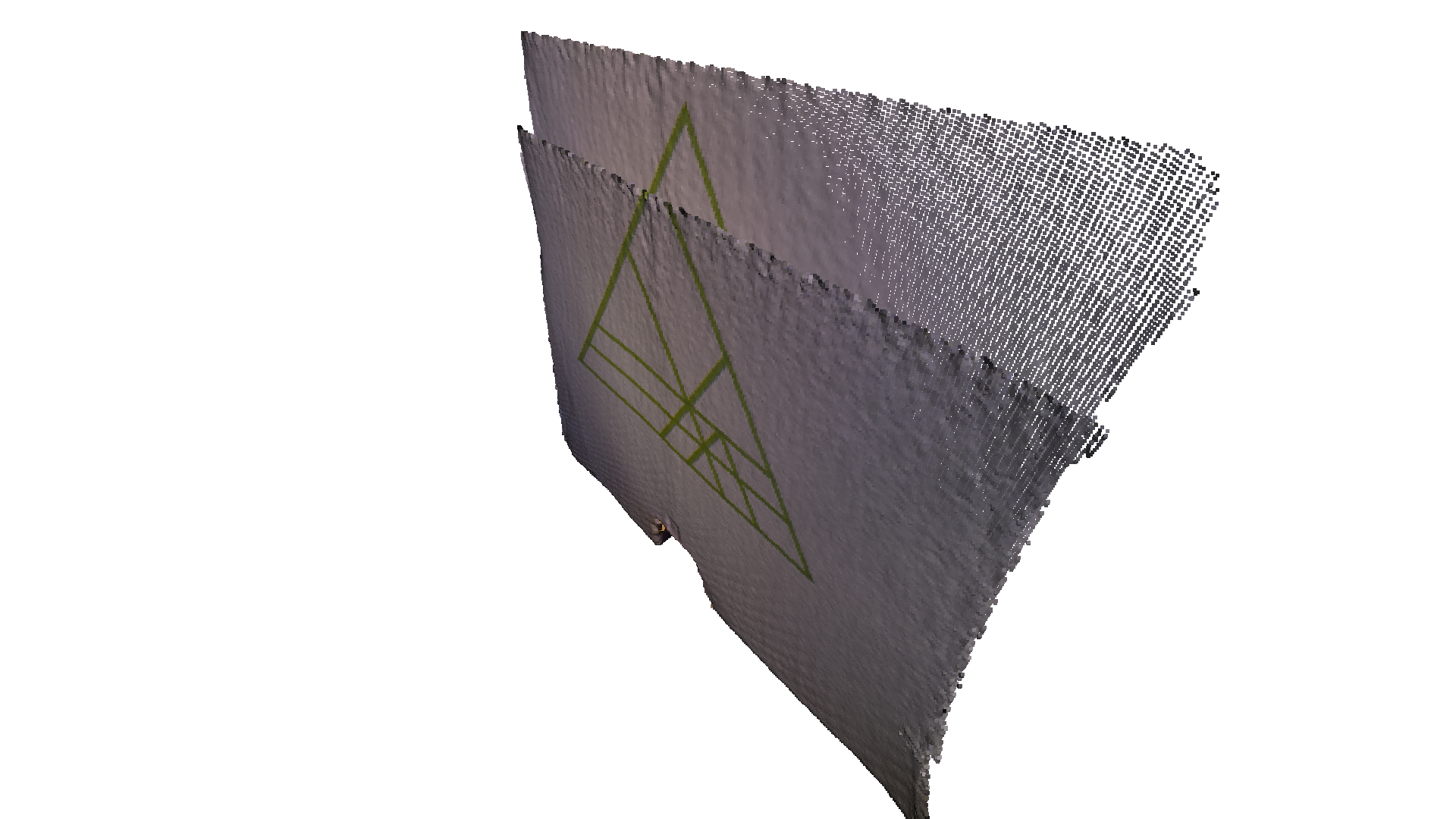
输出:
1. Load two point clouds and show initial pose[Open3D INFO] Downloading https://github.com/isl-org/open3d_downloads/releases/download/20220201-data/DemoColoredICPPointClouds.zip[Open3D INFO] Downloaded to /home/runner/open3d_data/download/DemoColoredICPPointClouds/DemoColoredICPPointClouds.zip[Open3D INFO] Created directory /home/runner/open3d_data/extract/DemoColoredICPPointClouds.[Open3D INFO] Extracting /home/runner/open3d_data/download/DemoColoredICPPointClouds/DemoColoredICPPointClouds.zip.[Open3D INFO] Extracted to /home/runner/open3d_data/extract/DemoColoredICPPointClouds.[Open3D WARNING] GLFW Error: Failed to detect any supported platform[Open3D WARNING] GLFW initialized for headless rendering.Point-to-plane ICP
Section titled “Point-to-plane ICP”我们首先运行 Point-to-plane ICP 作为基线方法。下面的可视化展示了未能对齐的绿色三角形纹理。这是因为几何约束无法阻止两个平面之间发生滑动。
# point to plane ICPcurrent_transformation = np.identity(4)print("2. Point-to-plane ICP registration is applied on original point")print(" clouds to refine the alignment. Distance threshold 0.02.")result_icp = o3d.pipelines.registration.registration_icp( source, target, 0.02, current_transformation, o3d.pipelines.registration.TransformationEstimationPointToPlane())print(result_icp)draw_registration_result_original_color(source, target, result_icp.transformation)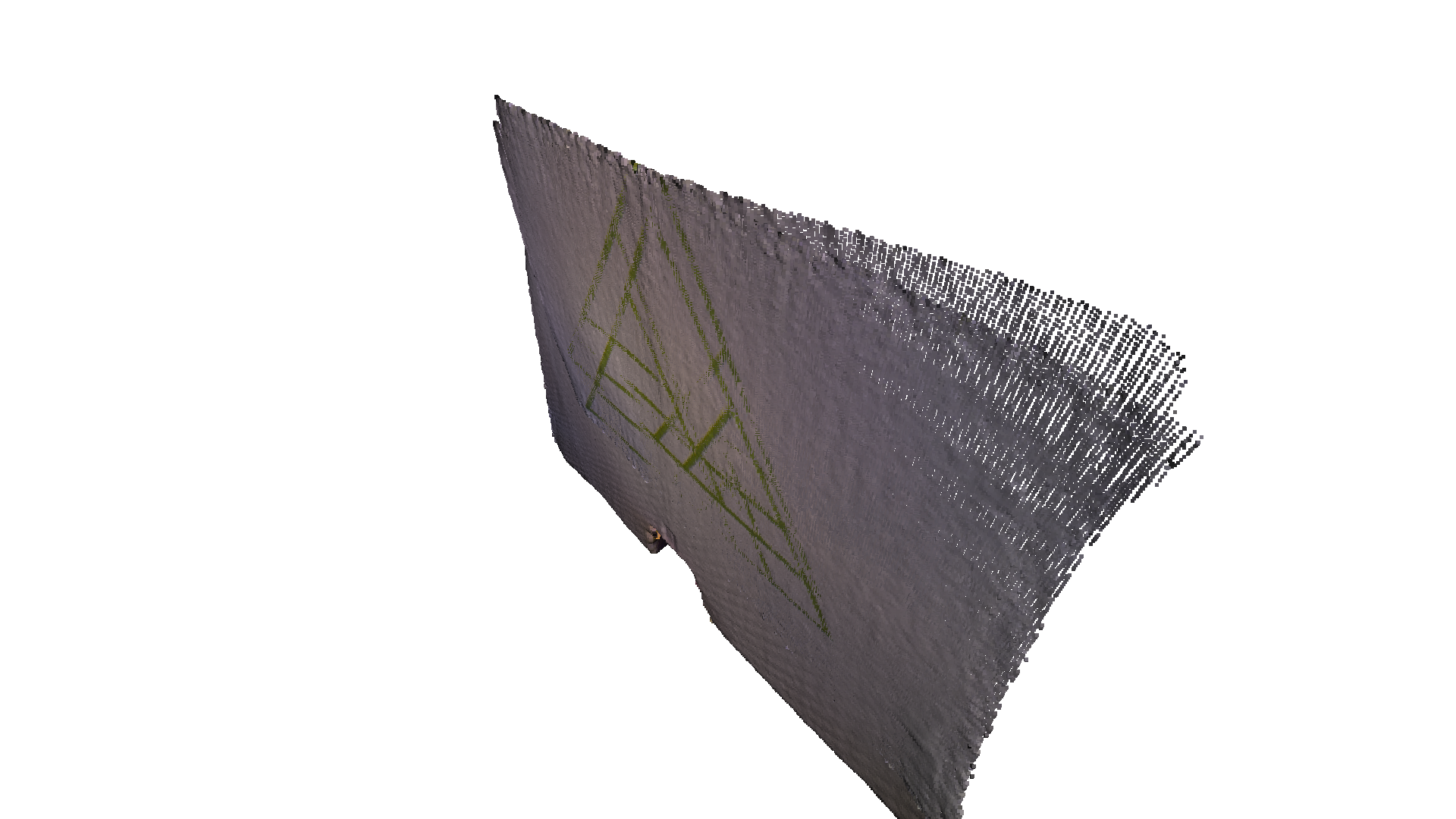
输出:
2. Point-to-plane ICP registration is applied on original point clouds to refine the alignment. Distance threshold 0.02.RegistrationResult with fitness 0.1xxxx and correspondence_set size of 62729Access transformation to get result.[Open3D WARNING] GLFW initialized for headless rendering.彩色点云配准
Section titled “彩色点云配准”彩色点云配准的核心函数是 registration_colored_icp。按照 [Park2017] 的方法,它以联合优化目标运行 ICP 迭代(详见 Point-to-point ICP):
其中 是待估计的变换矩阵, 与 分别是光度项(photometric term)与几何项(geometric term), 是一个由经验确定的权重参数。
几何项 与 Point-to-plane ICP 的目标相同:
其中 是当前迭代中的对应关系集合, 是点 的法向量。
颜色项 度量点 的颜色(记为 )与它在 的切平面上投影点的颜色之差:
其中 是在 的切平面上预先计算的连续函数, 将一个三维点投影到切平面上。更多细节请参阅 [Park2017]。
为进一步提升效率,[Park2017] 提出了一种多尺度(multi-scale)配准方案。其实现见如下脚本。
# colored pointcloud registration# This is implementation of following paper# J. Park, Q.-Y. Zhou, V. Koltun,# Colored Point Cloud Registration Revisited, ICCV 2017voxel_radius = [0.04, 0.02, 0.01]max_iter = [50, 30, 14]current_transformation = np.identity(4)print("3. Colored point cloud registration")for scale in range(3):    iter = max_iter[scale]    radius = voxel_radius[scale]    print([iter, radius, scale])
    print("3-1. Downsample with a voxel size %.2f" % radius)    source_down = source.voxel_down_sample(radius)    target_down = target.voxel_down_sample(radius)
    print("3-2. Estimate normal.")    source_down.estimate_normals(        o3d.geometry.KDTreeSearchParamHybrid(radius=radius * 2, max_nn=30))    target_down.estimate_normals(        o3d.geometry.KDTreeSearchParamHybrid(radius=radius * 2, max_nn=30))
    print("3-3. Applying colored point cloud registration")    result_icp = o3d.pipelines.registration.registration_colored_icp(        source_down, target_down, radius, current_transformation,        o3d.pipelines.registration.TransformationEstimationForColoredICP(),        o3d.pipelines.registration.ICPConvergenceCriteria(relative_fitness=1e-6,                                                          relative_rmse=1e-6,                                                          max_iteration=iter))    current_transformation = result_icp.transformation    print(result_icp)draw_registration_result_original_color(source, target,                                        result_icp.transformation)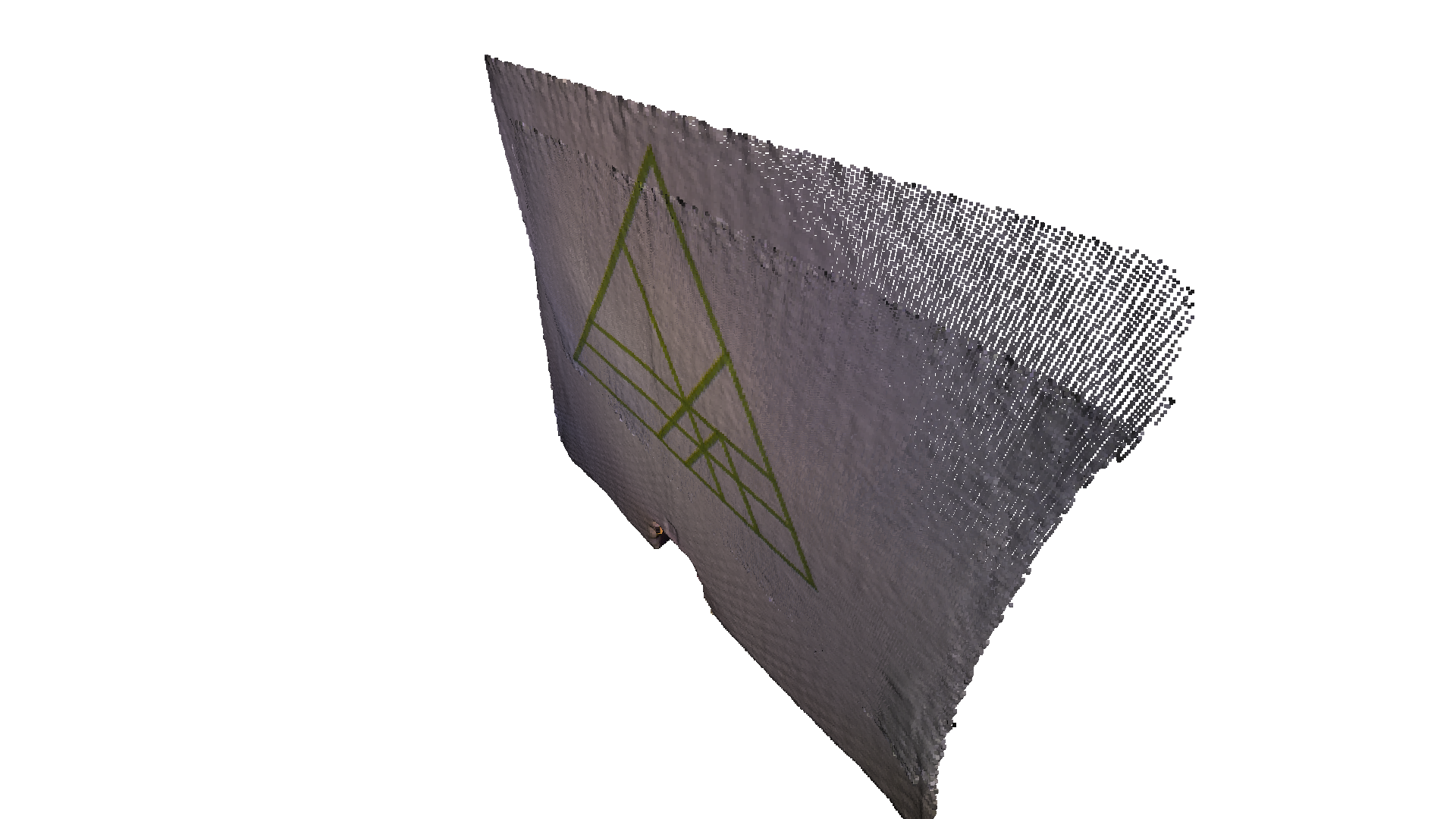
输出:
3. Colored point cloud registration[50, 0.04, 0]3-1. Downsample with a voxel size 0.043-2. Estimate normal.3-3. Applying colored point cloud registrationRegistrationResult with fitness 0.8xxxxx and correspondence_set size of 2084Access transformation to get result.[30, 0.02, 1]3-1. Downsample with a voxel size 0.023-2. Estimate normal.3-3. Applying colored point cloud registrationRegistrationResult with fitness 0.8xxxxx and correspondence_set size of 7541Access transformation to get result.[14, 0.01, 2]3-1. Downsample with a voxel size 0.013-2. Estimate normal.3-3. Applying colored point cloud registrationRegistrationResult with fitness 0.8xxxxx and correspondence_set size of 24737Access transformation to get result.[Open3D WARNING] GLFW initialized for headless rendering.这里通过 voxel_down_sample 总共创建了 3 层多分辨率点云,并使用顶点法向量估计来计算法向量。核心配准函数 registration_colored_icp 从粗到细地在每一层上各调用一次。lambda_geometric 是 registration_colored_icp 的一个可选参数,用于确定整体能量 中的 。
最终输出是两个点云之间的紧密对齐。注意墙上对齐良好的绿色三角形。