
设计:rosbag2 回放时间处理
本设计不考虑录制,只处理回放,因为回放与时间的交互更复杂。
术语:
- “ROS 时间(ROS Time)“——在
/clock话题上表示的时间 - “ROS 时间源(ROS Time Source)“——向
/clock发布内容的实体 关于 ROS 2 中时间的更多背景,参见 http://design.ros2.org/articles/clock_and_time.html#ros-time
Rosbag2 回放需要支持的不只是按系统时钟实时回放。 对于回放,希望支持以下”时间控制(time control)“功能:
- 暂停和恢复时间
- 时间恢复后,rosbag2 将按顺序播放最后一条已发布消息之后的下一条消息
- 还有一种”暂停和恢复”的含义是”时间继续流动但抑制录制/发布,从而跳过消息”——本文档中的”暂停和恢复”指的是”停止和启动时间流”。另一种设计负责处理该功能,它可能更适合命名为”抑制(suppress)“或”静音(mute)“,类似于音频播放的概念。
- 设置(向前的)回放速率——比实时快或慢
- 这在写本文档时已经实现,但本设计建议改变实现方式
- 向后或向前跳转到任意时间点
- 这在时间接口中称为”jump(跳转)“,但在 player 接口中很可能被称为”seek(定位)”
- 在暂停模式下播放下一条消息
- 这是一个新功能,允许在暂停时立即播放下一条消息,没有任何延迟。 这对于调试很有用,比如在暂停状态下按相应的键盘键逐步推进消息。 也可用于第三方应用的确定性数据驱动回放。
需要处理的时间情况:
- 稳态时间(Steady Time)—— Rosbag2 在内部参照单调系统时钟保持时间,既不发布也不订阅
/clock- 这是默认行为
- Rosbag2 作为 ROS 时间源,向
/clock话题发布(情况 1 的简单扩展)- 通过
ros2 bag play的--clock选项选择
- 通过
- Rosbag2 由外部 ROS 时间源驱动——最常见的是 Gazebo 仿真器
- 此时 Rosbag2 无法使用上述时间控制功能,因为它是时间的被动消费者
- 通过
ros2 bag play的--use-sim-time参数选择
注意:用户需确保 /clock 上只有一个发布者——Rosbag2 不会尝试解决多个 ROS 时间源的冲突,但检测到多个发布者时会打印警告。
关于当前实现的说明(设计编写时)
Section titled “关于当前实现的说明(设计编写时)”rosbag2_transport::Player 目前使用 std::chrono::system_clock 查询时间,并使用 std::this_thread::sleep_until 在发布消息之间等待,回放速率通过显式逻辑处理。
向 rosbag2_transport::Player 传递一个 PlayerClock 实例
- 使用
PlayerClock::now查询起始时间 - 在消息之间使用
PlayerClock::sleep_untilrclcpp::Clock尚未实现sleep_until——详见 https://github.com/ros2/rcl/issues/898- 如果无法在 Galactic API 冻结前向
rclcpp上游提交该特性,Galactic 版本可能需要在 rosbag2 内部实现一个临时子类。
下面的伪代码给出了高层 API 设计(仅供参考,并非定稿)
// A time point value without a reference timetype TimePointValue;
// A time intervaltype Duration;
/*  Used to control the timing of bag playback.  This clock should be used to query times and sleep between message playing,  so that the complexity involved around time control and time sources is encapsulated in this one place.  Internally, it may own an rclcpp::Clock, but does not override the class in order to implement a slightly different API.*/class PlayerClock{  /*    Provide the current time according to the clock's internal model.    if use_sim_time: provides current ROS Time (with optional extrapolation - see "Clock Rate and Time Extrapolation" section)    if !use_sim_time: calculates current "Player Time" based on starting time, playback rate, pause state.      this means that /clock time will match with the recorded messages time, as if we are fully reliving the recorded session   */  TimePointValue now();
  /*    Sleep (non-busy wait) the current thread until the provided time is reached - according to this Clock    If time is paused, the requested time may never be reached: `real_time_timeout` uses the internal steady clock to return false if the timeout elapses    If jump() is called, return false, allowing the caller to handle the new time    Return true when the time is reached  */  bool sleep_until(TimePointValue until, Duration real_time_timeout);
  /*    Pauses/resumes time.    While paused, `now()` will repeatedly return the same time, until resumed.    Note: this could have been defined as `set_rate(0)`, but this interface allows the clock to save the playback rate internally  */  void set_paused(bool paused);  bool get_paused() const;
  /*    Set the rate of playback - a unitless ratio. Defaults to 1.0 (real-time)    rate must be greater than 0 - to stop playback, use set_paused instead  */  void set_rate(float rate);  float get_rate() const;
  /*    Set the rate in Hz that /clock will be published. Defaults to 0.    If this is set to <= 0, then /clock will not be published.    If this is set to > 0, then /clock will start being published immediately  */  void set_clock_publish_frequency(float frequency);  float get_clock_publish_frequency() const;
  /*    Change the current internally maintained offset so that next published time is different.    This will trigger any registered JumpHandler callbacks.    Call this with the first message timestamp for a bag before starting playback (otherwise this will return current wall time)  */  void jump(rclcpp::Time time);
  /*    This is a copy of the rclcpp::Clock API - these handlers will be called in two cases:    1. use_sim_time is true: if the external time source jumps back in time, or forward farther than the threshold    2. use_sim_time is false: if jump() is called)  */  rclcpp::JumpHandler::SharedPtr  create_jump_callback(    rclcpp::JumpHandler::pre_callback_t pre_callback,    rclcpp::JumpHandler::post_callback_t post_callback,    const rcl_jump_threshold_t & threshold);
  /*    Forcing to play next message immediately when in pause.    Proposed implementation via calling jump to the timestamp corresponding to the next message in    queue.  */  void play_next();
};  // end of PlayerClock API
// Construct a clock that subscribes to /clock and cannot control time.// It will print a warning when a user tries to change rate, jump, pause, etc.PlayerClock SimTimePlayerClock(bool extrapolate_samples = false);
// Construct a clock that can control time and optionally publish to /clockPlayerClock TimeControlPlayerClock(  TimePointValue starting_time,  float rate = 1.0,  bool start_paused = true,  float clock_publish_frequency = 0.0);
时钟速率与时间外推
Section titled “时钟速率与时间外推”本节只与情况 3(订阅外部 ROS 时间源)相关,不适用于其他情况。
常见的 /clock 发布速率是 10–100Hz,远低于 IMU 等高频传感器——IMU 通常以 200Hz 或更高频率发布。
根据 ROS 时间源设计,“对 ROS 时间抽象层的调用将返回从 /clock 话题接收到的最新时间。”
这意味着较高速率话题的回放分辨率最多只能达到 /clock 的速率,如下图所示。
# dots are arbitrary time tick, letters are when a message is published# M is topic Message, C is /clock message
# original systemM..M..M..M..M..M..M..M..M..M..M..C.......C........C........C......
# playback on use_sim_time with default behavior - when a new time sample is received a burst of backed up messages will be playedM.......MM.......MMM......MMM....C.......C........C........C......
“Clock and Time” 设计中的”默认不进行高级时间估计”一节指出,更高级的行为是可行的,但(原文)“这些技术需要对时间抽象层的未来行为做出假设。而且在回放或仿真被瞬时暂停的情况下,这些假设中的任何一个都可能被打破。”
换句话说:我们无法预知下一条 /clock 消息的内容,甚至不知道它是否会到达;它可能是更大的时间间隔(速率增加)、更小的时间间隔(速率降低)、永远不到达(暂停),或者跳到完全不相关的时间。
虽然从技术上讲上述说法是正确的,但仍建议为订阅外部 ROS 时间源的情况实现一个简单的时间外推:
- 在内部存储最近 N 个时间样本(记录样本到达的速率)
- 调用
now()时,根据存储的时间样本确定速率,并基于时间进行外推 - 在时钟上加一个看门狗,如果在预期时间内没有收到新消息就发出通知
- 首选在
/clock发布者上使用 Deadline QoS,但我们可能无法对所有 ROS 时间源强制执行这一点 - 当发现样本缺失时,立即”暂停时间”
- 首选在
错误情况:
- ROS 时间源提高时间速率:回放可能稍落后,在下一个样本到来时追上。
- ROS 时间源降低时间速率:回放可能因外推导致消息提前发布而稍超前,随后等待到新校正的时间才发布下一条消息。不会重新发布已发出的消息。
- ROS 时间源瞬时暂停:Rosbag2 不会播放超过一个时钟采样周期的”未来”消息,一旦检测到暂停就会停止。
所有情况下的误差_最多_等于一个时钟样本所代表的时间量。
本设计认为对于大多数用例来说该误差可以接受,而且对高频话题回放来说收益显著。
该行为可选启用,由用户自行决定,通过 --extrapolate-ros-time 选项控制,该选项仅在提供 --use-sim-time 时有效。
注意:/clock 速率越快,无论是否外推,可能的误差都越小。
暂停和恢复时间
Section titled “暂停和恢复时间”Player 不需要做特殊处理——时间仍会正常提供,但不会向前流动,因此下一条消息在时间恢复之前不会被发布。
注意:这与”抑制/静音”不同——后者时间继续流动但发布停止,该功能在时间控制之外处理。
Player 不需要做特殊处理——时间会以不同的速率提供,sleep_until 会处理这一点。
Player 必须向 Clock 注册一个 JumpHandler——这样当发生跳转时,可以作废当前消息回放队列,并根据新的起始时间重新入队。
时间同步与转换
Section titled “时间同步与转换”实现该时间控制时,需要考虑两条独立的时间流:
- “ROS 时间”:与 bag 中消息相关的时间——该时间可以根据 rosbag 回放控制(或外部时间源)加速、减速、暂停或跳转
- “稳态时间(Steady time)“:总是向前移动,且速率恒定;即观看回放的用户所经历的实时时间。
为了实现 now() -> ROSTime 和 sleep_until(ROSTime until),需要在”ROS 时间”和”稳态时间”之间进行任意转换。
下图展示了转换方程的推导过程。
稳态时间标记为时间线 S,ROS 时间标记为时间线 R。
任意一对 R_n 和 S_n 都是匹配的时间点,它们彼此重合:在稳态时间 S_n,now() 返回 R_n。
同样,当调用 sleep_until(R_n) 时,使用稳态时间进行睡眠的 PlayerClock 将睡眠到 S_n。
图中可以看到 rate 变化、pause 和 jump,箭头标示了匹配的时间点。
播放的 bag 从 R0 开始向前推进(图中未显示 bag 结尾)。
用户在 S 时间线上执行操作,这是用户经历的时间线。
线条和编号标记表示”事件”,即执行时间控制操作(如更改速率、暂停或跳转)的位置。
第一条时间线”速率变化”中的事件:
- 在
S_0:以0.5的速率开始播放 - 在
S_1:将速率改为2.0 - 在
S_2:将速率改为1.0
第二条时间线”暂停 / 跳转”中的事件:
- 在
S_0:以正常速度开始播放 - 在
S_1:调用pause - 在
S_2:调用resume - 在
S_3:调用jump到R_4
- 同样也可以沿 ROS 时间线向后跳转(但那样线条会交叉,图中不易展示)
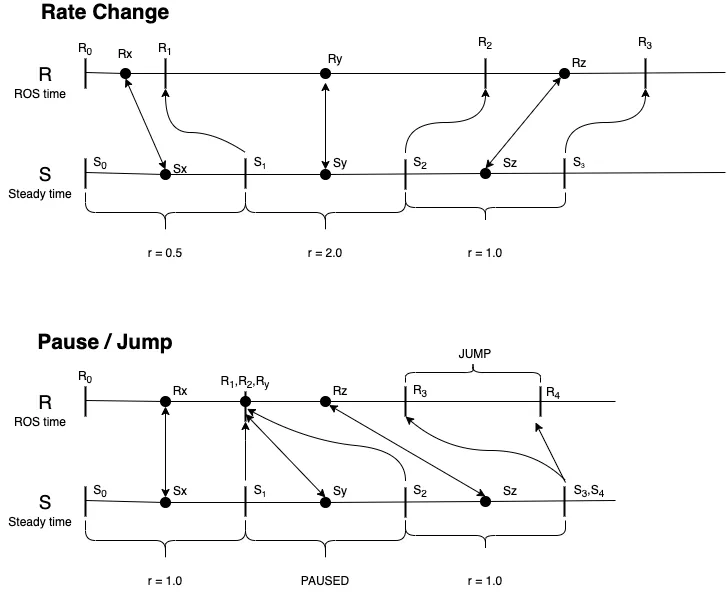
在时间控制事件之间,有任意的时间点 R_x / S_x、R_y / S_y 和 R_z / S_z,需要在它们之间进行转换。
使用的方程如下:
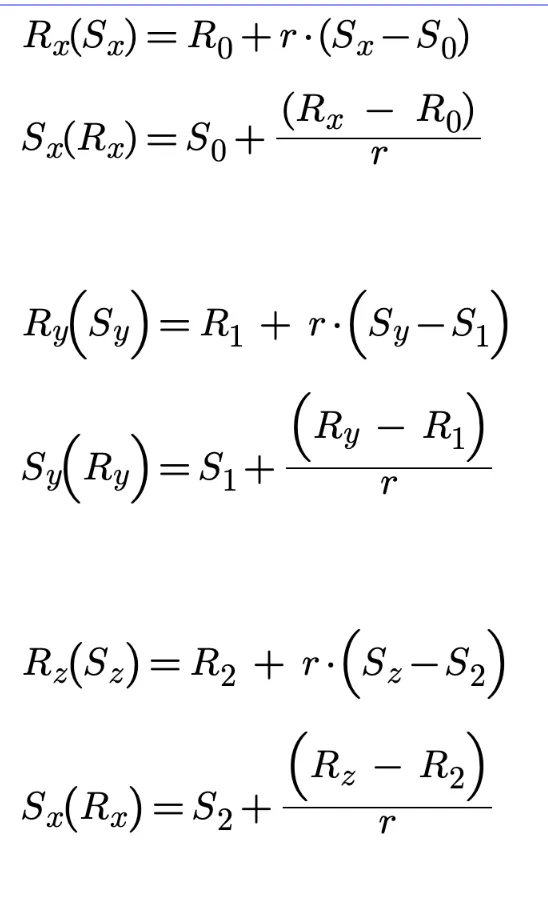
上面的方程显然具有以下的一般形式:
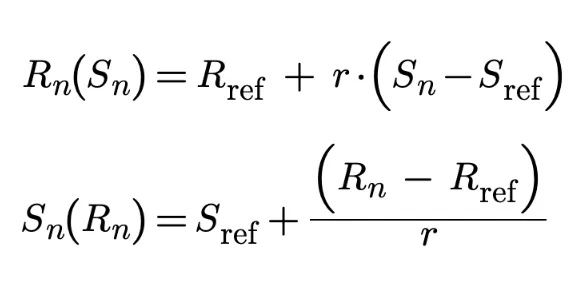
基于此,实现需要在执行时间控制操作时对 R_ref 和 S_ref 进行”快照”,以便后续准确计算转换。
其他值得注意的结果
Section titled “其他值得注意的结果”同步 rosbag2 回放
Section titled “同步 rosbag2 回放”基于本设计的结果,可以同步多个 rosbag 的回放:将一个 bag 设置为用 --clock 发布,其他 bag 用 --use-sim-time 监听即可。例如,当多个 bag 是在同一时间段为不同话题分别录制的,这个功能就很有用。
该功能不应一次性整体实现,而应拆分为小的、渐进式的 PR,每个 PR 都有可靠的测试且易于审查。 建议的实施顺序如下:
- 创建一个基本未实现的
PlayerClock类,让Player使用它来保持当前功能。这样完成了整个 API 变更,无需太多实现和审查工作。 - 将回放速率处理从
Player移到PlayerClock中。 - 实现
/clock发布器。 - 为
PlayerClock实现暂停/恢复。 - 为
PlayerClock实现时间跳转(并为Player实现相应的处理器)。 - 为
PlayerClock实现 play_next。 - 将速率、暂停/恢复和时间跳转作为服务暴露,以支持 CLI/键盘/GUI 控制。
- 实现
use_sim_time(/clock订阅)——不做外推。 - 实现仿真时间外推。