
混合规划
在本节中,你将学习如何使用 MoveIt 2 的 混合规划(Hybrid Planning)功能。
混合规划使你可以使用 MoveIt 2 在线(重新)规划并执行机器人运动,还能为运动规划流程加入更多自定义逻辑。
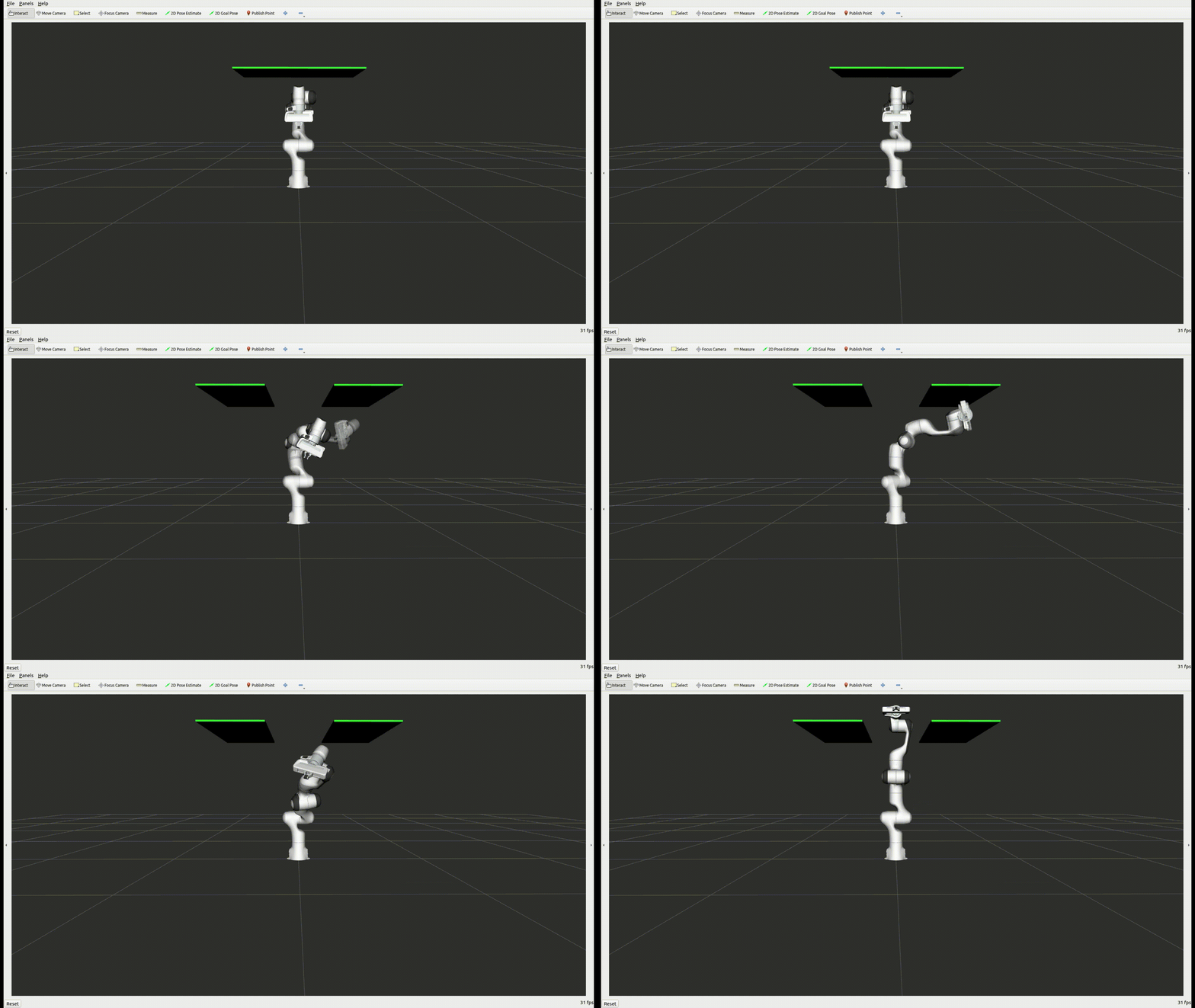
什么是混合规划?
Section titled “什么是混合规划?”混合规划将(较慢的)全局运动规划器与(较快的)局部运动规划器结合使用,使机器人能够在动态环境中在线解决各种任务。通常,全局运动规划器用于离线创建初始运动规划,并在全局解失效时对其进行重新规划;局部规划器则将全局解适配到局部约束,并对环境变化立即做出响应。关于该架构更详细的描述,请参阅混合规划概念。
MoveIt 2 中实现 混合规划 的架构如下图所示:
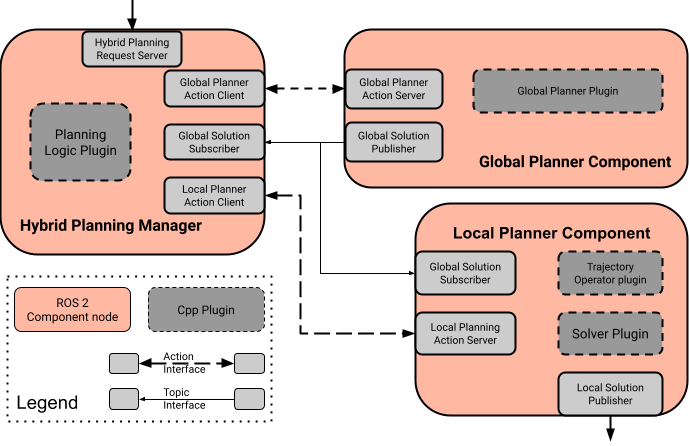
混合规划管理器(Hybrid Planning Manager)为 混合规划请求(Hybrid Planning requests)提供 API,实现高层规划逻辑,并协调两个规划器之间的交互。全局规划请求由 全局规划器组件(Global Planner Component)响应,该组件求解给定的规划问题并发布解;局部规划器组件(Local Planner Component)处理传入的全局轨迹更新,并在每次迭代中求解局部规划问题。使用该架构的主要优势有:
- 全局和局部受约束的运动规划问题可以分开处理
- 借助局部规划器可以实现在线运动规划
- 在动态或未知环境中进行响应式重新规划
如果尚未完成,请确保你已经完成了入门指南中的步骤。
要启动混合规划演示,只需运行:
ros2 launch moveit_hybrid_planning hybrid_planning_demo.launch.py你应该会看到与上方示例 GIF 类似的行为(但不包含重新规划)。
要与该架构交互,只需向 混合规划管理器 提供的 action server 发送一个 混合规划请求 即可。
现在让我们改变这种行为,使架构能够重新规划失效的轨迹。为此,只需修改 planner_logic_plugin:将演示配置中的插件名替换为 “moveit_hybrid_planning/ReplanInvalidatedTrajectory”,然后重新构建该包:
colcon build --packages-select moveit2_tutorials重新运行上面的启动命令后,你应该会看到架构重新规划了失效的轨迹。
要将混合规划架构集成到你的项目中,需要在某个 launch 文件中添加一个带有必要参数的 混合规划 组件节点:
# Generate launch description with multiple componentscontainer = ComposableNodeContainer( name="hybrid_planning_container", namespace="/", package="rclcpp_components", executable="component_container", composable_node_descriptions=[ ComposableNode( package="moveit_hybrid_planning", plugin="moveit::hybrid_planning::GlobalPlannerComponent", name="global_planner", parameters=[ global_planner_param, robot_description, robot_description_semantic, kinematics_yaml, ompl_planning_pipeline_config, ], ), ComposableNode( package="moveit_hybrid_planning", plugin="moveit::hybrid_planning::LocalPlannerComponent", name="local_planner", parameters=[ local_planner_param, robot_description, robot_description_semantic, kinematics_yaml, ], ), ComposableNode( package="moveit_hybrid_planning", plugin="moveit::hybrid_planning::HybridPlanningManager", name="hybrid_planning_manager", parameters=[hybrid_planning_manager_param], ), ], output="screen",)自定义混合规划架构
Section titled “自定义混合规划架构”与 MoveIt 2 的其他部分一样,混合规划架构在设计上高度可定制,同时也便于复用现有解决方案。架构中的每个组件都是一个 ROS 2 节点,只要它提供其他节点所需的 API,就可以被你自定义的 ROS 2 节点完全替换。每个组件的运行时行为由插件定义。本节重点介绍如何通过实现自己的插件来定制 混合规划架构。
全局与局部运动规划
Section titled “全局与局部运动规划”要获得全局运动规划解,需要通过 全局规划 Action Server 激活 全局规划器组件。当收到 MotionPlanRequest 时,组件使用 全局规划器插件 计算运动规划,并将解发布给其他组件。组件内的数据流如下图所示:
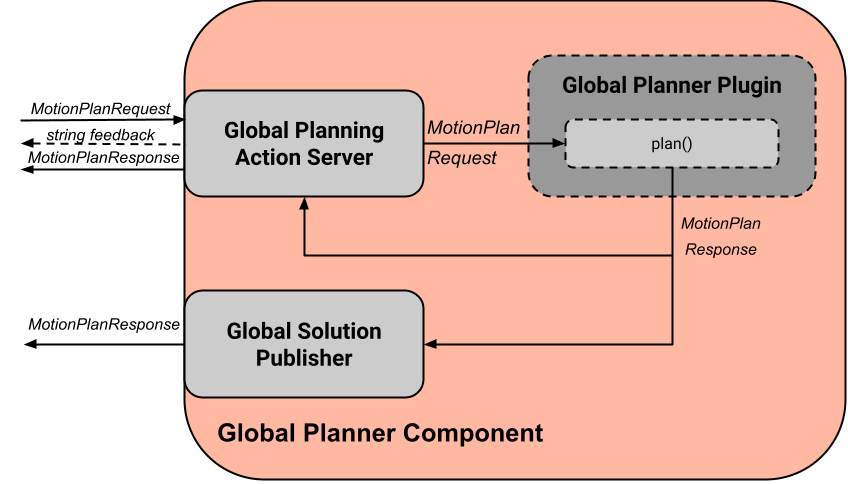
全局规划器插件 可用于实现和定制全局规划算法。要实现你自己的规划器,只需继承 GlobalPlannerInterface:
class MySmartPlanner : public GlobalPlannerInterface{public:  // Constructor and Destructor - Don't forget to define it!  MySmartPlanner() = default;  ~MySmartPlanner() = default;
  // This function is called when your plugin is loaded  bool initialize(const rclcpp::Node::SharedPtr& node) override;
  // Defines how the planner solves the motion planning problem  moveit_msgs::msg::MotionPlanResponse  plan(const std::shared_ptr<rclcpp_action::ServerGoalHandle<moveit_msgs::action::GlobalPlanner>> global_goal_handle) override;
// This is called when global planning is aborted or finished bool reset() override;};全局规划器的示例实现可以在此处找到。
局部规划器组件 的行为则更为复杂。其数据流如下图所示:
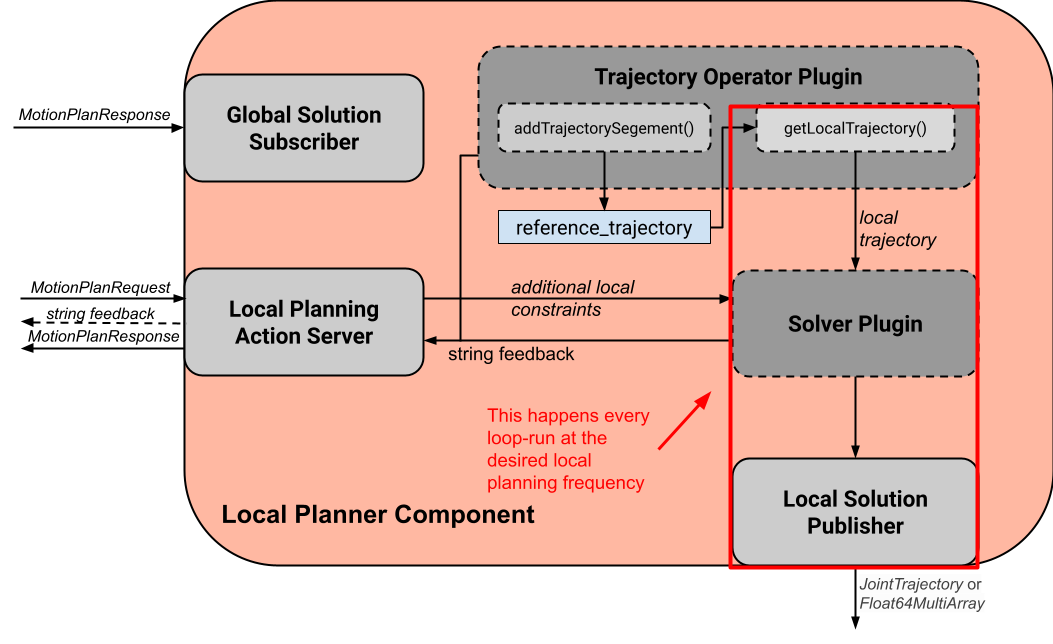
局部规划器通过 局部规划 Action Server 启动和停止。组件启动后,每次迭代都会执行以下任务:
- 通过调用 getLocalTrajectory() 基于当前状态获取局部规划问题
- 按照 局部求解器插件 的定义,求解由期望的局部轨迹和可选的附加约束所构成的局部规划问题
- 将局部解作为 JointTrajectory 或 Float64MultiArray 消息发布
通过 全局解订阅器,局部规划器组件 接收全局规划更新,这些更新经过处理后融合到参考轨迹中。基于该参考轨迹,局部规划器一旦启动就会识别并求解局部规划问题。全局轨迹更新如何处理并纳入参考轨迹,由 轨迹算子 的 addTrajectorySegment() 函数定义。
局部规划器组件 的行为可以通过 轨迹算子插件 和局部 求解器插件 定制:
轨迹算子插件 负责处理参考轨迹。要创建你自己的算子,你需要创建一个继承自 TrajectoryOperatorInterface 的插件类:
class MyAwesomeOperator : public TrajectoryOperatorInterface{public:  // Constructor and Destructor - Don't forget to define it!  MyAwesomeOperator() = default;  ~MyAwesomeOperator() = default;
  // This function is called when your plugin is loaded  bool initialize(const rclcpp::Node::SharedPtr& node, const moveit::core::RobotModelConstPtr& robot_model,                  const std::string& group_name) override;  moveit_msgs::action::LocalPlanner::Feedback
  // Process global trajectory updates  moveit_msgs::action::LocalPlanner::Feedback  addTrajectorySegment(const robot_trajectory::RobotTrajectory& new_trajectory) override;
  // Sample the local planning problem from the reference trajectory  moveit_msgs::action::LocalPlanner::Feedback  getLocalTrajectory(const moveit::core::RobotState& current_state,                     robot_trajectory::RobotTrajectory& local_trajectory) override;
  // Optional but can be useful for the algorithm you're using  double getTrajectoryProgress(const moveit::core::RobotState& current_state) override;
// This is called when local planning is aborted or re-invoked bool reset() override;};轨迹算子的示例实现可以在此处找到。
局部求解器插件 实现了每次迭代求解局部规划问题的算法。要实现你自己的求解器,你需要继承 LocalConstraintSolverInterface:
class MyAwesomeSolver : public LocalConstraintSolverInterface{public:  // Constructor and Destructor - Don't forget to define it!  MyAwesomeSolver() = default;  ~MyAwesomeSolver() = default;
  // This function is called when your plugin is loaded  bool initialize(const rclcpp::Node::SharedPtr& node,                  const planning_scene_monitor::PlanningSceneMonitorPtr& planning_scene_monitor,                  const std::string& group_name) override;
  // This is called when the local planning is aborted or re-invoked  bool reset() override;
// Within this function the local planning problem is solved. // Conversation into the configured msg type is handled by the local planner component moveit_msgs::action::LocalPlanner::Feedback solve(const robot_trajectory::RobotTrajectory& local_trajectory, const std::shared_ptr<const moveit_msgs::action::LocalPlanner::Goal> local_goal, trajectory_msgs::msg::JointTrajectory& local_solution) override;};局部约束求解器的示例实现可以在此处找到。
两个插件在初始化时都会收到 ROS 2 节点的共享指针,可用于创建额外的自定义 ROS 2 通信接口,例如订阅额外的传感器数据源。
规划逻辑与响应行为
Section titled “规划逻辑与响应行为”除了能够组合全局与局部运动规划器之外,该架构还使机器人能够在线响应事件。你可以通过 规划逻辑插件 定制这一行为。一个简单的 混合规划逻辑 示例如下图所示:
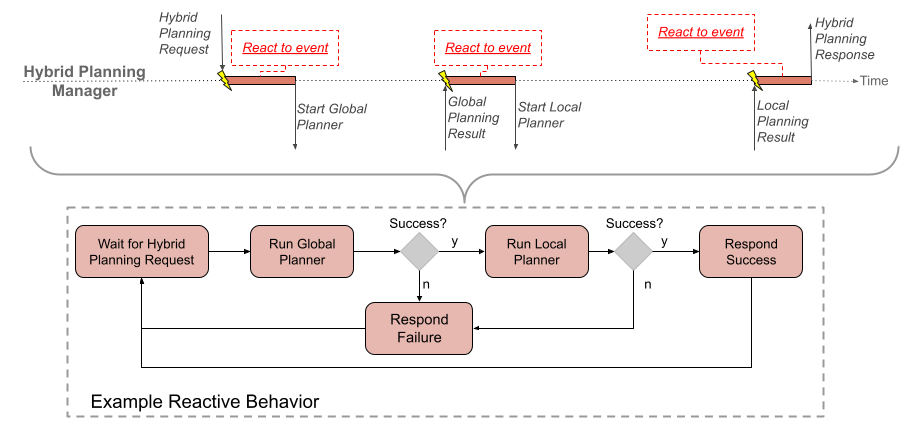
事件是触发 混合规划管理器 内回调函数的离散信号。ROS 2 的 action 反馈、action 结果和话题被用作事件通道。需要特别指出的是,从规划器节点到 混合规划管理器 的 action 反馈并非用于返回反馈,而是用于触发对 action 处于活动期间所发生事件的响应。例如,在线局部规划期间出现未预见的碰撞物体:局部规划器组件 通过 action 反馈通道向 混合规划管理器 发送 “collision object ahead” 事件消息,但当前局部规划 action 是中止还是仅更新参考轨迹,则由 混合规划管理器 中的 规划逻辑插件 决定。
混合规划管理器 中事件通道的回调函数如下所示:
// Local planner action feedback callbacklocal_goal_options.feedback_callback =    [this](rclcpp_action::ClientGoalHandle<moveit_msgs::action::LocalPlanner>::SharedPtr /*unused*/,           const std::shared_ptr<const moveit_msgs::action::LocalPlanner::Feedback> local_planner_feedback) {
      // Call the planner plugin's react function with a given event string      ReactionResult reaction_result = planner_logic_instance_->react(local_planner_feedback->feedback);
      // If the reaction is not successful, the whole hybrid planning action is aborted      if (reaction_result.error_code.val != moveit_msgs::msg::MoveItErrorCodes::SUCCESS)      {        auto result = std::make_shared<moveit_msgs::action::HybridPlanning::Result>();        result->error_code.val = reaction_result.error_code.val;        result->error_message = reaction_result.error_message;        hybrid_planning_goal_handle_->abort(result);        RCLCPP_ERROR(LOGGER, "Hybrid Planning Manager failed to react to  '%s'", reaction_result.event.c_str());      }    };
要创建你自己的 规划逻辑插件,你需要继承 PlannerLogicInterface:
class MyCunningLogic : public PlannerLogicInterface{public:  // Brief constructor and destructor  MyCunningLogic() = default;  ~MyCunningLogic() = default;
  // The plugin needs a shared pointer to the hybrid planning manager to access its member functions like planGlobalTrajectory()  bool initialize(const std::shared_ptr<moveit_hybrid_planning::HybridPlanningManager>& hybrid_planning_manager) override;
  // This function can be used to implement reaction to some default Hybrid Planning events  ReactionResult react(const BasicHybridPlanningEvent& event) override;
  // Here are reactions to custom events encoded as string implemented  ReactionResult react(const std::string& event) override;};
react() 函数的一种可能实现是包含一个 switch-case 语句,将事件映射到动作,如示例逻辑插件中所示。