
TF2 问题调试
目标: 学习如何使用系统化的方法调试 tf2 相关问题。
教程级别: 中级
预计时间: 10 分钟
本教程将带你逐步调试一个典型的 tf2 问题,过程中会用到多个 tf2 调试工具,例如 tf2_echo、tf2_monitor 和 view_frames。本教程假设你已经完成了 学习 tf2 教程。
1. 设置并启动示例
Section titled “1. 设置并启动示例”在本教程中,我们将搭建一个存在若干问题的演示程序。目标是运用系统化的方法来发现和解决这些问题。首先,让我们创建源文件。
进入我们在 tf2 教程 中创建的 learning_tf2_cpp 包。在 src 目录中,复制源文件 turtle_tf2_listener.cpp 并将其重命名为 turtle_tf2_listener_debug.cpp。
使用你喜欢的文本编辑器打开该文件,将第 65 行从
std::string toFrameRel = "turtle2";改为
std::string toFrameRel = "turtle3";并将第 73-77 行的 lookupTransform() 调用从
try { t = tf_buffer_->lookupTransform( toFrameRel, fromFrameRel, tf2::TimePointZero);} catch (const tf2::TransformException & ex) {改为
try { t = tf_buffer_->lookupTransform( toFrameRel, fromFrameRel, this->now());} catch (const tf2::TransformException & ex) {保存文件更改。为了运行这个演示,我们需要在 learning_tf2_cpp 包的 launch 目录中创建一个启动文件 start_tf2_debug_demo_launch,扩展名为 .py、.xml 或 .yaml:
Python 版本:
from launch import LaunchDescriptionfrom launch.actions import DeclareLaunchArgumentfrom launch.substitutions import LaunchConfigurationfrom launch_ros.actions import Node

def generate_launch_description():    return LaunchDescription([        DeclareLaunchArgument(            'target_frame', default_value='turtle1',            description='Target frame name.'        ),        Node(            package='turtlesim',            executable='turtlesim_node',            name='sim',            output='screen'        ),        Node(            package='learning_tf2_cpp',            executable='turtle_tf2_broadcaster',            name='broadcaster1',            parameters=[                {'turtlename': 'turtle1'}            ]        ),        Node(            package='learning_tf2_cpp',            executable='turtle_tf2_broadcaster',            name='broadcaster2',            parameters=[                {'turtlename': 'turtle2'}            ]        ),        Node(            package='learning_tf2_cpp',            executable='turtle_tf2_listener_debug',            name='listener_debug',            parameters=[                {'target_frame': LaunchConfiguration('target_frame')}            ]        ),    ])
XML 版本:
<?xml version="1.0" encoding="UTF-8"?><launch> <arg name="target_frame" default="turtle1" description="Target frame name." /> <node pkg="turtlesim" exec="turtlesim_node" name="sim" output="screen" /> <node pkg="learning_tf2_cpp" exec="turtle_tf2_broadcaster" name="broadcaster1"> <param name="turtlename" value="turtle1" /> </node> <node pkg="learning_tf2_cpp" exec="turtle_tf2_broadcaster" name="broadcaster2"> <param name="turtlename" value="turtle2" /> </node> <node pkg="learning_tf2_cpp" exec="turtle_tf2_listener_debug" name="listener_debug"> <param name="target_frame" value="$(var target_frame)" /> </node></launch>YAML 版本:
%YAML 1.2---launch: - arg: name: "target_frame" default: "turtle1" description: "Target frame name." - node: pkg: "turtlesim" exec: "turtlesim_node" name: "sim" output: "screen" - node: pkg: "learning_tf2_cpp" exec: "turtle_tf2_broadcaster" name: "broadcaster1" param: - name: "turtlename" value: "turtle1" - node: pkg: "learning_tf2_cpp" exec: "turtle_tf2_broadcaster" name: "broadcaster2" param: - name: "turtlename" value: "turtle2" - node: pkg: "learning_tf2_cpp" exec: "turtle_tf2_listener_debug" name: "listener_debug" param: - name: "target_frame" value: "$(var target_frame)"别忘了将 turtle_tf2_listener_debug 可执行文件添加到 CMakeLists.txt 中,然后编译该包。
现在运行它,看看会发生什么:
$ ros2 launch learning_tf2_cpp start_tf2_debug_demo_launch.xml$ ros2 launch learning_tf2_cpp start_tf2_debug_demo_launch.yaml$ ros2 launch learning_tf2_cpp start_tf2_debug_demo_launch.py你现在会看到 turtlesim 启动了。同时,如果你在另一个终端窗口中运行 turtle_teleop_key,就可以使用方向键来驱动 turtle1 移动。
$ ros2 run turtlesim turtle_teleop_key[turtle_tf2_listener_debug-4] [INFO] [1630223454.942322623] [listener_debug]: Could nottransform turtle3 to turtle1: "turtle3" passed to lookupTransform argument target_framedoes not exist你还会注意到左下角有第二只乌龟。如果演示正常运行,这第二只乌龟应该跟随你可以用方向键控制的那只乌龟。然而事实并非如此——我们必须先解决一些问题。
2. 查找 tf2 请求
Section titled “2. 查找 tf2 请求”首先,我们需要弄清楚到底在要求 tf2 做什么。因此,我们要查看使用 tf2 的代码部分。打开 src/turtle_tf2_listener_debug.cpp 文件,看第 65 行:
std::string toFrameRel = "turtle3";以及第 73-77 行:
try { t = tf_buffer_->lookupTransform( toFrameRel, fromFrameRel, this->now());} catch (const tf2::TransformException & ex) {这三个参数直接告诉了我们向 tf2 请求的内容:在「当前」时间,从坐标系 turtle3 到坐标系 turtle1 的变换。
现在,让我们看看为什么这个 tf2 请求会失败。
3. 检查坐标系
Section titled “3. 检查坐标系”首先,要查明 tf2 是否知道 turtle3 和 turtle1 之间的变换,我们使用 tf2_echo 工具。
$ ros2 run tf2_ros tf2_echo turtle3 turtle1[INFO] [1630223557.477636052] [tf2_echo]: Waiting for transform turtle3 -> turtle1:Invalid frame ID "turtle3" passed to canTransform argument target_frame - frame doesnot exist输出告诉我们坐标系 turtle3 不存在。
那么到底存在哪些坐标系呢?如果你想获得图形化的表示,可以使用 view_frames 工具。
$ ros2 run tf2_tools view_frames打开生成的 frames.pdf 文件,你会看到如下输出:
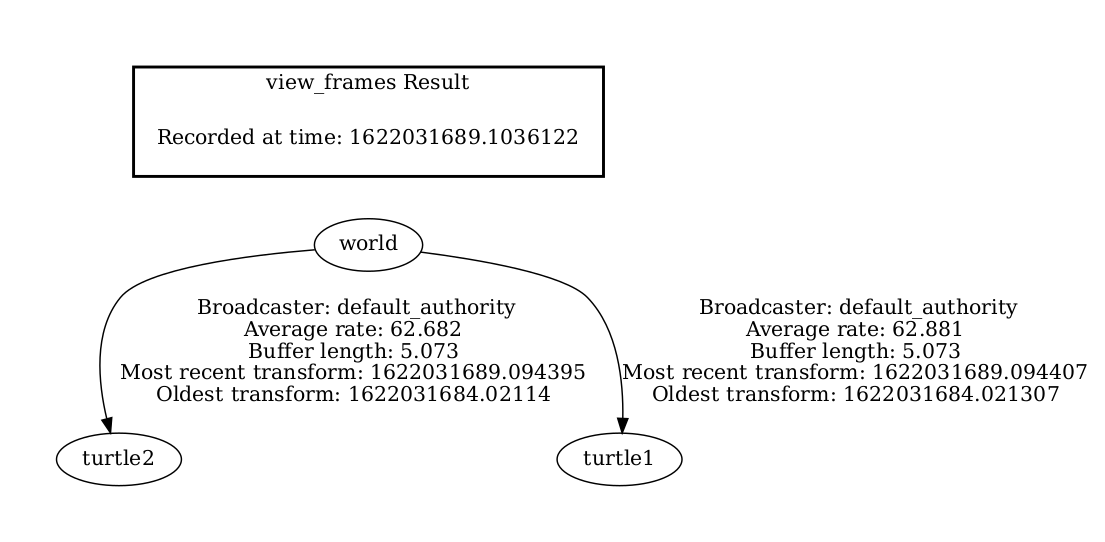
很明显,问题在于我们请求从不存在的坐标系 turtle3 进行变换。修复这个 bug,只需将第 65 行的 turtle3 替换为 turtle2。
现在停止正在运行的演示,重新编译并再次运行:
$ ros2 launch learning_tf2_cpp start_tf2_debug_demo_launch.xml[turtle_tf2_listener_debug-4] [INFO] [1630223704.617382464] [listener_debug]: Could nottransform turtle2 to turtle1: Lookup would require extrapolation into the future. Requestedtime 1630223704.617054 but the latest data is at time 1630223704.616726, when looking uptransform from frame [turtle1] to frame [turtle2]$ ros2 launch learning_tf2_cpp start_tf2_debug_demo_launch.yaml[turtle_tf2_listener_debug-4] [INFO] [1630223704.617382464] [listener_debug]: Could nottransform turtle2 to turtle1: Lookup would require extrapolation into the future. Requestedtime 1630223704.617054 but the latest data is at time 1630223704.616726, when looking uptransform from frame [turtle1] to frame [turtle2]$ ros2 launch learning_tf2_cpp start_tf2_debug_demo_launch.py[turtle_tf2_listener_debug-4] [INFO] [1630223704.617382464] [listener_debug]: Could nottransform turtle2 to turtle1: Lookup would require extrapolation into the future. Requestedtime 1630223704.617054 but the latest data is at time 1630223704.616726, when looking uptransform from frame [turtle1] to frame [turtle2]很快我们又遇到了下一个问题。
4. 检查时间戳
Section titled “4. 检查时间戳”既然已经解决了坐标系名称的问题,接下来看看时间戳。记住,我们试图获取当前时间(即 now)下 turtle2 和 turtle1 之间的变换。要获取时间统计信息,可以针对相应的坐标系调用 tf2_monitor。
$ ros2 run tf2_ros tf2_monitor turtle2 turtle1RESULTS: for turtle2 to turtle1Chain is: turtle1Net delay     avg = 0.00287347: max = 0.0167241
Frames:Frame: turtle1, published by <no authority available>, Average Delay: 0.000295833, Max Delay: 0.000755072
All Broadcasters:Node: <no authority available> 125.246 Hz, Average Delay: 0.000290237 Max Delay: 0.000786781
这里的关键信息是从 turtle2 到 turtle1 链路的延迟。输出显示平均延迟约为 3 毫秒。这意味着 tf2 只能在 3 毫秒过去之后,才能在两乌龟之间进行变换。所以,如果我们不是向 tf2 请求「当前」的变换,而是请求 3 毫秒前的变换,tf2 有时就能给出答案。让我们快速验证一下,将第 73-77 行改为:
try { t = tf_buffer_->lookupTransform( toFrameRel, fromFrameRel, this->now() - rclcpp::Duration::from_seconds(0.1));} catch (const tf2::TransformException & ex) {在新代码中,我们请求的是 100 毫秒前两乌龟之间的变换。使用更长的时间差只是为了确保变换数据已经到达。停止演示,编译并运行:
$ ros2 launch learning_tf2_cpp start_tf2_debug_demo_launch.xml$ ros2 launch learning_tf2_cpp start_tf2_debug_demo_launch.yaml$ ros2 launch learning_tf2_cpp start_tf2_debug_demo_launch.py你应该终于能看到乌龟移动了!
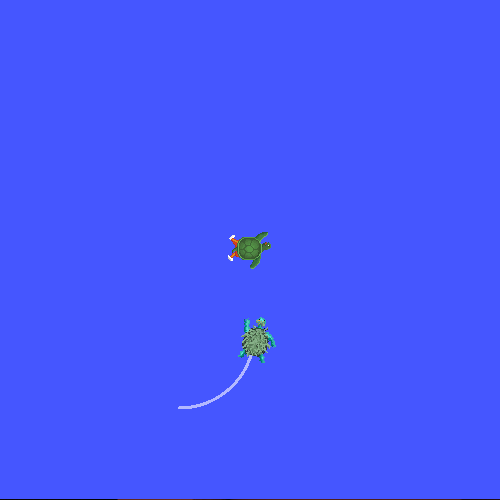
我们上一步做的修复其实并不是你真正想要的做法,那只是为了确认问题所在。真正的修复应该像这样:
try { t = tf_buffer_->lookupTransform( toFrameRel, fromFrameRel, tf2::TimePointZero);} catch (const tf2::TransformException & ex) {或者像这样:
try { t = tf_buffer_->lookupTransform( toFrameRel, fromFrameRel, tf2::TimePoint());} catch (const tf2::TransformException & ex) {你可以在 使用时间 教程中了解更多关于超时的内容,并按如下方式使用:
try { t = tf_buffer_->lookupTransform( toFrameRel, fromFrameRel, this->now(), rclcpp::Duration::from_seconds(0.05));} catch (const tf2::TransformException & ex) {在本教程中,你学习了如何使用系统化的方法来调试 tf2 相关问题,还学习了如何使用 tf2 调试工具(如 tf2_echo、tf2_monitor 和 view_frames)来辅助调试。