
Pilz 工业运动规划器
pilz_industrial_motion_planner 提供了一个轨迹生成器,可与 MoveIt 配合规划标准的机器人运动,如点对点 (PTP)、直线 (LIN) 和圆弧 (CIRC) 运动。
通过加载相应的规划管线(在 *_moveit_config 包中的 pilz_industrial_motion_planner_planning_planner.yaml 中配置),即可通过 move_group 节点提供的用户界面(C++、Python 或 RViz)访问轨迹生成功能,例如 /plan_kinematic_path 服务和 /move_action 动作。详细的使用教程,请参阅 MoveItCpp 教程 和 Move Group 接口教程。
规划器使用运行 Pilz 规划管线的 ROS 节点的参数中定义的最大速度和加速度。使用 MoveIt Setup Assistant 时,joint_limits.yaml 文件会自动生成并带有合适的默认值,在启动时自动加载。
此处指定的限制会覆盖 URDF 机器人描述中的限制。请注意,位置限制和速度限制既可以在 URDF 中设置,也可以在参数文件中设置,但加速度限制只能通过参数文件设置。除了常见的 has_acceleration 和 max_acceleration 参数之外,我们还增加了设置 has_deceleration 和 max_deceleration(小于 0.0)的能力。
限制的合并遵循以下原则:节点参数中的限制必须比 URDF 中设置的参数更严格或至少相等。
目前,计算出的轨迹会取所有限制中最严格的组合作为所有关节的共同限制来遵守。
对于笛卡尔轨迹生成(LIN/CIRC),规划器需要知道三维笛卡尔空间中的最大速度信息。也就是说,平移和旋转的速度、加速度、减速度需要在节点参数中如下设置:
cartesian_limits: max_trans_vel: 1 max_trans_acc: 2.25 max_trans_dec: -5 max_rot_vel: 1.57你可以在 *_moveit_config 包中名为 pilz_cartesian_limits.yaml 的文件里指定笛卡尔速度和加速度限制。
规划器假定平移和旋转的梯形速度曲线具有相同的加速度比率。旋转加速度按 max_trans_acc / max_trans_vel * max_rot_vel 计算(减速度同理)。
该包使用 moveit_msgs::msgs::MotionPlanRequest 和 moveit_msgs::msg::MotionPlanResponse 作为运动规划的输入和输出。各规划算法所需的参数说明如下。
关于如何填充 MotionPlanRequest 的总体介绍,请参阅 Move Group 接口教程。
你可以将 MotionPlanRequest 的 planner_id 指定为 "PTP"、"LIN" 或 "CIRC"。
PTP 运动命令
Section titled “PTP 运动命令”该规划器生成完全同步的点对点轨迹,具有梯形关节速度曲线。所有关节被假定具有相同的最大关节速度/加速度/减速度限制。如果不是,则采用最严格的限制。到达目标耗时最长的轴被选为主导轴,其他轴相应减速,以便与主导轴共享相同的加速/匀速/减速阶段。
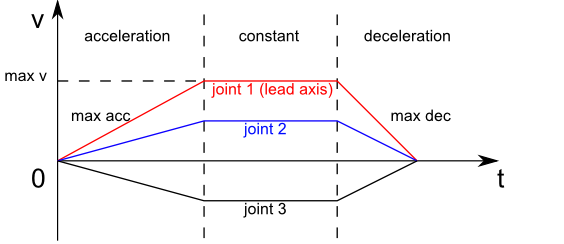
PTP 输入参数(moveit_msgs::MotionPlanRequest)
Section titled “PTP 输入参数(moveit_msgs::MotionPlanRequest)”planner_id:"PTP"group_name:规划组的名称max_velocity_scaling_factor:最大关节速度的缩放因子max_acceleration_scaling_factor:最大关节加速度/减速度的缩放因子start_state/joint_state/(name, position and velocity):起始状态的关节名称/位置/速度(可选)goal_constraints:(目标可以在关节空间或笛卡尔空间中给出)- 对于关节空间中的目标:
goal_constraints/joint_constraints/joint_name:目标关节名称goal_constraints/joint_constraints/position:目标关节位置
- 对于笛卡尔空间中的目标:
goal_constraints/position_constraints/header/frame_id:该数据关联的坐标系goal_constraints/position_constraints/link_name:目标连杆名称goal_constraints/position_constraints/constraint_region:目标点的包围体积goal_constraints/position_constraints/target_point_offset:目标连杆上目标点的偏移量(在连杆坐标系中)(可选)
PTP 规划结果(moveit_msg::MotionPlanResponse)
Section titled “PTP 规划结果(moveit_msg::MotionPlanResponse)”trajectory_start:规划轨迹的首个机器人状态trajectory/joint_trajectory/joint_names:所生成关节轨迹的关节名称列表trajectory/joint_trajectory/points/(positions,velocities,accelerations,time_from_start):生成的航点列表。每个点包含所有关节的位置/速度/加速度(顺序与关节名称一致)以及距起始的时间。最后一个点的速度和加速度为零。group_name:规划组的名称error_code/val:运动规划的错误代码
LIN 运动命令
Section titled “LIN 运动命令”该规划器在目标位姿和起始位姿之间生成直线笛卡尔轨迹。规划器使用笛卡尔限制在笛卡尔空间中生成梯形速度曲线。平移运动是起始与目标位置向量之间的线性插值。旋转运动是起始与目标姿态之间的四元数球面插值(slerp)。平移与旋转运动在时间上同步。该规划器仅接受速度为零的起始状态。规划结果为关节轨迹。如果因违反关节空间限制而导致运动规划失败,用户需要调整笛卡尔速度/加速度缩放因子。
LIN 输入参数(moveit_msgs::MotionPlanRequest)
Section titled “LIN 输入参数(moveit_msgs::MotionPlanRequest)”-
planner_id:"LIN" -
group_name:规划组的名称 -
max_velocity_scaling_factor:最大笛卡尔平移/旋转速度的缩放因子 -
max_acceleration_scaling_factor:最大笛卡尔平移/旋转加速度/减速度的缩放因子 -
start_state/joint_state/(name, position and velocity:起始状态的关节名称/位置 -
goal_constraints(目标可以在关节空间或笛卡尔空间中给出)-
对于关节空间中的目标:
goal_constraints/joint_constraints/joint_name:目标关节名称goal_constraints/joint_constraints/position:目标关节位置
-
对于笛卡尔空间中的目标:
goal_constraints/position_constraints/header/frame_id:该数据关联的坐标系goal_constraints/position_constraints/link_name:目标连杆名称goal_constraints/position_constraints/constraint_region:目标点的包围体积goal_constraints/position_constraints/target_point_offset:目标连杆上目标点的偏移量(在连杆坐标系中)(可选)
-
LIN 规划结果(moveit_msg::MotionPlanResponse)
Section titled “LIN 规划结果(moveit_msg::MotionPlanResponse)”trajectory_start:规划轨迹的首个机器人状态trajectory/joint_trajectory/joint_names:所生成关节轨迹的关节名称列表trajectory/joint_trajectory/points/(positions,velocities,accelerations,time_from_start):生成的航点列表。每个点包含所有关节的位置/速度/加速度(顺序与关节名称一致)以及距起始的时间。最后一个点的速度和加速度为零。group_name:规划组的名称error_code/val:运动规划的错误代码
CIRC 运动命令
Section titled “CIRC 运动命令”该规划器在目标位姿和起始位姿之间生成笛卡尔空间中的圆弧轨迹。有两种方式给出路径约束:
- 圆的中心点:规划器总是在起始点和目标点之间生成较短的弧,且无法生成半圆;
- 弧上的中间点:生成的轨迹始终经过中间点。规划器无法生成整圆。
需要设置笛卡尔限制,即平移和旋转的速度、加速度、减速度,规划器使用这些限制在笛卡尔空间中生成梯形速度曲线。旋转运动是起始与目标姿态之间的四元数球面插值(slerp)。平移与旋转运动在时间上同步。该规划器仅接受速度为零的起始状态。规划结果为关节轨迹。如果因违反关节限制而导致运动规划失败,用户需要调整笛卡尔速度/加速度缩放因子。
CIRC 输入参数(moveit_msgs::MotionPlanRequest)
Section titled “CIRC 输入参数(moveit_msgs::MotionPlanRequest)”-
planner_id:"CIRC" -
group_name:规划组的名称 -
max_velocity_scaling_factor:最大笛卡尔平移/旋转速度的缩放因子 -
max_acceleration_scaling_factor:最大笛卡尔平移/旋转加速度/减速度的缩放因子 -
start_state/joint_state/(name, position and velocity:起始状态的关节名称/位置 -
goal_constraints(目标可以在关节空间或笛卡尔空间中给出)-
对于关节空间中的目标:
goal_constraints/joint_constraints/joint_name:目标关节名称goal_constraints/joint_constraints/position:目标关节位置
-
对于笛卡尔空间中的目标:
goal_constraints/position_constraints/header/frame_id:该数据关联的坐标系goal_constraints/position_constraints/link_name:目标连杆名称goal_constraints/position_constraints/constraint_region:目标点的包围体积goal_constraints/position_constraints/target_point_offset:目标连杆上目标点的偏移量(在连杆坐标系中)(可选)
-
-
path_constraints(中间点/中心点的位置)path_constraints/name:interim 或 centerpath_constraints/position_constraints/constraint_region/primitive_poses/point:点的位置
CIRC 规划结果(moveit_msg::MotionPlanResponse)
Section titled “CIRC 规划结果(moveit_msg::MotionPlanResponse)”trajectory_start:规划轨迹的首个机器人状态trajectory/joint_trajectory/joint_names:所生成关节轨迹的关节名称列表trajectory/joint_trajectory/points/(positions,velocities,accelerations,time_from_start):生成的航点列表。每个点包含所有关节的位置/速度/加速度(顺序与关节名称一致)以及距起始的时间。最后一个点的速度和加速度为零。group_name:规划组的名称error_code/val:运动规划的错误代码
通过运行:
ros2 launch moveit_resources_panda_moveit_config demo.launch.py你可以通过 RViz 的 “MotionPlanning” 面板与规划器交互。
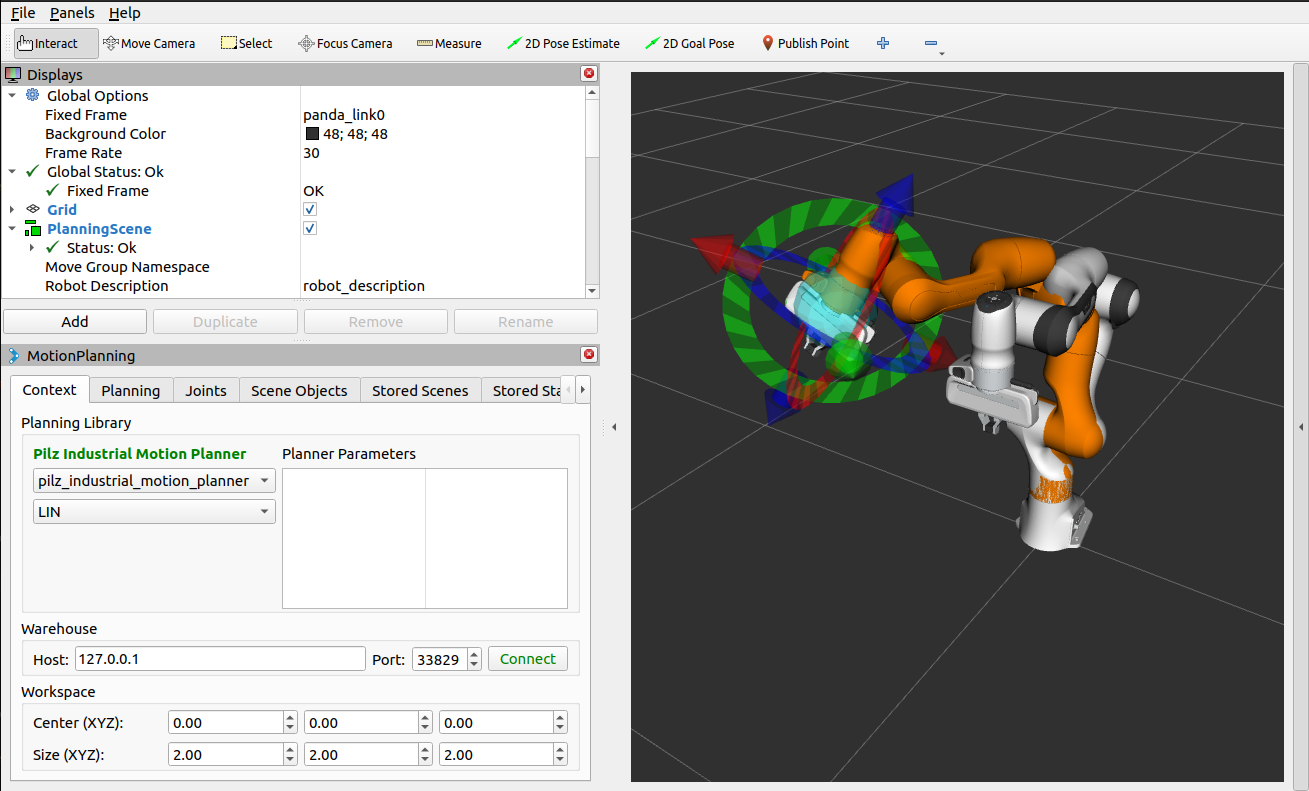
要通过 Move Group 接口使用规划器,请参阅 Move Group 接口 C++ 示例。要运行它,请在单独的终端中执行以下命令:
ros2 launch moveit2_tutorials pilz_moveit.launch.pyros2 run moveit2_tutorials pilz_move_group要通过 MoveIt Task Constructor 使用规划器,请参阅 MoveIt Task Constructor C++ 示例。要运行它,请在单独的终端中执行以下命令:
ros2 launch moveit2_tutorials mtc_demo.launch.pyros2 launch moveit2_tutorials pilz_mtc.launch.pypilz_industrial_motion_planner::CommandPlanner 作为 MoveIt 运动规划管线提供,因此可以与所有其他使用 MoveIt 的机械臂一起使用。加载该插件需要在 move_group 节点启动前,将参数 /move_group/<pipeline_name>/planning_plugins 设置为 [pilz_industrial_motion_planner/CommandPlanner]。例如,panda_moveit_config 包 按如下方式设置了一个 pilz_industrial_motion_planner 管线:
ros2 param get /move_group pilz_industrial_motion_planner.planning_plugins
String value is: pilz_industrial_motion_planner/CommandPlanner
要使用命令规划器,必须定义笛卡尔限制。这些限制应位于命名空间 <robot_description>_planning 下,其中 <robot_description> 指的是 URDF 加载时所用的参数名。例如,如果 URDF 加载到了 /robot_description,那么笛卡尔限制就必须定义在 /robot_description_planning。
你可以使用 *_moveit_config 包中的 pilz_cartesian_limits.yaml 文件来设置这些限制。示例可在 panda_moveit_config 中找到。
要验证限制设置是否正确,你可以检查 move_group 节点的参数。例如:
ros2 param list /move_group --filter .*cartesian_limits
/move_group: robot_description_planning.cartesian_limits.max_rot_vel robot_description_planning.cartesian_limits.max_trans_acc robot_description_planning.cartesian_limits.max_trans_dec robot_description_planning.cartesian_limits.max_trans_vel要将多个轨迹串联起来并一次性完成规划,可以使用序列能力。这可以减少规划开销,并允许沿预先描述的路径运动而无需在中间点停下。
请注意: 如果序列中某个命令的规划失败,序列中的任何命令都不会被执行。
请注意: 序列命令可以包含多个规划组(例如 “Manipulator”、“Gripper”)的命令。
用户界面的序列功能
Section titled “用户界面的序列功能”一个被称为命令列表管理器的专用 MoveIt 功能以 moveit_msgs::msg::MotionSequenceRequest 作为输入。该请求包含一系列后续目标(如上所述)以及一个额外的 blend_radius 参数。如果给定的 blend_radius(以米为单位)大于零,则相应的轨迹会与下一个目标合并,使机器人不会在当前目标处停下。当 TCP 与目标的距离小于给定的 blend_radius 时,机器人就已经被允许向下一个目标运动。当离开当前目标周围的球体后,机器人会回到不进行混合时本应经过的轨迹上。
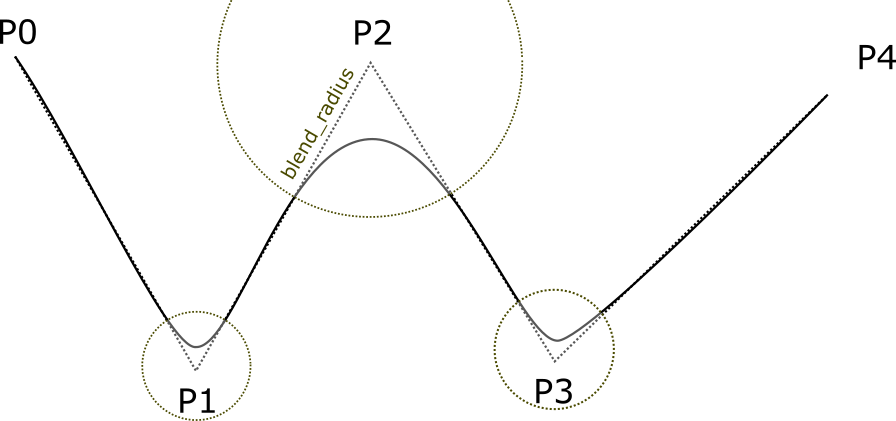
实现细节可参见PDF。
对 MotionSequenceRequest 的限制
Section titled “对 MotionSequenceRequest 的限制”- 只有第一个目标可以带有起始状态。后续轨迹从前一个目标处开始。
- 两个相邻的
blend_radius球体不得重叠。blend_radius(i) +blend_radius(i+1) 必须小于目标之间的距离。
服务 plan_sequence_path 允许用户为 moveit_msgs::msg::MotionSequenceRequest 生成关节轨迹。轨迹会被返回而不会被执行。
要使用 MoveGroupSequenceService 和 MoveGroupSequenceAction,请参阅 Pilz 运动规划器序列示例。要运行它,请在单独的终端中执行以下命令:
ros2 launch moveit2_tutorials pilz_moveit.launch.pyros2 run moveit2_tutorials pilz_sequence对于该服务和动作,需要修改 move_group 启动文件以包含这些 Pilz 运动规划器功能。改用新的 pilz_moveit.launch.py:
moveit_config = (   MoveItConfigsBuilder("moveit_resources_panda")   .robot_description(file_path="config/panda.urdf.xacro")   .trajectory_execution(file_path="config/gripper_moveit_controllers.yaml")   .planning_scene_monitor(      publish_robot_description=True, publish_robot_description_semantic=True   )   .planning_pipelines(      pipelines=["pilz_industrial_motion_planner"]   )   .to_moveit_configs())
# Starts Pilz Industrial Motion Planner MoveGroupSequenceAction and MoveGroupSequenceService serversmove_group_capabilities = {   "capabilities": "pilz_industrial_motion_planner/MoveGroupSequenceAction pilz_industrial_motion_planner/MoveGroupSequenceService"}
pilz_sequence.cpp 文件 创建了两个将被依次到达的目标位姿。
// ----- Motion Sequence Item 1// Create a MotionSequenceItemmoveit_msgs::msg::MotionSequenceItem item1;
// Set pose blend radiusitem1.blend_radius = 0.1;
// MotionSequenceItem configurationitem1.req.group_name = PLANNING_GROUP;item1.req.planner_id = "LIN";item1.req.allowed_planning_time = 5.0;item1.req.max_velocity_scaling_factor = 0.1;item1.req.max_acceleration_scaling_factor = 0.1;
moveit_msgs::msg::Constraints constraints_item1;moveit_msgs::msg::PositionConstraint pos_constraint_item1;pos_constraint_item1.header.frame_id = "world";pos_constraint_item1.link_name = "panda_hand";
// Set a constraint poseauto target_pose_item1 = [] {   geometry_msgs::msg::PoseStamped msg;   msg.header.frame_id = "world";   msg.pose.position.x = 0.3;   msg.pose.position.y = -0.2;   msg.pose.position.z = 0.6;   msg.pose.orientation.x = 1.0;   msg.pose.orientation.y = 0.0;   msg.pose.orientation.z = 0.0;   msg.pose.orientation.w = 0.0;   return msg;} ();item1.req.goal_constraints.push_back(kinematic_constraints::constructGoalConstraints("panda_link8", target_pose_item1));
需要初始化服务客户端:
// MoveGroupSequence service clientusing GetMotionSequence = moveit_msgs::srv::GetMotionSequence;auto service_client = node->create_client<GetMotionSequence>("/plan_sequence_path");
// Verify that the action server is up and runningwhile (!service_client->wait_for_service(std::chrono::seconds(10))){   RCLCPP_WARN(LOGGER, "Waiting for service /plan_sequence_path to be available...");}
然后,创建请求:
// Create requestauto service_request = std::make_shared<GetMotionSequence::Request>();service_request->request.items.push_back(item1);service_request->request.items.push_back(item2);一旦服务调用完成,future.wait_for(timeout_duration) 方法会阻塞,直到指定的 timeout_duration 已过去或结果变为可用(以先到者为准)。返回值表示结果的状态。这一操作每秒执行一次,直到 future 就绪。
// Call the service and process the resultauto service_future = service_client->async_send_request(service_request);
// Function to draw the trajectoryauto const draw_trajectory_tool_path =   [&moveit_visual_tools, jmg = move_group_interface.getRobotModel()->getJointModelGroup("panda_arm")](      auto const& trajectories) {   for (const auto& trajectory : trajectories) {      moveit_visual_tools.publishTrajectoryLine(trajectory, jmg);   }};
// Wait for the resultstd::future_status service_status;do{   switch (service_status = service_future.wait_for(std::chrono::seconds(1)); service_status)   {      case std::future_status::deferred:      RCLCPP_ERROR(LOGGER, "Deferred");      break;      case std::future_status::timeout:      RCLCPP_INFO(LOGGER, "Waiting for trajectory plan...");      break;      case std::future_status::ready:      RCLCPP_INFO(LOGGER, "Service ready!");      break;   }} while (service_status != std::future_status::ready);
future 的响应通过 future.get() 方法读取。
auto service_response = service_future.get();if (service_response->response.error_code.val == moveit_msgs::msg::MoveItErrorCodes::SUCCESS){   RCLCPP_INFO(LOGGER, "Planning successful");
   // Access the planned trajectory   auto trajectory = service_response->response.planned_trajectories;   draw_trajectory_tool_path(trajectory);   moveit_visual_tools.trigger();}else{   RCLCPP_ERROR(LOGGER, "Planning failed with error code: %d", service_response->response.error_code.val);
   rclcpp::shutdown();   return 0;}
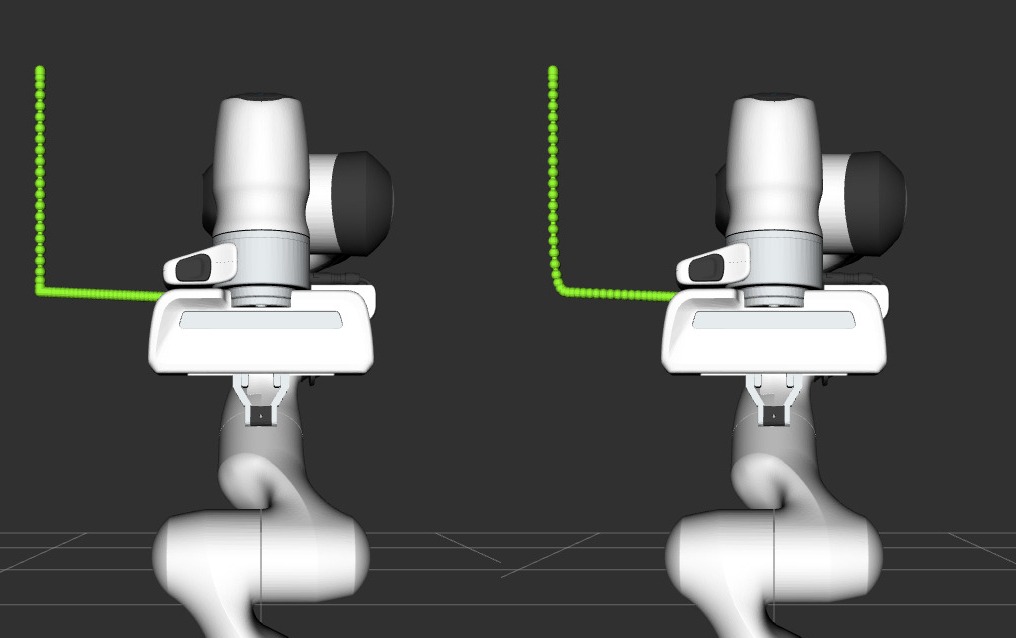
在本例中,规划出的轨迹会被绘制出来。下图是第一段和第二段轨迹分别使用 0 和 0.1 混合半径的对比。
与 MoveGroup 动作接口类似,用户可以通过 /sequence_move_group 处的动作服务器规划并执行 moveit_msgs::MotionSequenceRequest。
MoveGroupSequenceAction 与标准 MoveGroup 功能有一点不同:如果机器人已经位于目标位置,路径仍然会被执行。底层的 PlannerManager 可以检查单个 moveit_msgs::msg::MotionPlanRequest 的约束是否已满足,但 MoveGroupSequenceAction 功能并未实现这样的检查,以允许沿圆弧或类似路径运动。
需要初始化动作客户端:
// MoveGroupSequence action clientusing MoveGroupSequence = moveit_msgs::action::MoveGroupSequence;auto action_client = rclcpp_action::create_client<MoveGroupSequence>(node, "/sequence_move_group");
// Verify that the action server is up and runningif (!action_client->wait_for_action_server(std::chrono::seconds(10))){   RCLCPP_ERROR(LOGGER, "Error waiting for action server /sequence_move_group");   return -1;}
然后,创建请求:
// Create a MotionSequenceRequestmoveit_msgs::msg::MotionSequenceRequest sequence_request;sequence_request.items.push_back(item1);sequence_request.items.push_back(item2);目标和规划选项会被配置,还可以包含目标响应回调和结果回调。
// Create action goalauto goal_msg = MoveGroupSequence::Goal();goal_msg.request = sequence_request;
// Planning optionsgoal_msg.planning_options.planning_scene_diff.is_diff = true;goal_msg.planning_options.planning_scene_diff.robot_state.is_diff = true;// goal_msg.planning_options.plan_only = true; // Uncomment to only plan the trajectory
最后,发送目标请求并等待响应:
// Send the action goalauto goal_handle_future = action_client->async_send_goal(goal_msg, send_goal_options);
// Get resultauto action_result_future = action_client->async_get_result(goal_handle_future.get());
// Wait for the resultstd::future_status action_status;do{   switch (action_status = action_result_future.wait_for(std::chrono::seconds(1)); action_status)   {      case std::future_status::deferred:      RCLCPP_ERROR(LOGGER, "Deferred");      break;      case std::future_status::timeout:      RCLCPP_INFO(LOGGER, "Executing trajectory...");      break;      case std::future_status::ready:      RCLCPP_INFO(LOGGER, "Action ready!");      break;   }} while (action_status != std::future_status::ready);
if (action_result_future.valid()){   auto result = action_result_future.get();   RCLCPP_INFO(LOGGER, "Action completed. Result: %d", static_cast<int>(result.code));}else{   RCLCPP_ERROR(LOGGER, "Action couldn't be completed.");}
如果需要在执行过程中停止运动,可以通过以下方式取消动作:
auto future_cancel_motion = client->async_cancel_goal(goal_handle_future_new.get());