
设置 SDF 模型
本指南将为一个简单的差速驱动机器人创建 SDF(Simulation Description Format,仿真描述格式)文件,帮助读者积累为 Gazebo 仿真构建 SDF 文件的实践经验。
注意:本教程的完整源代码可在 navigation2_tutorials 仓库的
sam_bot_description包中找到。该仓库中的代码是完成本系列全部教程后的最终版本。
关于 SDF
Section titled “关于 SDF”SDF 是一种用于仿真器(如 Gazebo)的文件格式,可描述仿真环境、模型(包括连杆、关节及物理仿真元数据)以及相关插件。本指南创建的 SDF 适用于现代 Gazebo,但也可用于其他仿真器,如 Open3D Engine 或 Isaac Sim。
借助 sdformat-urdf 包,可以将 SDF 与 robot_state_publisher 配合使用,后续教程会详细介绍。
首先,加载 ROS 2 安装目录的环境变量:
source /opt/ros/<ros2-distro>/setup.bash然后安装 sdformat-urdf 包:
sudo apt install ros-$ROS_DISTRO-sdformat-urdf该包提供一个 C++ 库和 urdf_parser_plugin,能将 SDFormat XML 转换为 URDF C++ 结构。安装后,即可用 SDFormat XML 替代 URDF XML 作为机器人描述。
注意:如需了解更多关于 SDF 和 sdformat_urdf 的信息,可查阅官方 SDFormat 网站 和 sdformat_urdf GitHub 仓库。
编写 SDF
Section titled “编写 SDF”目前的 SDF 基本上是 URDF 代码的 SDFormat 版本。两种描述的差异主要体现在后续添加的插件和传感器上。此外,SDF 还加入了仿真器所需的物理属性,如惯性(inertia)、质量(mass)和材质(material)。
以下是 URDF 代码的 SDF 版本:
<?xml version="1.0" ?><sdf version="1.8" xmlns:xacro="http://ros.org/wiki/xacro">  <model name='sam_bot' canonical_link='base_link'>
    <!-- Define robot constants -->    <xacro:property name="base_width" value="0.31"/>    <xacro:property name="base_length" value="0.42"/>    <xacro:property name="base_height" value="0.18"/>
    <xacro:property name="wheel_radius" value="0.10"/>    <xacro:property name="wheel_width" value="0.04"/>    <xacro:property name="wheel_ygap" value="0.025"/>    <xacro:property name="wheel_zoff" value="0.05"/>    <xacro:property name="wheel_xoff" value="0.12"/>
    <xacro:property name="caster_xoff" value="0.14"/>
    <!-- Define some commonly used inertial properties  -->    <xacro:macro name="box_inertia" params="m w h d">      <inertial>        <pose>0 0 0 ${pi/2} 0 ${pi/2}</pose>        <mass>${m}</mass>        <inertia>          <ixx>${(m/12) * (h*h + d*d)}</ixx>          <ixy>0.0</ixy>          <ixz>0.0</ixz>          <iyy>${(m/12) * (w*w + d*d)}</iyy>          <iyz>0.0</iyz>          <izz>${(m/12) * (w*w + h*h)}</izz>        </inertia>      </inertial>    </xacro:macro>
    <xacro:macro name="cylinder_inertia" params="m r h">      <inertial>        <pose>0 0 0 ${pi/2} 0 0</pose>        <mass>${m}</mass>        <inertia>          <ixx>${(m/12) * (3*r*r + h*h)}</ixx>          <ixy>0.0</ixy>          <ixz>0.0</ixz>          <iyy>${(m/12) * (3*r*r + h*h)}</iyy>          <iyz>0.0</iyz>          <izz>${(m/2) * (r*r)}</izz>        </inertia>      </inertial>    </xacro:macro>

    <xacro:macro name="sphere_inertia" params="m r">      <inertial>        <mass>${m}</mass>        <inertia>          <ixx>${(2/5) * m * (r*r)}</ixx>          <ixy>0.0</ixy>          <ixz>0.0</ixz>          <iyy>${(2/5) * m * (r*r)}</iyy>          <iyz>0.0</iyz>          <izz>${(2/5) * m * (r*r)}</izz>        </inertia>      </inertial>    </xacro:macro>
    <!-- Robot Base -->    <link name='base_link'>      <must_be_base_link>true</must_be_base_link>      <visual name="base_link_visual">        <geometry>          <box><size>            ${base_length} ${base_width} ${base_height}          </size></box>        </geometry>        <material>          <ambient>0 1 1 1</ambient>          <diffuse>0 1 1 1</diffuse>        </material>      </visual>
      <collision name="base_link_collision">        <geometry>          <box><size>            ${base_length} ${base_width} ${base_height}          </size></box>        </geometry>      </collision>    </link>
    <!-- Robot Footprint -->    <link name='base_footprint'>      <pose relative_to="base_joint"/>      <xacro:box_inertia m="15" w="${base_width}" d="${base_length}" h="${base_height}"/>    </link>
    <joint name='base_joint' type='fixed'>      <parent>base_link</parent>      <child>base_footprint</child>      <pose relative_to="base_link">0.0 0.0 ${-(wheel_radius+wheel_zoff)} 0 0 0</pose>    </joint>

    <!-- Wheels -->    <xacro:macro name="wheel" params="prefix x_reflect y_reflect">      <link name="${prefix}_link">        <pose relative_to="${prefix}_joint"/>
        <visual name="${prefix}_link_visual">          <pose relative_to="${prefix}_link">0 0 0 ${pi/2} 0 0</pose>          <geometry>            <cylinder>              <radius>${wheel_radius}</radius>              <length>${wheel_width}</length>            </cylinder>          </geometry>          <material>            <ambient>0.3 0.3 0.3 1.0</ambient>            <diffuse>0.7 0.7 0.7 1.0</diffuse>          </material>        </visual>
        <collision name="${prefix}_link_collision">          <pose relative_to="${prefix}_link">0 0 0 ${pi/2} 0 0</pose>          <geometry>            <cylinder>              <radius>${wheel_radius}</radius>              <length>${wheel_width}</length>            </cylinder>          </geometry>        </collision>
        <xacro:cylinder_inertia m="0.5" r="${wheel_radius}" h="${wheel_width}"/>      </link>
      <joint name="${prefix}_joint" type="revolute">        <parent>base_link</parent>        <child>${prefix}_link</child>        <pose relative_to="base_link">${x_reflect*wheel_xoff} ${y_reflect*(base_width/2+wheel_ygap)} ${-wheel_zoff} 0 0 0</pose>        <axis>          <xyz>0 1 0</xyz>          <limit>            <lower>-inf</lower>            <upper>inf</upper>          </limit>        </axis>      </joint>    </xacro:macro>
    <xacro:wheel prefix="drivewhl_l" x_reflect="-1" y_reflect="1" />    <xacro:wheel prefix="drivewhl_r" x_reflect="-1" y_reflect="-1" />
    <link name="front_caster">      <pose relative_to="caster_joint"/>
      <visual name="front_caster_visual">        <geometry>          <sphere>            <radius>${(wheel_radius+wheel_zoff-(base_height/2))}</radius>          </sphere>        </geometry>        <material>          <ambient>0 1 1 1</ambient>          <diffuse>0 1 1 1</diffuse>        </material>      </visual>
      <collision name="front_caster_collision">        <geometry>          <sphere>            <radius>${(wheel_radius+wheel_zoff-(base_height/2))}</radius>          </sphere>        </geometry>      </collision>
      <xacro:sphere_inertia m="0.5" r="${(wheel_radius+wheel_zoff-(base_height/2))}"/>    </link>
<joint name="caster_joint" type="fixed"> <parent>base_link</parent> <child>front_caster</child> <pose relative_to="base_link">${caster_xoff} 0.0 ${-(base_height/2)} 0 0 0</pose> </joint> </model></sdf>将 display.launch.py 中的 default_model_path 改为引用 SDF 描述而不是 URDF 描述。
default_model_path = os.path.join(pkg_share, 'src', 'description', 'sam_bot_description.sdf')构建并加载包,然后启动 display.launch.py:
colcon build --symlink-installsource install/setup.bashros2 launch sam_bot_description display.launch.py注意:可能会出现类似
[kdl_parser]: The root link base_link has an inertia specified in the URDF, but KDL does not support a root link with an inertia. As a workaround, you can add an extra dummy link to your URDF.的警告。该警告可以安全忽略,这只是 SDF 到 URDF 转换过程中的一个已知现象。
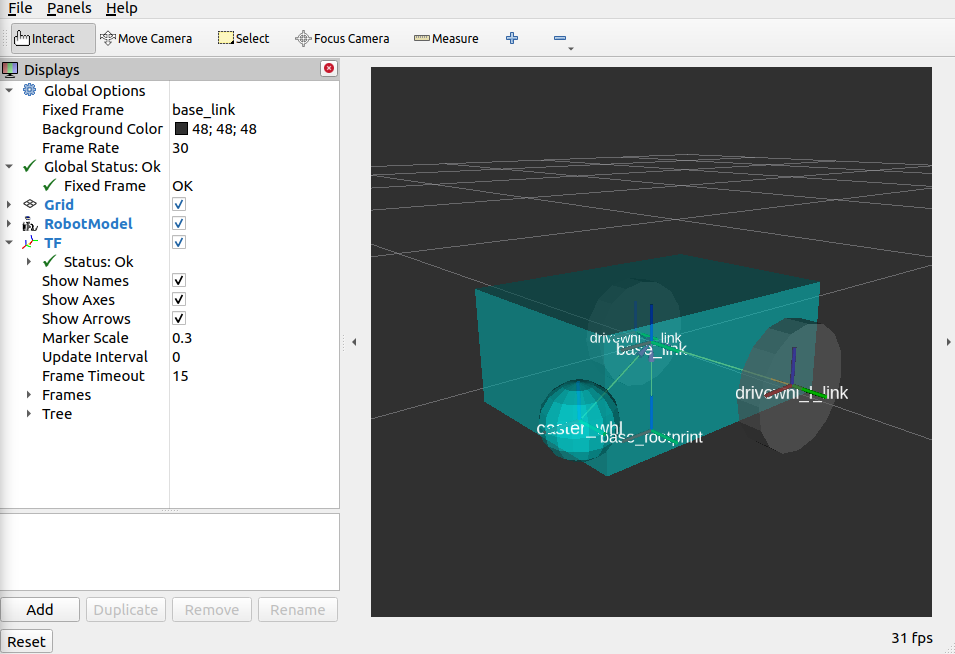
至此,本教程全部完成:为简单的差速驱动机器人创建了 SDF 文件,搭建了 ROS 2 项目,启动了使用该 SDF 发布机器人坐标变换的 publisher 节点,并通过 RViz 可视化验证了 SDF 的正确性。